Description of the functions
功能說明
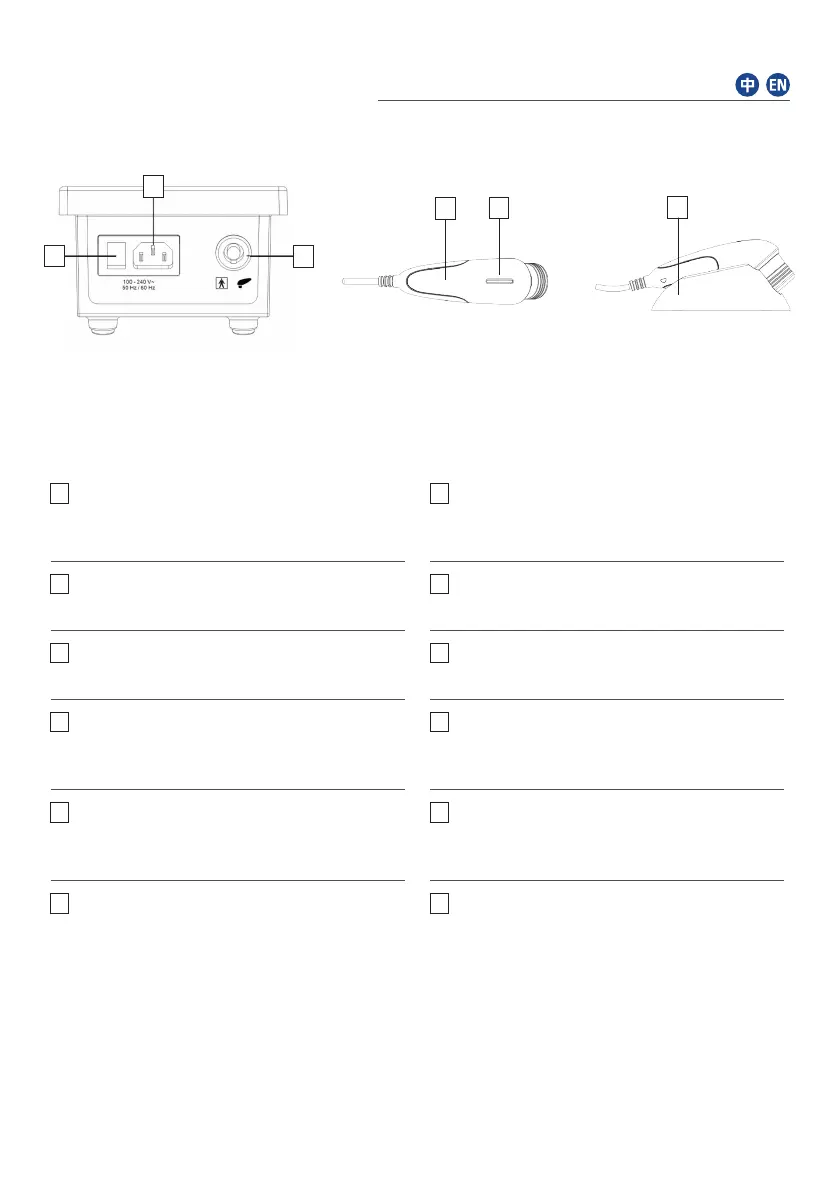
26
24
23
21
22
25
圖5 開關及連接插頭
Fig. 5 Switches and connector sockets
屏幕、顯示器、視窗及按鈕說明
Description of screens, displays, windows, buttons
注意:直接用手指在屏幕上操作所有視窗和按鈕。
Note: Activate all windows and buttons by pressing directly on the screen with your finger.
圖6 超聲波頭
Fig. 6 Ultrasound head
圖7 超聲波頭連插座
Fig. 7 Ultrasound head with holder
1
程式介面 打開治療介面
Programme screen Opens the therapy screen
2
配置介面 打開配置介面
Configuration screen Opens the
configuration screen
3
上 / 下強度 調整強度
Up / down intensity Adjustment of intensity
4
開始 / 停止 開始 / 停止治療
Start / Stop Start / Stop of therapy
5
返回 返回程序畫面
Return Back to programm screen
6
上 / 下時間 調整時間
Up / down time Adjustment of time
7
時間顯示 顯示治療時間
Time display Displays the therapy time
8
耦合值顯示 以百分比顯示耦合值
Coupling display Displays the coupling
value in percent
9
頻率 調整頻率至1或3 MHz
Frequency Adjustment of frequency
to 1 or 3 MHz
10
參數顯示 顯示目前治療的參數
Parameter display Displays the parameters
of the current therapy
11
強度顯示 顯示調整後的功率
和/或強度
以W, W /cm²或
W + W /cm²為單位
(Weff, W /cm²峰值)
Intensity display Displays the adjusted
power and/or intensity
in W, W /cm² or
W + W /cm²
(Weff, W /cm² peak)
12
棒形圖 顯示調整後的強度
Bargraph Displays the adjusted
intensity
6


 To Next Page