MS - SOUND decoders MS440 to MS990 and MN - NON-SOUND decoders MN170 to MN340 Page 51
Threshold
for
brake squeal
The brake squeal should start when the speed drops below a
specific speed step. It will be automatically stopped at speed 0
(based on back-EMF results).
Brake squeal
Minimum drive time
The braking squeal is to be suppressed when an engine is
driven for a short time only, which is usually a shunting run and
often without any cars (it is mostly the cars that are squealing
not the loco itself!).
NOTE: Brake squeal sounds can also be assigned to a function
key (see allocation procedure CV #300 = …), with which the
brake squeal can be started or stopped manually! (SW version
5.00 and higher)
Cornering squeals
or
Reed configuration
Bit0 - switching input 1 activates cornering squeal
Bit1 - switching input 2 activates braking squeal
Bit2 - switching input 3 activates braking squeal
Bit3 - switching input 4 activates braking squeal
Bit7 - 0 = key defined in CV #308 suppresses cornering squeal
of Reed inputs if this key is ON
1 = key defined in CV #308 activates cornering squeal in-
dependent of Reed inputs
0: No key defined. Reed inputs always active.
1-28 = key F1 to F28.
Use of FO4
FO4 as normal
function output
or
FO4 as output for
steam exhaust fan
smoke generator in
steam locos
and
IN (reed) pins
Configuration
and
MS440: FO9 to pin IN4
= 0: FA4 used as normal function output,
i.e. controllable by a function key,
= 1: FA4 for smoke fan controlled by "simulated" axis detector
or by "real" axis detector. See CVs #267, #268!
NOTE: The operation mode of a fan is also determined by the
sound project.
NOTE: Large scale decoders have special outputs and setting
options for fans!
Bit 4 – inverts the polarity of Reed input 1
Bit 3 – inverts the polarity of Reed input 2
Bit 2 – inverts the polarity of Reed input 3
Bit 5 – inverts the polarity of Reed input 4
Bit 6 - (only types MS440) Pin IN4 becomes output FO9
Maximum volume for
volume increase key
Configuration range for volume with the help of the louder key
according to CV #397; can also be higher than the basic config-
uration in CV #266.
0 = No key defined.
1-28 = key F1 to F28 29 = F0-key
0 = No key defined.
1-28 = key F1 to F28 29 = F0-key
Conditions for switching be-
tween collections, as per
CV #345
Those CVs can be found in chapter
“Diesel and electro locos → ...”
.
They are valid for all types of drives,
but are mainly important for diesel locos.
Switch key
for driving and sound perfor-
mance when driving solo
Measures to be taken when
switching to solo drive (with key
selected in CV #347)
SW version 4.00 (sound projects for diesel and electro locos)
(not yet implemented in SW-version 4.00: Diesel with manual transmission)
Background sounds - Volume adjustments:
Volume driving sound “simmering”
Sound “changing directions”
Volume driving sound for e.g. Johnson Bar
Thyristor sound volume (ELECTRIC engine)
Volume Starting whistle (STEAM/DIESEL)
Blow-off volume (STEAM engine)
Electric motor volume (ELECTRIC engine)
Planned for SW version 5.00
Electric switch gear sound
Switch gear volume (ELECTRIC engine)
Second thyristor (ELECTRIC)
Planned for SW version 5.00
Planned for SW version 5.00
Planned for SW version 5.00
Turbocharger volume (DIESEL engine)
Volume “cornering squeal”
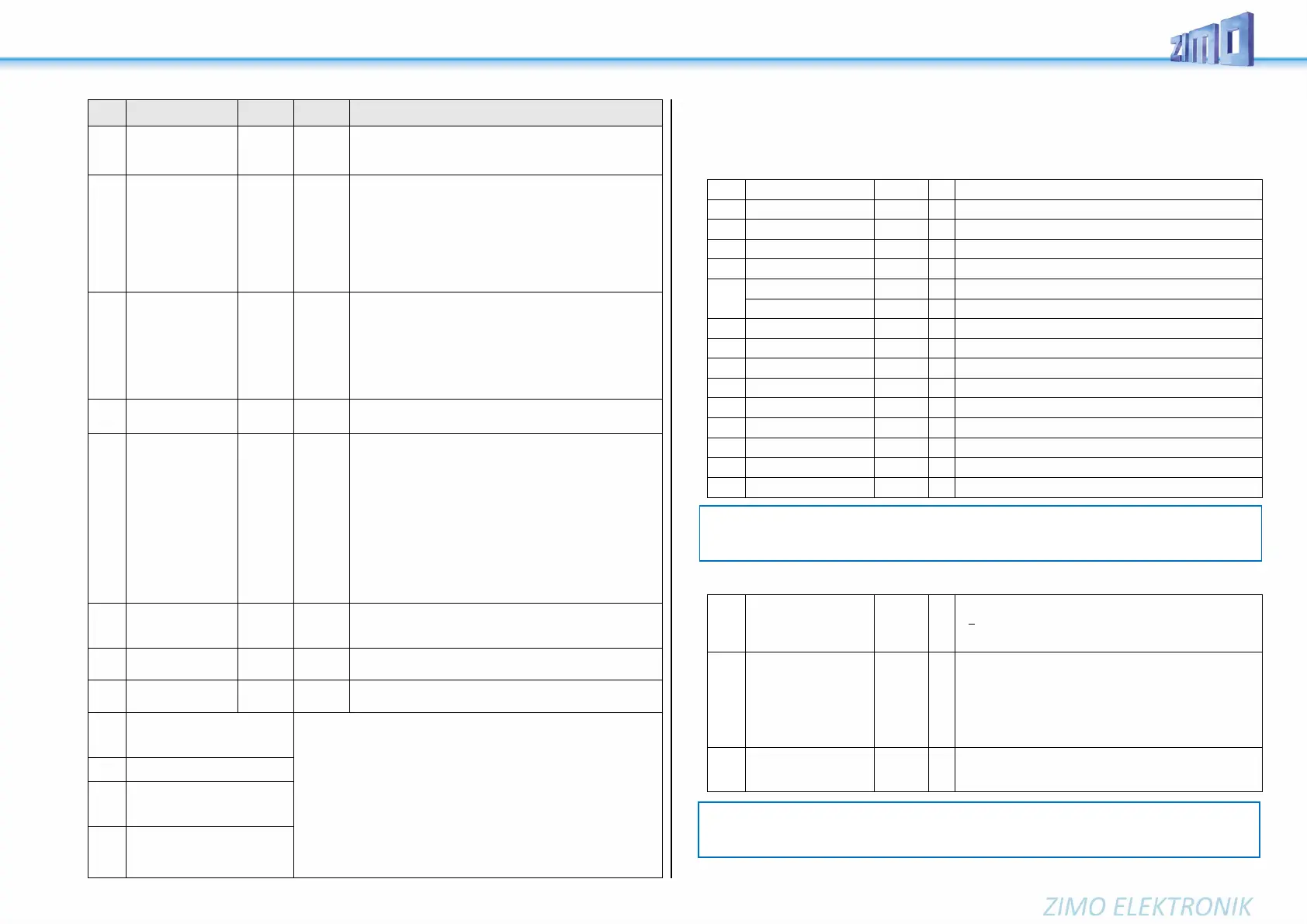
Function sounds - Volume adjustments:
Sound volume operated with function key F0
= 0: full volume, original sound sample volume (same as 255)
= 1 - 254: reduced volume 1 – 99.5 %
= 255: full volume
#514
#517
#520
#523
…
#565
#568
Function sound F1
Function sound F2
Function sound F3
Function sound F4
…
Function sound F18
Function sound F19
Sound volume operated with function key F1
Sound volume operated with function key F2
Sound volume operated with function key F3
Sound volume operated with function key F4
…
Sound volume operated with function key F18
Sound volume operated with function key F19
Function sound F20
…
Function sound F28
Sound volume operated with function key F20
…
Sound volume operated with function key F28
NOTE: The CVs before the names (#573, #575, #577, etc.) contain information to the corresponding
sound sample (sound number, loop parameters), which can be modified, if necessary, usually by
the CV #300 procedure.
NOTE: The CVs between the above (#570, #572, #513, #515, #516, #518 etc.) contain information
to the corresponding sound samples (sample numbers, loop parameters etc.), which can also be
modified if needed, usually with the CV #300 procedures.


 To Next Page
 Loading...