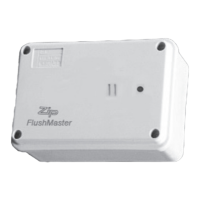
The Zip FlushMaster (Product Code 40090) is a surface-mounted, water-saver urinal flushing system designed for efficient and hygienic operation in commercial and public restrooms. It utilizes an infrared sensor to detect user presence and activate a flush cycle, promoting water conservation and improved hygiene.
Function Description:
The Zip FlushMaster system consists of a surface-mounted sensor, a latching valve, and either a battery or an optional power pack for operation. The sensor detects when a urinal has been used and triggers the latching valve to open, allowing water to flow into the urinal for a set duration. This system is designed to replace traditional manual flushing mechanisms, offering an automated and water-saving solution. It can be configured for use with cisterns or direct injection airbreak systems, accommodating various plumbing setups. The FlushMaster is capable of managing multiple urinal stalls or troughs, with specific installation guidelines for single, twin, and triple stall configurations. The system's intelligence allows for adjustable delay times (valve closed) and valve open durations (flush/fill times), which can be customized to optimize water usage based on the specific urinal setup and local water pressure.
Important Technical Specifications:
- Sensor Type: Surface-mounted infrared sensor.
- Power Source: Battery-operated (6V battery included) for simple installation, with an optional power pack for 220-240 V AC power connection. The recommended battery type is a lithium cell CRP2 / 223A (Zip product code 90098).
- Operating Pressure: 350 - 700 kPa.
- Flush Cycle: Variable, allowing for precise adjustment to meet specific needs.
- Delay Time (Valve Closed): Adjustable from a minimum of 45 seconds (all switches OFF) to a maximum of 15 minutes (all switches ON).
- Valve Open Duration (Flush/Fill Time): Adjustable from 5 seconds (all switches OFF) to 15.75 minutes (all switches ON).
- Sensor Coverage: Approximately 2400 x 3600 mm from a 2700 mm ceiling.
- Latching Valve: 15mm OD, ensuring correct flow direction.
- Restrictor: Restrictaflow restrictor (1.9mm) is normally required for operating pressures greater than 700kPa, designed to save water and reduce flow, especially in single stall installations. It can be drilled out in 0.5mm increments or removed if higher flow is needed for multiple stalls or if water pressure is insufficient.
- Fuse: F1.6A fuse (Buss).
- Compliance: All plumbing connections must be made in accordance with AS/NZS3500, and installation with AS/NZS3500.2. Designed for indoor use only.
Usage Features:
- Automated Flushing: Infrared sensor detects user presence, eliminating the need for manual flushing and improving hygiene.
- Water Conservation: Variable flush cycle and adjustable timing settings allow for precise control of water usage, making it an effective water-saver system.
- Flexible Installation: Choice of surface-mounted or ceiling-recessed sensors (though this manual focuses on surface-mounted). Battery operation simplifies installation, while the optional power pack offers a permanent power solution.
- Configurable for Different Setups: Compatible with both cistern-based and direct injection airbreak urinal systems.
- Multi-Stall Management: Can be installed to manage single, twin, or triple urinal stalls, or troughs, with guidelines for optimal sensor placement. Additional sensors can be used for more than three stalls.
- Adjustable Timing: Flush delay and valve open times can be set using DIP switches or a "Fill Time Button" for fine-tuning.
- Test Mode: When all switches are OFF, the sensor defaults to a test mode with approximately 35 seconds delay and 5 seconds flush, which can be adjusted.
- Fill Time Button: Allows for intuitive setting of the valve open (flush/fill) time, particularly useful for cistern installations to ensure adequate filling and syphon activation.
- Backflow Prevention: An air gap must always remain between the cistern water level and the inlet water pipe level to prevent backflow.
- Vandalism Prevention: Secure fixing of piping to the wall as per AS/NZS3500 is recommended to prevent tampering.
Maintenance Features:
- Cleaning: The sensor's slot openings should be kept clear of dirt. The case should be wiped with a soft cloth, warm water, and dishwashing liquid; strong or abrasive cleaners should be avoided. Hosing or spraying any part of the system is not recommended.
- Battery Replacement: For battery-powered units, the lithium battery (CRP2 / 223A) should be replaced annually, or approximately every three years depending on activation frequency, to avoid system malfunction. The process involves removing the protective cover, locating the battery holder, and replacing the battery.
- Valve Diaphragm Replacement: It is recommended to replace the latching valve diaphragm annually, especially in conjunction with battery replacement. The procedure involves isolating the water supply, removing the fixing clip and coil from the latching valve, carefully disassembling the valve housing, replacing the rubber diaphragm, and reassembling. A replacement diaphragm kit (Zip part number 90279) is available.
- Power Pack Maintenance: If an optional power pack is fitted, the power must be turned off at the power point before any maintenance is attempted.
- Troubleshooting Guide: The manual includes a comprehensive troubleshooting section to diagnose and resolve common issues such as the cistern not filling, incorrect flush durations, or the sensor not activating. This includes recommended actions like checking water supply, resetting timer switches, replacing components, or cleaning the sensor.


 To Next Page
 General