CEX-O_CEX-U, Maintenance and User Instructions V1.02 Page 14 March / 2014
Temperature limitation
Units are supplied with the temperature
limitation function deactivated.
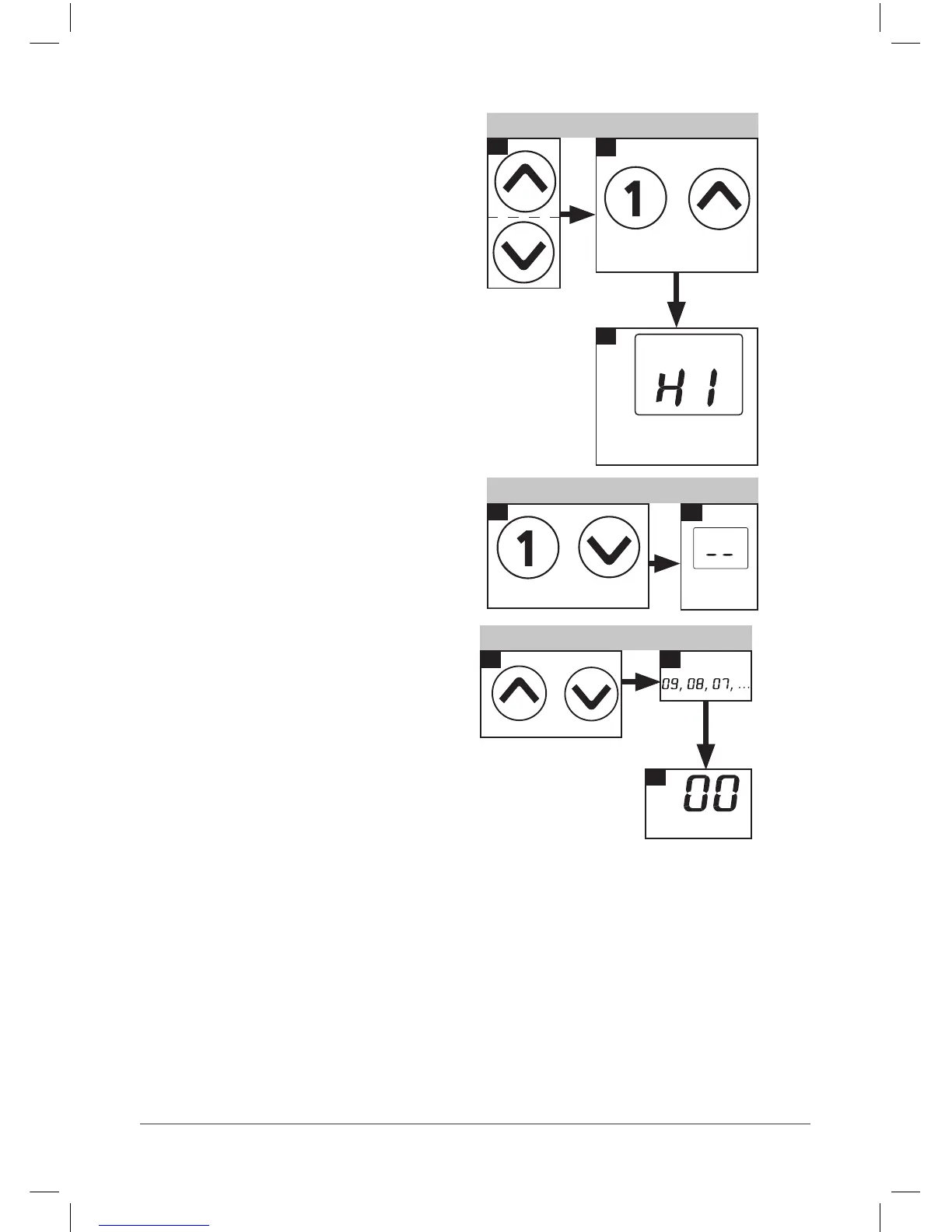
To activate, select the limit temperature then
press the program 1 and up arrow function
keys simultaneously for at least 3 seconds.
“HI” is displayed briey to conrm activation.
To deactivate, press the program 1 and down
arrow function keys simultaneously for at least
3 seconds.
“- -“ is displayed briey to conrm
deactivation. Note: Programmed temperature
settings may need to be reset after
deactivating temperature limitation.
Reset to factory setting
To reset to factory settings press the up arrow
and down arrow function keys simultaneously.
The display will count backwards from “10” to
“00” in one second intervals.
The appliance is reset when the counter
reaches “00”.
Releasing the function keys earlier will cancel
the process.
Temperature limitation on
3
1
2
Press >3
seconds
Conrms
activation
+
Temperature limitation off
1
2
Press >3 seconds
Conrms
deactivation
+
Reset to factory setting
2
3
1
Press + hold
Reset complete
+
Energy saving
Set the required hot water temperature on the
appliance.
If the water is too hot reduce the temperature on the appliance instead of mixing with cold
water.
Any cold water added is not controlled by the electronic circuitry meaning that precise temperature
control can no longer be guaranteed.
Note! Adding cold water wastes the energy used to heat the water. This unit is not
intended for use with thermostatic mixing valves or taps.




 To Next Page