CONNECT THE ZIPABOX
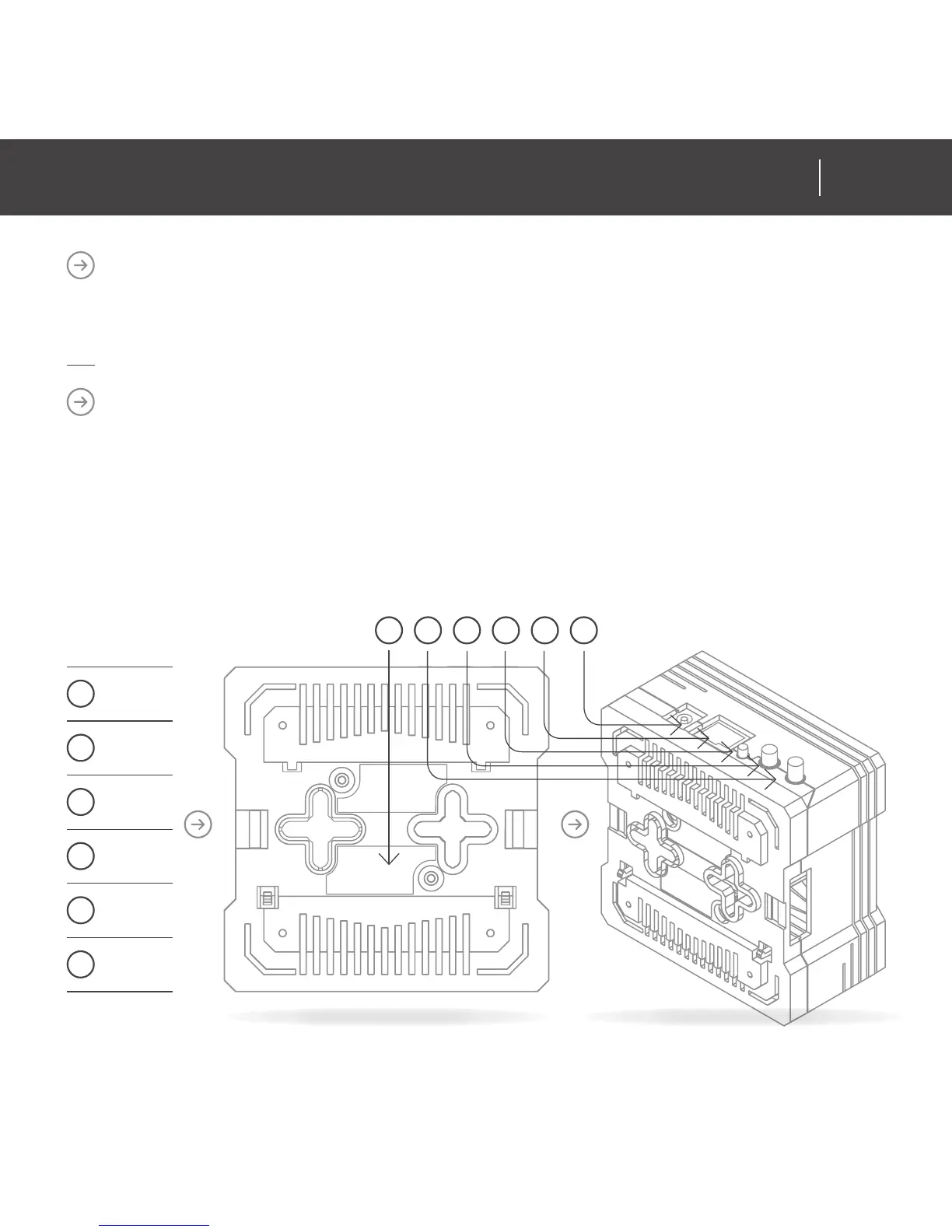
Locate your serial number Your Serial number is located on the back of the Zipabox,
make a note of it as it will be required when registering your panel online.
CONNECT TO BROADBAND
Connect your Zipabox to your broadband router via the Ethernet cable.
The Ethernet port is located on the back of the Zipabox.
Zipabox queries your DHCP server for an IP address. If you do not have a DHCP
server in your local network, after 60 seconds Zipabox will auto confi gure itself with
link-local IPv4 address (in 169.254.0.0/16 range).
01
Serial
number
02
Antenna
1
03
Antenna 2
(optional)
04
Reset
button
05
Ethernet
port
06
Power
input
01 02 03 04 05 06
13
ZIPABOX
QUICK INSTALLATION GUIDE12
ZIPABOX
QUICK INSTALLATION GUIDE
www.zipato.comwww.zipato.com


 To Next Page