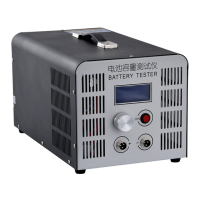
Need help?
Do you have a question about the ZKETECH EBC-A20 and is the answer not in the manual?
Details the physical connection ports on the front panel for batteries.
Explains how to connect the tester to a computer using a USB-TTL cable.
Specifies the required DC power supply voltage and current for the tester.
Defines the function of each button (ON, SET, INC, DEC) on the tester.
Describes the information displayed on the LCD screen during operation.
Guides on configuring testing modes, parameters, and options.
Details settings for DSC-CC mode: cut-off voltage and maximum time.
Details settings for DSC-CP mode: cut-off voltage and maximum time.
Details settings for CHG-CV mode: cut-off current and auto mode.
Provides practical examples for various testing configurations.
 General
| Capacity test | Yes |
|---|---|
| LCD display | Yes |
| PC connection | USB |
| Battery Types | Li-ion, NiMH, NiCd, Lead Acid |
| Operating Temperature | 0°C - 40°C |
| Current measurement | 0.00A - 20.00A |
| Discharge power | 200W |
| Connection | 4-wire |
| Voltage Range | 0.00V - 30.00V |
| Charging Current Accuracy | ±(0.5% + 2 digits) |
| Discharging Current Accuracy | ±(0.5% + 2 digits) |
| Voltage Accuracy | ±(0.5% + 2 digits) |
| Power Supply | 12V DC |
| Voltage setting | 0.00V - 30.00V |
| Current Range | 0.10A - 20.00A |

 To Next Page