EasyManua.ls Logo

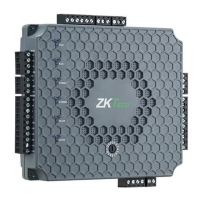
ZKTeco Atlas-260 - User Manual

ZKTeco Atlas-260
52 pages
Print Icon
To Next Page IconTo Next Page
Loading...
Installation Guide
Atlas Bio Series
Access Control Panels
www.zktecousa.com
Ver 1.0
This installation guide is used for Atlas-160 Bundle, Atlas-260 Bundle and Atlas-460 Bundle.

Questions and Answers

Summary

Important Safety Precautions

Installation Setup

Installation of Panel & Cabinet

Provides step-by-step instructions for mounting the Atlas panel inside a metal cabinet.

Connections

Overall Connection Diagram

Presents a comprehensive diagram showing all possible connections for the Atlas Series panel.

Power Wiring Diagram

Details how to connect the power supply, including 12V DC and PoE options.

Ethernet Connection

Explains how to establish LAN and direct Ethernet connections for the access control panel.

Atlas Series Web Management Application Programming Guide

Understanding the Atlas Series Network

Explains the primary and secondary controller architecture in Atlas Series systems.

Initial Controller Setup

Guides through the initial setup process, including connecting to DC power and Ethernet.

Running the Setup Wizard

Details how to log in and use the setup wizard for initial controller configuration.

Connecting to the Network

Explains how to reconnect the controller to the local network after setup.

Hardware Configuration

Guides on configuring controller hardware, readers, inputs, and outputs via the Web Management Application.

Configuring Doors

Explains how to configure door settings, modes, and reader functions.

User Test Access

Creating Access Level

Details the steps to create access levels that define user permissions for doors.

Adding a User

Explains how to add new users, including their credentials like card, PIN, or biometrics.

Assigning Access Level

Describes assigning created access levels to users and configuring door access for them.

Adding Secondary Controller

Initial Setup

Guides on setting up secondary controllers as 'Secondary' in the wizard.

Adding Controller via Web Application

Explains how to discover and add secondary controllers via the Web Management Application.

Manual Secondary Controller Addition

Details the manual process for adding secondary controllers to the system.

Troubleshooting

Summary

Important Safety Precautions

Installation Setup

Installation of Panel & Cabinet

Provides step-by-step instructions for mounting the Atlas panel inside a metal cabinet.

Connections

Overall Connection Diagram

Presents a comprehensive diagram showing all possible connections for the Atlas Series panel.

Power Wiring Diagram

Details how to connect the power supply, including 12V DC and PoE options.

Ethernet Connection

Explains how to establish LAN and direct Ethernet connections for the access control panel.

Atlas Series Web Management Application Programming Guide

Understanding the Atlas Series Network

Explains the primary and secondary controller architecture in Atlas Series systems.

Initial Controller Setup

Guides through the initial setup process, including connecting to DC power and Ethernet.

Running the Setup Wizard

Details how to log in and use the setup wizard for initial controller configuration.

Connecting to the Network

Explains how to reconnect the controller to the local network after setup.

Hardware Configuration

Guides on configuring controller hardware, readers, inputs, and outputs via the Web Management Application.

Configuring Doors

Explains how to configure door settings, modes, and reader functions.

User Test Access

Creating Access Level

Details the steps to create access levels that define user permissions for doors.

Adding a User

Explains how to add new users, including their credentials like card, PIN, or biometrics.

Assigning Access Level

Describes assigning created access levels to users and configuring door access for them.

Adding Secondary Controller

Initial Setup

Guides on setting up secondary controllers as 'Secondary' in the wizard.

Adding Controller via Web Application

Explains how to discover and add secondary controllers via the Web Management Application.

Manual Secondary Controller Addition

Details the manual process for adding secondary controllers to the system.

Troubleshooting

ZKTeco Atlas-260 Specifications

General IconGeneral
ModelAtlas-260
Number of Doors Controlled2
Communication InterfaceTCP/IP, RS485
Auxiliary Input2
Auxiliary Output2
Door Sensor Input2
Exit Button Input2
Alarm Output2
Transaction Capacity100, 000
Operating SystemLinux
Number of Readers Supported4
Wiegand SignalInput and Output
Power SupplyDC 12V/3A
Operating Humidity20%-80%
Weight0.5kg
Backup BatteryNot Included
Access Control ModeStandalone, Networked

Related product manuals