C2-260/inBio2-260 Access Control Panel
User Manual
Page | 37 Copyright©2020 ZKTECO CO., LTD. All rights reserved.
Upgrade Firmware
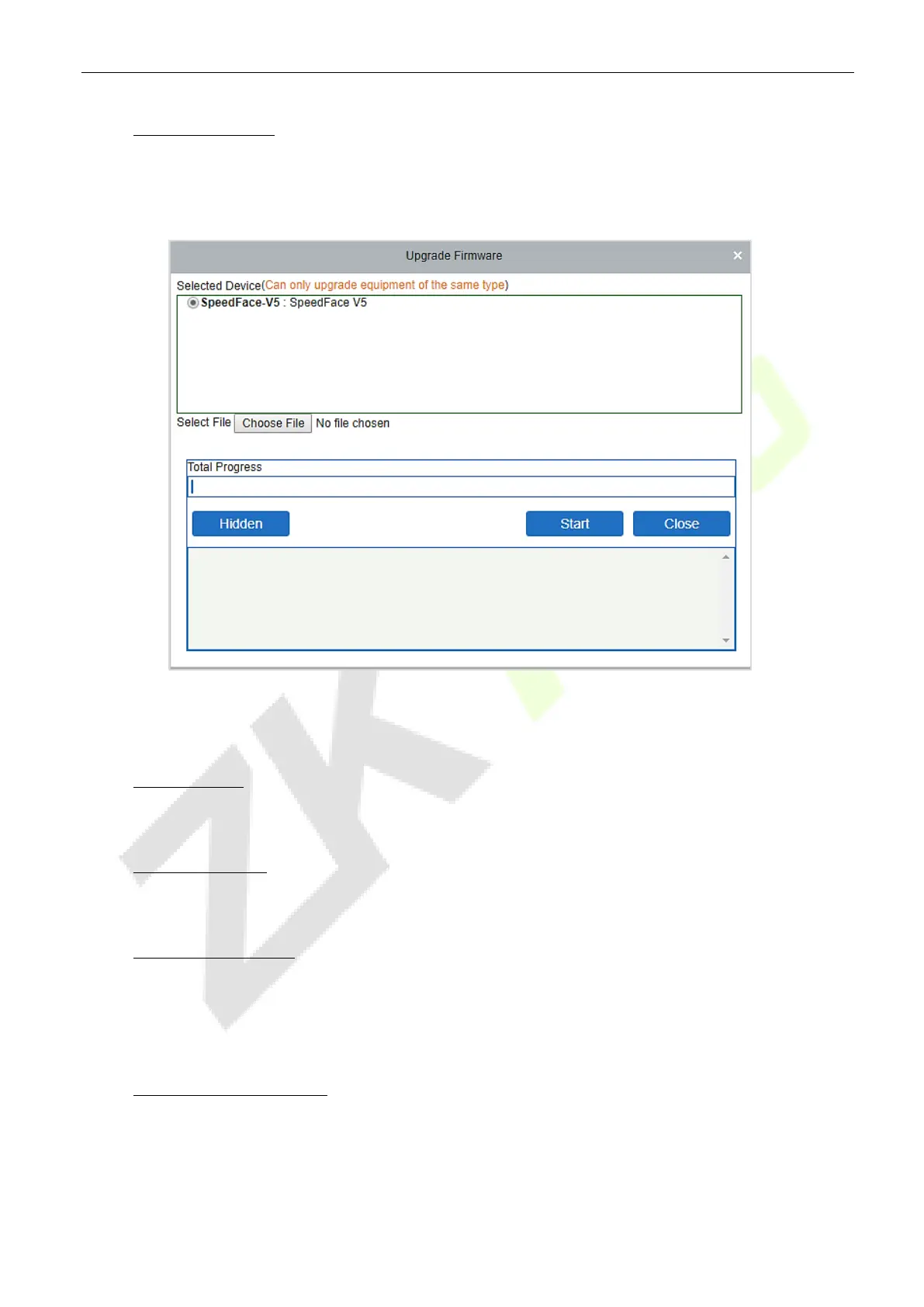
Select the required device that needs to be upgraded, click
Upgrade firmware
to enter the edit interface,
then click
Choose File
to select the firmware upgrade file (named emfw.cfg) provided by the Access
software, and click
OK
to start upgrading.
Note:
The user shall not upgrade firmware without authorization. Contact the distributor before
upgrading the firmware or upgrade it by following the instructions of the distributor. The unauthorized
upgrade may affect normal operations.
Reboot Device
It will reboot the selected device.
Synchronize Time
It will synchronize the device time with the server’s current time.
Set Device Time Zone
If the device supports the time zone settings and is not in the same time zone with the server, you need to
set the time zone of the device. After setting the time zone, the device will automatically synchronize the
time according to the time zone and server time.
Set as Registration device
Set the registration device only when the standalone device’s data such as personnel can automatically
upload.


 To Next Page