Need help?
Do you have a question about the ZKTeco LF20 and is the answer not in the manual?
Connect door sensors, exit buttons, alarms, and bells to the device terminals.
Configure Wiegand26 output for reader functionality and stable transmission.
Connect the device to a network via Ethernet for communication.
Register new users with ID, name, fingerprint, badge, password, and access control settings.
Verify user identity using fingerprint, password, or card swipe for access.
View attendance records on device and download data via USB-disk.
Access records via ZKAccess3.5 software after network setup.
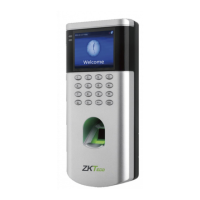
The ZKTeco LF10/20 is a versatile access control device designed for secure entry management, offering a range of authentication methods and connectivity options. It serves as a standalone access control terminal, capable of managing user access, recording events, and integrating with other security systems. The device is suitable for various environments, from small offices to larger facilities, providing a robust solution for controlling entry and monitoring attendance.
At its core, the LF10/20 functions as an access control and time attendance terminal. It allows for user registration and authentication, ensuring that only authorized individuals can gain entry. The device supports multiple authentication methods, enhancing security and flexibility. Users can authenticate themselves using fingerprints, passwords, or optional RFID cards, providing a layered approach to access control. The integrated fingerprint sensor offers a biometric solution for quick and secure identification, while the keypad allows for password entry. For those opting for card-based access, a card swiping area is available.
The device includes a display screen that provides visual feedback during operation, showing indicators, menus, and verification results. This screen guides users through registration, authentication, and menu navigation. A keypad is present for entering user IDs, passwords, and navigating through the device's settings.
Beyond basic access control, the LF10/20 incorporates features for time attendance. It can record successful authentications, which can then be used to generate attendance reports. This functionality makes it a dual-purpose device, streamlining both security and workforce management.
Connectivity is a key aspect of the LF10/20. It features a TCP/IP port for network integration, allowing it to communicate with computer software for centralized management. This enables administrators to configure device settings, manage users, and retrieve event logs remotely. For offline data transfer, a USB port is included, supporting the use of a USB-disk to download attendance and user data. The device also provides Wiegand output, allowing it to function as a reader for external access controllers, thus integrating seamlessly into existing access control infrastructures.
The LF10/20 is designed to interact with various external security components. It supports connections for a door sensor, which monitors the door's open/closed status, and an exit button, providing a convenient way to exit from the secured area. Alarm connections are available to trigger external alarms in case of security breaches, such as forced entry or tampering. A bell connection allows for the integration of an external bell, which can be programmed for scheduled rings or as an alert. Furthermore, the device includes an auxiliary input, offering flexibility for connecting other security devices like smoke detectors, enhancing the overall safety system. A tamper switch is also integrated, providing an alert if the device itself is tampered with, adding another layer of physical security.
Power input is provided via a +12V DC connection, and the device is designed to operate with a recommended 12V, 1.5A power supply. It can also share power with other devices, provided a power supply with higher current ratings is used, offering flexibility in power distribution for integrated systems.
The LF10/20 is designed for straightforward installation and user-friendly operation. The installation process involves attaching a mounting template sticker to the wall, drilling holes, fixing a back plate, and then securing the device to the back plate with a security screw. This systematic approach ensures a stable and secure mounting. Before final installation, it's recommended to insert cables into the terminal, simplifying the wiring process.
For initial setup, the device allows for easy user registration. When no super administrator is set, pressing the M/OK button grants direct access to the main menu. It is highly recommended to register a super administrator first for security purposes, as subsequent menu access will require administrator verification. User registration involves entering a user ID, name, and registering authentication credentials such as fingerprints, badges (if applicable), and passwords. User roles and access control roles can also be defined during registration, allowing for granular control over access privileges.
User authentication is a simple process: users press their finger on the sensor, enter their password, or swipe their card. A successful verification is indicated on the display screen, granting access.
The device facilitates easy record viewing and data management. Users can view attendance records directly on the device by navigating to the "Attendance Search" menu, inputting a user ID, and selecting a time range. For more comprehensive data management, records can be downloaded via a USB-disk. By inserting a USB-disk into the USB port and selecting the "Download" option from the "USB Manager" menu, attendance and user data can be transferred for external analysis or backup.
Network connectivity through TCP/IP allows for integration with ZKAccess3.5 software. After connecting the device to the network and adding it to the software, administrators can download device records and generate reports. This centralized management capability simplifies the administration of multiple devices and users. The device's Ethernet settings can be configured via the main menu, allowing administrators to set the IP address, subnet mask, gateway, and other network parameters. A successful TCP/IP connection is visually indicated by an icon on the standby interface.
Access control settings are highly customizable. Through the "Access Control" menu, administrators can configure various parameters, including time schedules, holidays, access groups, and combined verification options. This allows for the creation of complex access rules tailored to specific organizational needs, such as restricting access during certain hours or on holidays, or requiring multiple authentication methods for high-security areas.
The lock relay connection supports both Normally Opened (NO) and Normally Closed (NC) locks, providing flexibility in door locking mechanisms. The wiring diagrams illustrate how to connect locks, whether the device shares power with the lock or uses a separate power supply, ensuring correct electrical integration.
The LF10/20 is designed for relatively low maintenance, with features that support easy data backup and system restoration. The ability to download user and attendance data to a USB-disk serves as a crucial maintenance feature, allowing for regular backups. In the event of data loss or system issues, this backup can be used to restore the device's configuration and user information, minimizing downtime and data integrity concerns.
The device's network connectivity also plays a role in maintenance. Remote management through ZKAccess3.5 software allows administrators to monitor device status, update firmware (if supported by the software and device), and troubleshoot issues without needing physical access to the device. This remote capability is particularly beneficial for managing devices deployed across multiple locations.
The inclusion of a reset button provides a straightforward way to restart the device or revert to factory settings if necessary, which can be useful for resolving software glitches or preparing the device for redeployment.
The tamper switch, which triggers an alarm if the device is opened or removed from its mounting, acts as a security and maintenance feature. It alerts administrators to potential physical tampering, prompting investigation and preventing unauthorized access to the device's internal components or wiring.
Overall, the ZKTeco LF10/20 offers a comprehensive and user-friendly solution for access control and time attendance, combining robust security features with flexible management options and straightforward maintenance procedures.
 General
| Model | LF20 |
|---|---|
| Power Supply | 12V DC, 3A |
| Operating Temperature | 0°C to 45°C |
| Event Capacity | 100, 000 |
| Operating Humidity | 20% to 80% |
| Operating System | Linux |
| Record Capacity | 100, 000 |
| Communication Interface | TCP/IP |
| Communication | TCP/IP, USB Host |
| Standard Functions | Access Control, Time Attendance |
| Card Type | Mifare |


 To Next Page