Need help?
Do you have a question about the ZKTeco UHF10F Pro Reader and is the answer not in the manual?
Provides an overview of the UHF Demo software and its purpose.
Details the visual layout and primary controls of the software's main screen.
Explains how to set the reader's operational mode, e.g., continuous or triggered reading.
Guides on adjusting the power output and frequency range for the reader.
Describes how to enable or disable audible alerts from the reader.
Explains how to configure the Wiegand protocol for data output, including forward/inverted order.
Allows setting the duration of continuous output signals from the reader.
Details the available Wiegand formats (e.g., WG26, WG34) for data transmission.
Sets the time gap between tag reads to prevent duplicates.
Details the configuration interface for RS485 serial communication.
Guides on setting the communication speed for RS485 connections.
Used to assign unique addresses to readers for network identification.
Explains selecting between Polling Mode and Auto Work for RS485 data retrieval.
Details forward and inverted output configurations for RS485 data.
Covers the interface for managing overall system configurations and parameters.
Allows setting the color of the reader's status LEDs for standby and card read.
Describes the process of importing and exporting software settings.
Lists the available output modes for card data: Wiegand, RS485, and TCP/IP.
Explains how to access and select the display language for the software.
Guides on setting the antenna's elevation angle for optimal line of sight.
Advises on optimal reader placement and avoiding interference from other readers.
Illustrates the correct positioning of RFID tags within vehicles for detection.
Notes how climatic conditions like rain, snow, or wind can affect detection distance.
Advises keeping the reader away from strong magnetic fields during operation.
Details specifications for the UHF1-Tag1 card, including frequency, data storage, and size.
Provides specifications for the UHF Parking Tag label, covering frequency, data storage, and size.
Offers solutions for issues related to the reader's recognition distance being too short.
Provides steps to diagnose and resolve issues when the reader fails to read cards.
Offers solutions for when the barrier does not open after a successful card read.
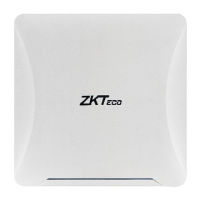
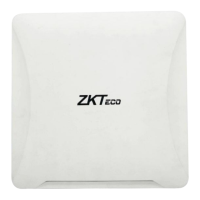
The UHF10F Pro Reader is ZKTeco's third-generation UHF reader, designed for enhanced stability, extended reading distance, and faster recognition speed. It is primarily used with passive UHF cards and is suitable for various applications, including vehicle and personnel management. The device is designed to meet CE and FCC technology requirements, with further security certifications pending.
The UHF10F Pro Reader is a sophisticated device capable of reading UHF cards at a significant distance, making it ideal for applications where quick and efficient identification is required without direct contact. Its core function involves identifying and processing information from passive UHF cards, which can be used for access control, tracking, and other management purposes.
The reader offers flexible working modes, including "Read Always" and "Read by Trigger." In "Read Always" mode, the reader continuously scans for cards, providing constant monitoring. The "Read by Trigger" mode allows the reader to activate only when a specific trigger is initiated, which can be useful for controlled reading environments or to conserve power.
For communication, the UHF10F Pro Reader supports multiple interfaces: Wiegand, RS485, and USB for configuration. The Wiegand interface is commonly used for connecting to access control panels, allowing the reader to send card data for authentication. The RS485 interface provides a robust serial communication method, enabling the reader to connect to controllers like the inbio260 and inbio460, and supports both "Polling Mode" and "Auto Work" for data transfer. The USB interface is primarily for configuring the reader's parameters via a PC.
The device also includes a buzzer for audible feedback, which can be enabled or disabled through the configuration software. This provides immediate confirmation of card reading events.
The UHF10F Pro Reader is designed for ease of use and configuration through its dedicated software, "UHF Demo." This software provides a comprehensive interface for managing the reader's settings.
Reader Connection: To begin, users connect the reader to a PC via USB and use the "Connect" button in the software to establish communication. Once connected, various parameters can be adjusted.
Work Mode Configuration: Users can select between "Read Always" for continuous scanning or "Read by Trigger" for on-demand reading. The "Read Time" parameter allows for setting the duration the reader remains active in "Read by Trigger" mode.
RF Settings: The software allows adjustment of the reader's power output and frequency range. This feature is crucial for optimizing reading distance and performance based on the specific environment and regulatory requirements. For instance, the Malaysian frequency range is specified as 919.5-923.0MHz.
Wiegand Output Settings: The reader supports Wiegand output, which can be configured for "Forward Output" or "Inverted Output." "Forward Output" reads card numbers in progressive order, while "Inverted Output" reads them in reverse. The "Start Bytes" parameter can also be set. The Wiegand format is highly customizable, with options including WG26 (default), WG34, WG42, WG50, WG58, WG66, WG74, WG82, WG90, and WG98, allowing compatibility with various access control systems.
Output Duration Setting: The continuous output signal time of the reader can be set, with a maximum of 1 second, providing control over how long the reader transmits data after a card read.
Card Reading Interval Setting: To prevent repeated card readings, a configurable interval can be set, ensuring that each card is processed only once within a specified timeframe.
RS485 Setting Interface: For RS485 communication, the software allows configuration of the baud rate, with 96000 as the default, and options for adjustment. The "Device Address Setting" is important for distinguishing multiple readers in different locations when connected via RS485. The "RS485 Working Mode" offers "Polling Mode," where the reader responds to card search commands, and "Auto Work," where it automatically uploads card data to the controller. Similar to Wiegand, RS485 output can be set to "Forward Output" or "Inverted Output."
System Settings: The "System Settings" tab provides options for LED light configuration, allowing users to set the color of the LED indicator for "Standby Status" and "Read Card Status" from seven available colors. This provides visual feedback on the reader's operational state. The software also supports data import and export for settings management.
Card Reader Output Modes: The reader supports three main output modes: Wiegand Mode, RS485 Mode, and TCP/IP Mode, offering versatility in integration with different access control systems.
Language Settings: The "UHF Demo" software includes language settings, allowing users to select their preferred language for the interface.
Installation Procedure: Proper installation is crucial for optimal performance. The directional antenna should be installed with a lower elevation angle of 60° to 75° to achieve the correct line of sight. It is important that the reader's facing direction and the vehicle's travel direction are in a straight line. A minimum distance of 50cm should be maintained between the reading head and the parking barrier. To avoid interference, readers should not be installed opposite each other. Environmental factors such as rain, snow, or wind can affect detection distance, and the reader should be kept away from strong magnetic fields.
The UHF10F Pro Reader is designed for robust operation, but certain checks can help maintain its performance and troubleshoot issues.
Troubleshooting Recognition Distance: If the recognition distance is too short, users can connect to the "UHF Demo" software and adjust the power output to the maximum setting. This can often resolve issues related to insufficient reading range.
Troubleshooting Card Reading Issues: If the reader fails to read cards, several steps can be taken:
Troubleshooting Barrier Opening Issues: If the barrier does not open after a card read, consider the following:
 General
| Frequency | 860-960 MHz |
|---|---|
| Protocol | ISO18000-6C (EPC GEN2) |
| Communication Interface | RS232, RS485, Wiegand, TCP/IP |
| Power Supply | DC 12V |
| IP Rating | IP65 |
| Storage Temperature | -40°C to +85°C |
| Certification | CE, FCC, RoHS |
| Read Range | Up to 10 meters |
| Frequency Range | UHF |
| Humidity | 5% to 95% (non-condensing) |

 To Next Page