[WA Satellite Battery
UPS
Optical flow Mode/GPS Mode
Revolve lens Rotate lens Ahem
Geomagnetic Interference
VR f Clarity f
tm.
Back
1 1 Introduction to the Operation Interface
TrejeeMal
flighawaspoint
flight
GPS troddngSmat
trecang
I
palm motel
Surrounding flight
Orteclick return
Sseca to map
1.2.1 Function Description
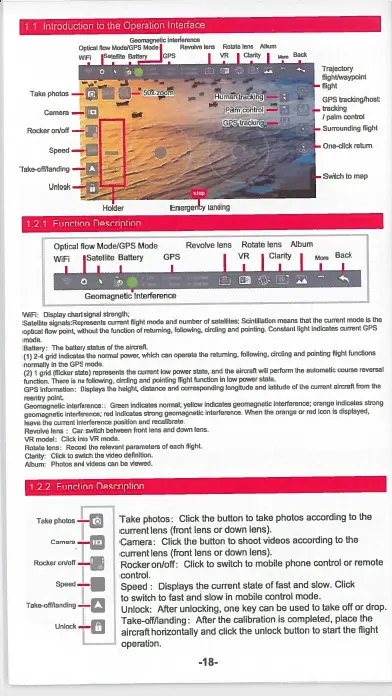
VAR: Disc.,' chart Wm. strerwja
SateS.WoostsRepresento anent fllgd mode and number of (Melaka Soinollaten rnsa. Mat the arrant mode is Ow
ols. Row point, without Me function Of rehrming, foaming, sirens° end pointing. Constant light irsficates curreolGPS
made.
Raters: The beams MMus of tee Mrs:reit
(1)2-0 grid indicates the noosel power, whla can operate the reaming. fonowing, circling and pointing flight funaons
eormaey In Me GPS mode
(2)1 slid (flicker sob) represents the anent Me power Mote, and To airor. 11 pe0orm ere euremsec course reverser
/undo, There Is rhs Worm,. Snoring and polnang flight Mrscan in low
power
sate.
GPS inlormation: Casale, the height cleterwo aM corresponang I.gatle and loaide of the arrant aircraft from the
morthlr Onint-
Geomagnetic Mterferencen Green indicates nomml, yellow Indicates geomagnetic interference; orange Micates strong
gromagnolic Interference, red Indicates strong geomagnetic interference when the orange or red loan is displayed.
loom the current interference position and amorenate
Repo.° lens : Can switch between hoot less and clown lens
VR rootlet: clia into VR mode
.
Rotate lens: React Me referant parameters of each flight.
Glade GI.
SWItal
W0eo dehMan
.
Album • Pastes
11.
Micro can be nerved.
1.2.2 Function Description
Telco photo -.ea Take photos: Click the button to take photos according to the
current lens (front lens or down lens).
Gamete -en Ifs
Camera: Click the button to shoot videos according to the
current lens (front lens or down lens).
-
111 Rocker on/oft: Click to switch to mobile phone control or remote
control.
speed-1111 Speed Displays the current state of fast and slow. Click
_g3
to switch to fast and slow in mobile control mode.
Unlock: After unlocking, one key can be used to take off or drop.
unlock
si
Take-off/landing: After the calibration is completed, place the
aircraft horizontally and click the unlock button to start the flight
operation.
-18-


 To Next Page