1 3
Gesture Recognition
Facing the front lens of the camera. the following gestures can be triggered to trigger the automate camera or
camera function of the aircraft.
Take Photos by Yeah Gestures Ahout 2m m front of tie camera of the aircraft had Me Yeah g.tere at
one ha. tat After the aircraft success.ily recognired the gestme. the mune.. Of 3 e.t.ads began
photos:
Shoot eldees by Bos °wheal, About 2 meters in front of Ma camera of the aircraft. put your hands on the
position
or
the face J. to make a square video gesture. After rho aircraft has successfully Anagneed the
gesture, No Wdeo wit start Whoa the gesture a reossnired again, end Ne recording (the tree difference
between hurt recognition should he more .n 3 seconds):
Shoot Videos by Palm Gestures About 2 meters in front of the aircraft /e., with Rea angers and one hand
gale After the airc.11 has successfully recognized the gesture. the video wig start When the gesture is
rem... again, end the recording (the time difference between Me recognition should he ma. ..an 3
seconds):
•
Special Instructions
To ensure
that the
lens gels a higher recognition rate
1. Please olm the less race Ns..
3. Plea. fry In go. rrght environment:
3 Please conded gesture racoortrann operation at a iffaitanca Mahout 2rn from
the
lens
In
roses, ftwll result in a low lens recognition rem
1) Weak light or .cidight
2. The Wiri signal N weak or. signal is dis.bed.
2
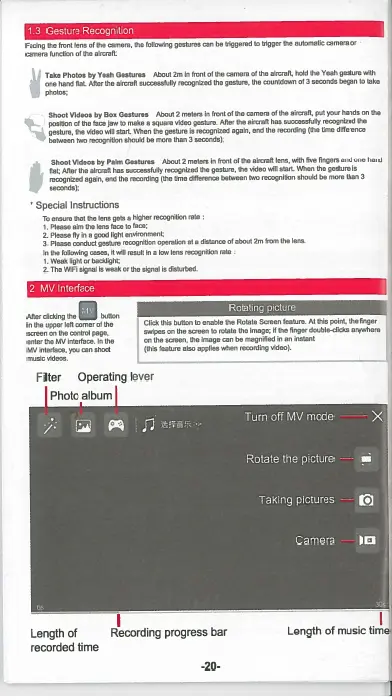
MV Interface
After ciMeng the 12 Mt.
In the upper loft corner of Ne
screen on the oon.I page,
MV
the MV in.dare. in Om
inte.ce, you can shoot
music videos
Rotating picture
Click Nis button in
enable
Na Rotate Screen reatum AI IhM point. the linger
swipes an the screen In Mete the Image; if No finer douldecteks anywhere
on the screen. the image can magnified in en Instant
(this sati
re also apples when swathe .dm).
Filter
Operating lever
Photo album
C
2
4
Turn off MV mode
Rotate the picture
—
fi)
Taking pictures —
a
.
Camera — ICI
Length of
Recording progress bar
Length of music time
recorded time
-20-


 To Previous Page