16
3.4.4 Timers
• To prevent against any risk of material damage or injury, you are strongly encouraged to use
the "Timers" when the pump is not managed by an external controller, in order to ensure that
no speed is running in the event of a general power cut.
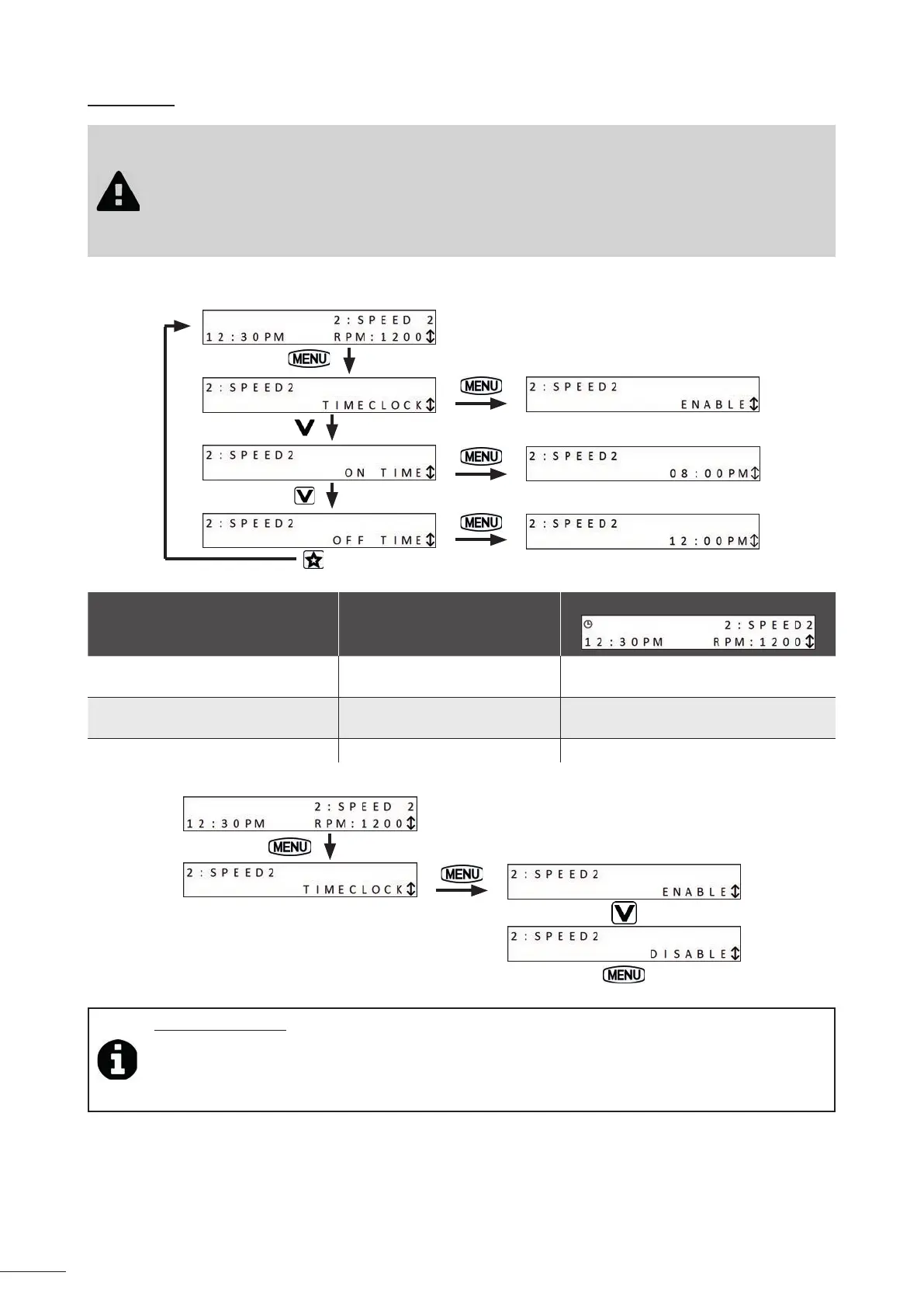
• "Timers" (programmes with scheduled pump start and stop mes) can be confi gured for
"eStar" speed and speed No. 2.
• "Timers" run in the same manner every day of the week.
• To access the "Timer" programme, the speed that you want to programme must be running ("eStar" speed or speed
No. 2):
Speed LED
Clock display
Timer ac ve
Pump on
red yes
Timer ac ve
Pump off
green yes
Timer inac ve / no
• To deac vate an ac ve Timer:
Tip: Timer opera on
• 2 Timers can be ac vated at the same me; the Timer with the highest speed will take priority.
• The pump can be stopped manually when a Timer is running by pressing the bu on for the ac ve speed.
The Timer will resume normal ac vity during the next cycle.
• If the pump is started manually, and a Timer is ac ve, it will stop at the end of the programmed Timer.


 To Next Page