18
3.6 I Addi onal func ons for professionals only (model with interface only)
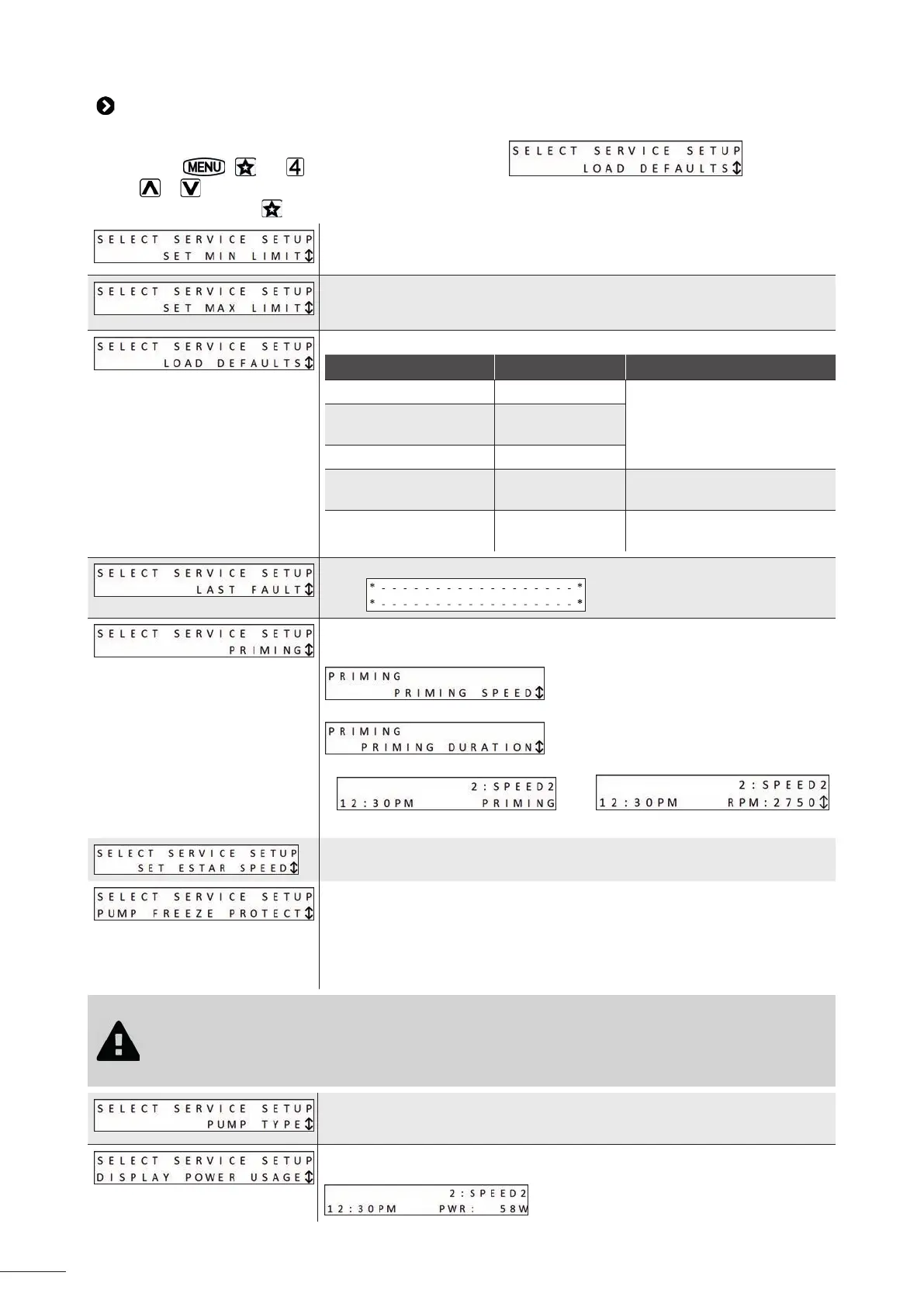
To enter the service menu, the pump must be stopped.
Press and hold
, and at the same me for 5 seconds: .
Use the
or keys to browse the menu.
To exit the menu, press the
key or refrain from performing any ac ons for 1 minute.
Limit the pump's minimum opera ng speed. The user will no longer be able to
set the pre-defi ned speeds 2, 3, 4, 5, 6, 7 and 8 below this speed. The default
speed is 600 rpm.
Limit the pump's maximum opera ng speed. The user will no longer be able to
set the pre-defi ned speeds 2, 3, 4, 5, 6, 7 and 8 above this speed. The default
speed is 3,450 rpm.
Restore factory se ngs:
Se ng By default Possible values
"eStar" speed 1,750 rpm
from 600 to 3,450 rpm, in
intervals of 10 rpm
Speed 2, 3, 4, 5, 6, 7
and 8
2,750 rpm
Priming speed 2,750 rpm
Frost protec on me 30 minutes
from 0 minutes to 8 hours in
30-minute intervals
Priming me 3 minutes
from 1 to 5 minutes in 1-minute
intervals
View the last 2 pump errors. If the memory contains no errors, the display will
show:
A priming speed greater than 2,500 rpm is highly recommended in order for it to
be eff ec ve.
To set the priming speed (from 600 to 3,450 rpm):
Then the priming cycle me (from 1 to 5 minutes):
The user interface displays:
/
when the pump is in the priming cycle.
To set the pre-defi ned "eStar" speed (known by default as "1: Filtra on").
The pump measures the running motor temperature and es mates the water
temperature.
It ac vates the "eStar" speed if the temperature falls too low, in order to protect
the pump from freezing temperatures. This se ng is used to confi gure the
dura on of the frost protec on cycle.
To set the me (from 0 minutes to 8 hours in 30-minute intervals).
To deac vate this func on, set the me to "0:00".
• The frost protec on func on is only designed to protect the appliance and pipework during short periods
of subzero temperatures. It ac vates the fi ltra on pump and circulates water to prevent freezing inside
the appliance. The frost protec on func on does not guarantee protec on during extended periods of
subzero temperatures or power cuts. In these condi ons, the pool must be completely winterised. If the
pump freezes, it may cause severe damage and invalidate the warranty.
This se ng is used to determine the maximum allowable pump speed depending
on the type of pump chosen.
We recommend not changing this se ng to keep op mum pump performance.
You can display the pump's electricity consump on while running (in Wa s).
This se ng is only displayed on the screen when the pump is running:


 To Next Page