EasyManua.ls Logo

Zojirushi NP-GBC05 - How to Set the Clock

Zojirushi NP-GBC05
25 pages
Print Icon
To Next Page IconTo Next Page
To Previous Page IconTo Previous Page
Loading...
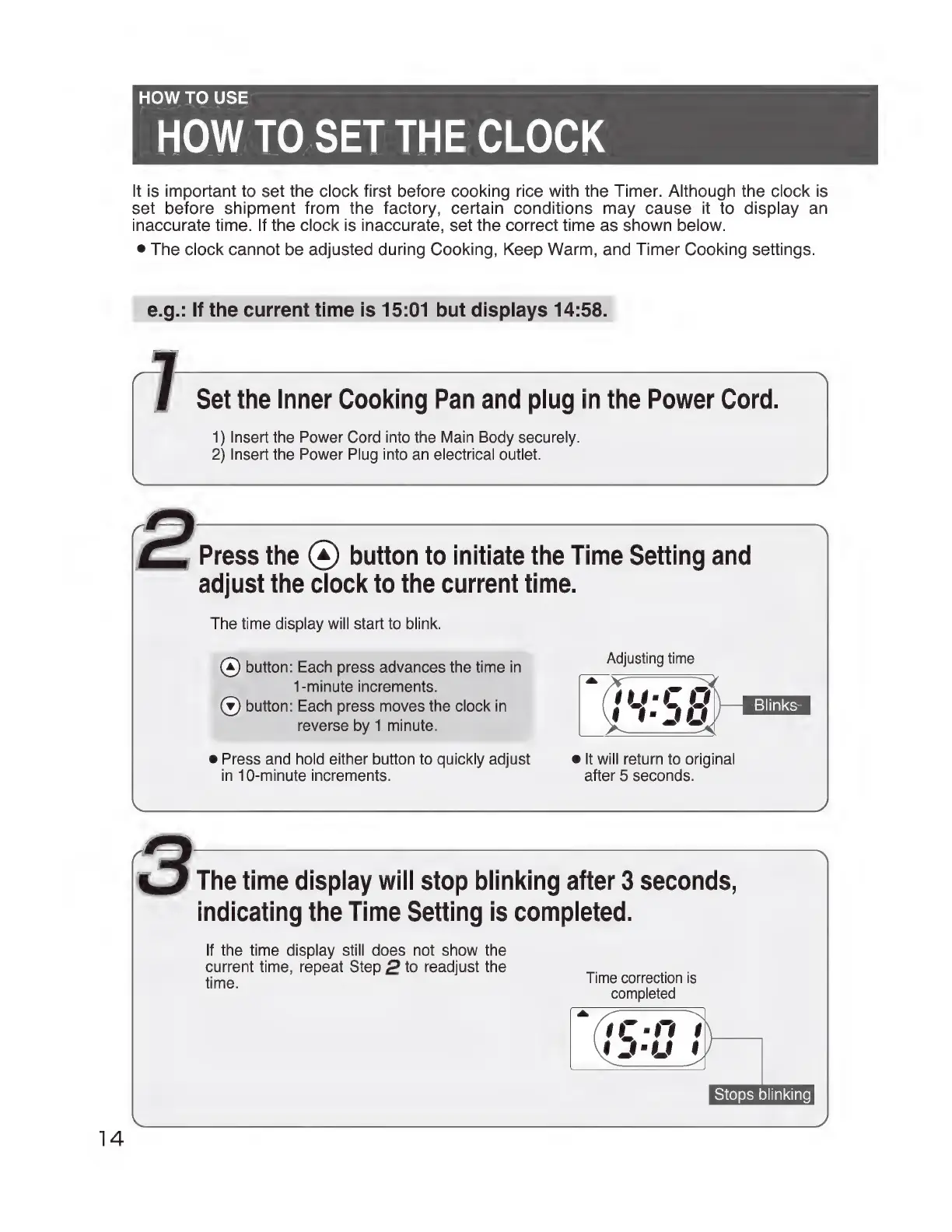
HOW
TO
USE
HOW
TO
SET
THE
CLOCK
It
is
important
to
set
the
clock
first
before
cooking
rice
with
the
Timer.
Although
the
clock
is
set
before
shipment
from
the
factory,
certain
conditions
may
cause
it
to
display
an
inaccurate
time.
If
the
clock
is
inaccurate,
set
the
correct
time
as
shown
below.
e
The
clock
cannot
be
adjusted
during
Cooking,
Keep
Warm,
and
Timer
Cooking
settings.
e.g.:
If
the
current
time
is
15:01
but
displays
14:58.
Set
the
Inner
Cooking
Pan and
plug
in
the
Power
Cord.
1)
Insert
the
Power
Cord
into
the
Main
Body
securely.
2)
Insert
the
Power
Plug
into
an
electrical
outlet.
E.
Press
the
(4)
button
to
initiate
the
Time
Setting
and
adjust
the
clock
to
the
current
time.
The
time
display
will
start
to
blink.
(a)
button:
Each
press
advances
the
time
in
SOUR
1-minute
increments.
=
(¥)
button:
Each
press
moves
the
clock
in
)
Blinks
reverse
by
1
minute.
e
Press
and
hold
either
button
to
quickly
adjust
elt
will
return
to
original
in
10-minute
increments.
after
5
seconds.
>
The
time
display
will
stop
blinking
after
3
seconds,
indicating
the
Time
Setting
is
completed.
If
the
time
display
still
does
not
show
the
current
time,
repeat
Step
2
to
readjust
the
time.
Time
correction
is
completed
Stops
blinking

Related product manuals