EasyManua.ls Logo

Zojirushi NP-GBC05 - Using the Timer Function; Timer Setup: Selection and Time; Activating Timer Cooking

Zojirushi NP-GBC05
25 pages
Print Icon
To Next Page IconTo Next Page
To Previous Page IconTo Previous Page
Loading...
16
HOW
TO
USE
USING
THE
TIMER
e
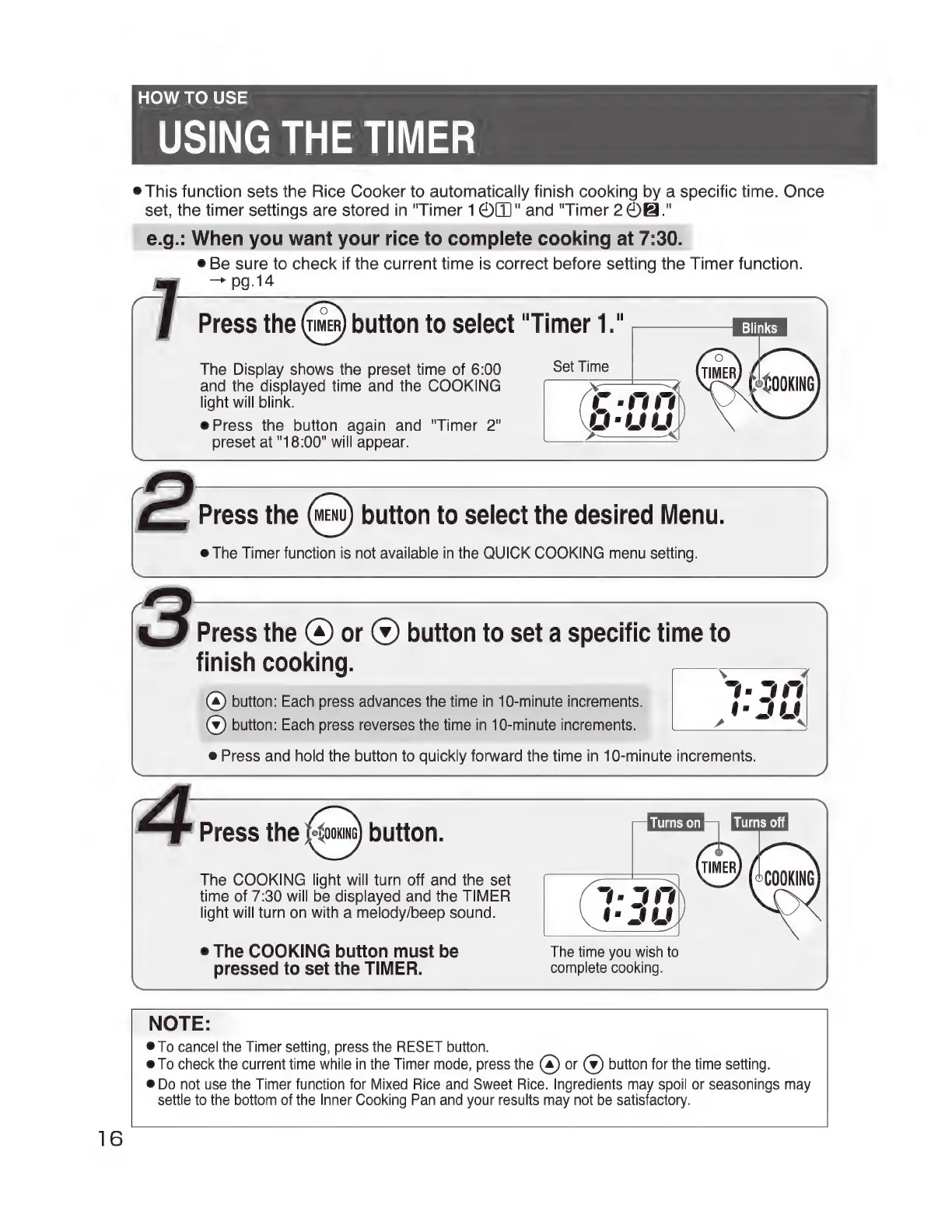
This
function
sets
the
Rice
Cooker
to
automatically
finish
cooking
by
a
specific
time.
Once
set,
the
timer
settings
are
stored
in
"Timer
1®()"
and
"Timer
2©@."
e.g.:
When
you
want
your
rice
to
complete
cooking
at
7:30.
e
Be
sure
to
check
if
the
current
time
is
correct
before
setting
the
Timer
function.
my
~—~pg.l4
Press
the
button
to
select
"Timer
1."
Blinks
The
Display
shows
the
preset
time
of
6:00
Set
Time
and
the
displayed
time
and
the
COOKING
light
will
blink.
@
Press
the
button
again
and
"Timer
2"
preset
at
"18:00"
will
appear.
D
Press
the
©
or
©
button
to
set
a
specific
time
to
finish
cooking.
(4)
button:
Each
press
advances
the
time
in
10-minute
increments.
(¥)
button:
Each
press
reverses
the
time
in
10-minute
increments.
e
Press
and
hold the
button
to
quickly
forward
the
time
in
10-minute
increments.
F"
Press
the
button.
The
COOKING
light
will
turn
off
and
the
set
time
of
7:30
will
be
displayed
and
the
TIMER
light
will
turn
on
with
a
melody/beep
sound.
e
The
COOKING
button
must
be
The
time
you
wish
to
pressed
to
set
the
TIMER.
complete
cooking.
NOTE:
®To
cancel
the
Timer
setting,
press
the
RESET
button.
@
To
check
the
current
time
while
in
the
Timer
mode,
press
the
(a)
or
(ei
button
for
the
time
setting.
@
Do
not
use
the
Timer
function
for
Mixed
Rice
and
Sweet
Rice.
Ingredients
may
spoil
or
seasonings
may
settle
to
the
bottom
of
the
Inner
Cooking
Pan
and
your
results
may
not
be
satisfactory.

Related product manuals