System Check: Minimum Requirements - GPS
1) At a minimum, the installer must perform a “System Check”
to verify proper installation
2) This procedure covers the minimum requirements for a system
installer. If at all possible a full and complete checkout using
Zonar’s Ground Traffic Control™ website should be performed.
Not all installers will have access to this area, check with a
Zonar Customer Service representative if in doubt
3) Turn Key On/Engine running, within 2 minutes:
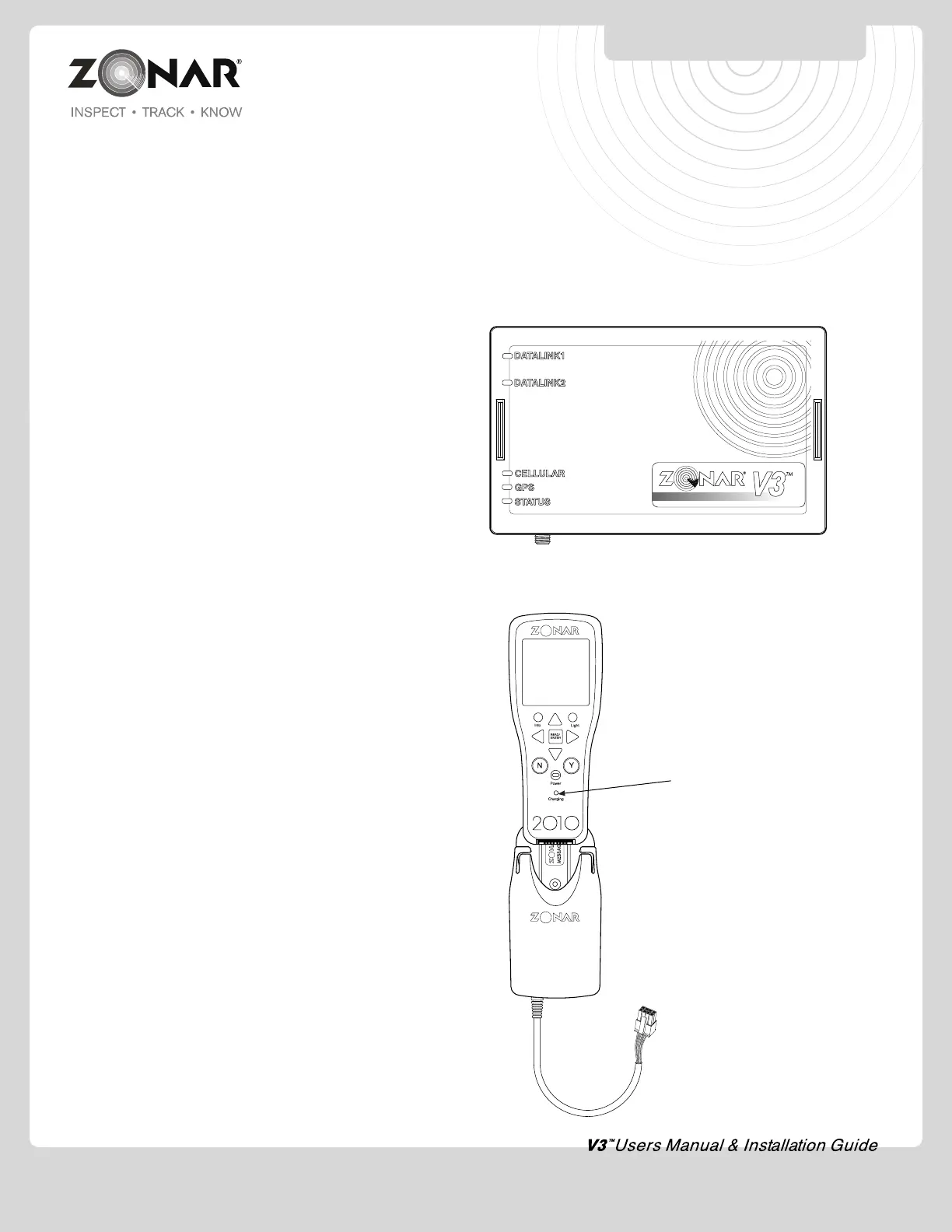
A) GPS Green LED: LED should be solid within 2 minutes
or less. Blinking indicates acquiring satellites, Solid
indicates satellite acquired. GPS antenna must have
a clear view to sky. Do not proceed further until GPS
LED is solid
i. Orange - Internal GPS antenna is being utilized
ii. Green - External GPS antenna is being utilized
B) GSM cellular Green LED: LED should be solid within 2
minutes. If blinking, ensure GSM antenna is secure, has
a clear view to the sky and area has cellular coverage
C) STATUS Green LED: Solid
V3™ Model if blinking-
i. Check J3 connection at GPS unit and vehicle
connector. Check integrated 4 Pin power pigtail
at GPS unit
ii. If J3 cable and 4 Pin power pigtail check good,
install stand alone 4 Pin power cable
D) Data Link1:
i. Single green blink 1 x per second if J1708/J1587
data is present.
ii. Single red blink per second if J1708/J1587
is not present.
E) Data Link2:
i. Single green blink 1 x per second if J1939 data
is present
ii. Single red blink per second if J1939 is not
present
4) Turn Key Off, within 2 minutes:
A) Data Link1: Disregard
B) Data Link2: Disregard
C) GSM Green LED: Disregard
D) GPS Green LED: Disregard
E) STATUS Green LED: Blinking (Solid may indicate
a problem, check white lead. Call your Zonar
Customer Service Representative if in doubt)
5) Turn key to accessory position with the engine off. Status LED
must not be solid
System Check – Minimum Requirements –
2010 / GPS Vehicle Mount
1) Insert 2010 RFID Reader into
GPS-VM (Vehicle Mount)
2) Ensure 2010 “Charging” indicator
(located below power button on
2010) illuminates Green, a slight
delay is normal
3) See page 17 “EVIR System
Checkout” for additional
requirements
Note 1: A proper and complete system/LED functional check
requires the engine to be running
Note 2: Vehicles installed with non JBus cables (4 Pin power
cable and lightduty/OBDII) require the vehicle to physically move
at least 5 MPH for a distance of at least 100 feet to properly
complete a new install checkout. If this is not performed GPS and
discrete I/O data will not be present in GTC until those thresholds
are met.
GPS SYSTEM CHECK
16


 To Next Page