Controls and Functions
7
ZOOM FIRE-18
(3) Display
Shows the number of the currently selected patch, or the value of setting parameters of the FIRE-18.
(4) [
Q
]/[
W
] keys
Serve to switch between patches and to adjust ZNR (ZOOM Noise Reduction).
(5) [STORE] key
Stores the current settings as a user patch.
(6) [EXIT] key
Cancels an operation and calls up the number of the currently selected patch onto the display.
(7) [TUNER] key
This key activates the built-in tuner of the FIRE-18.
(8) [ZNR] key
This key turns ZOOM Noise Reduction on or off. (ZNR is ON by default at power-on.)
◆
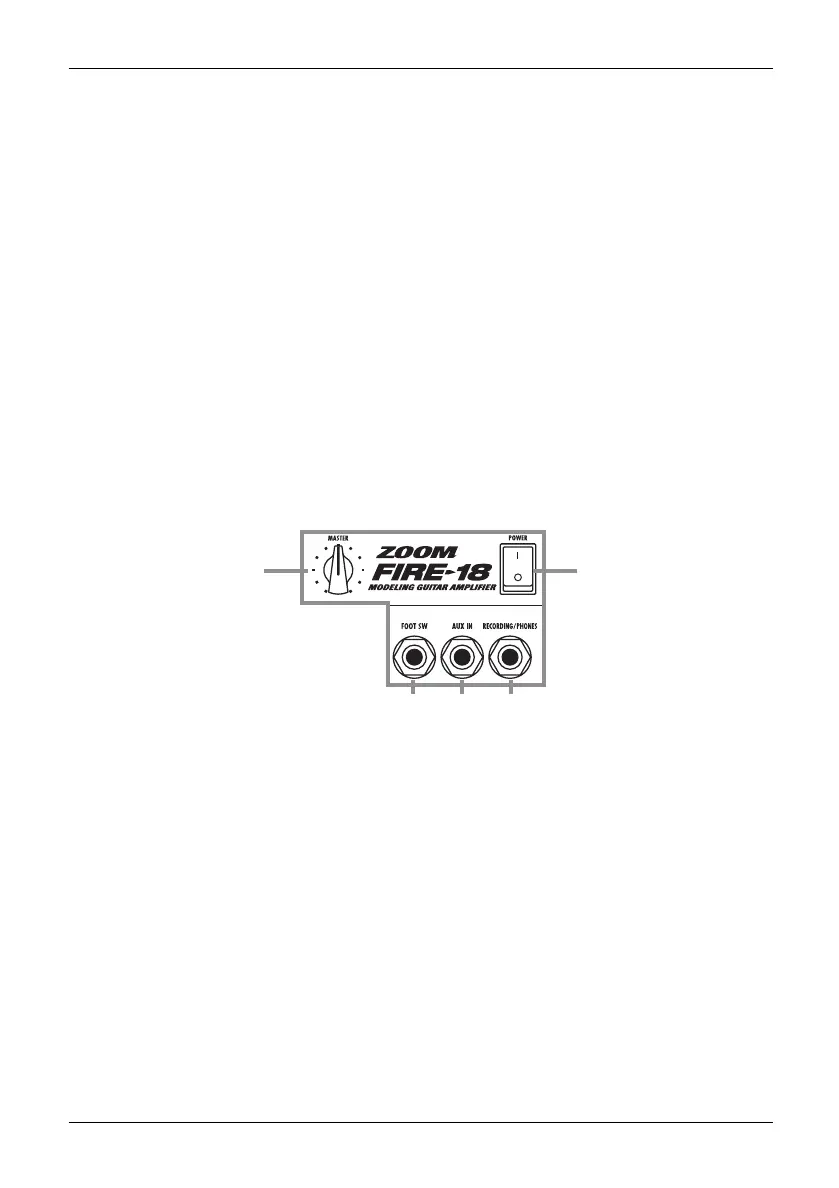
Output/control section
This section lets you adjust the overall amp volume and connect external devices including a foot switch.
(1) [MASTER] knob
Adjusts the volume.
(2) [POWER] switch
Controls the power on/off status.
(3) FOOT SW jack
A separately available foot switch (ZOOM FS-01) can be connected here, allowing you to toggle
between manual mode and program mode with your foot.
(4) [AUX IN] jack
This is a stereo input that accepts the signal from a CD player or MD player.
(5) [RECORDING/PHONES] jack
This is a stereo output that can be used to connect a recording device or a pair of headphones.
(1)
(3) (4) (5)
(2)
F18-E.fm 7 ページ 2004年2月27日 金曜日 午後2時25分



 To Next Page