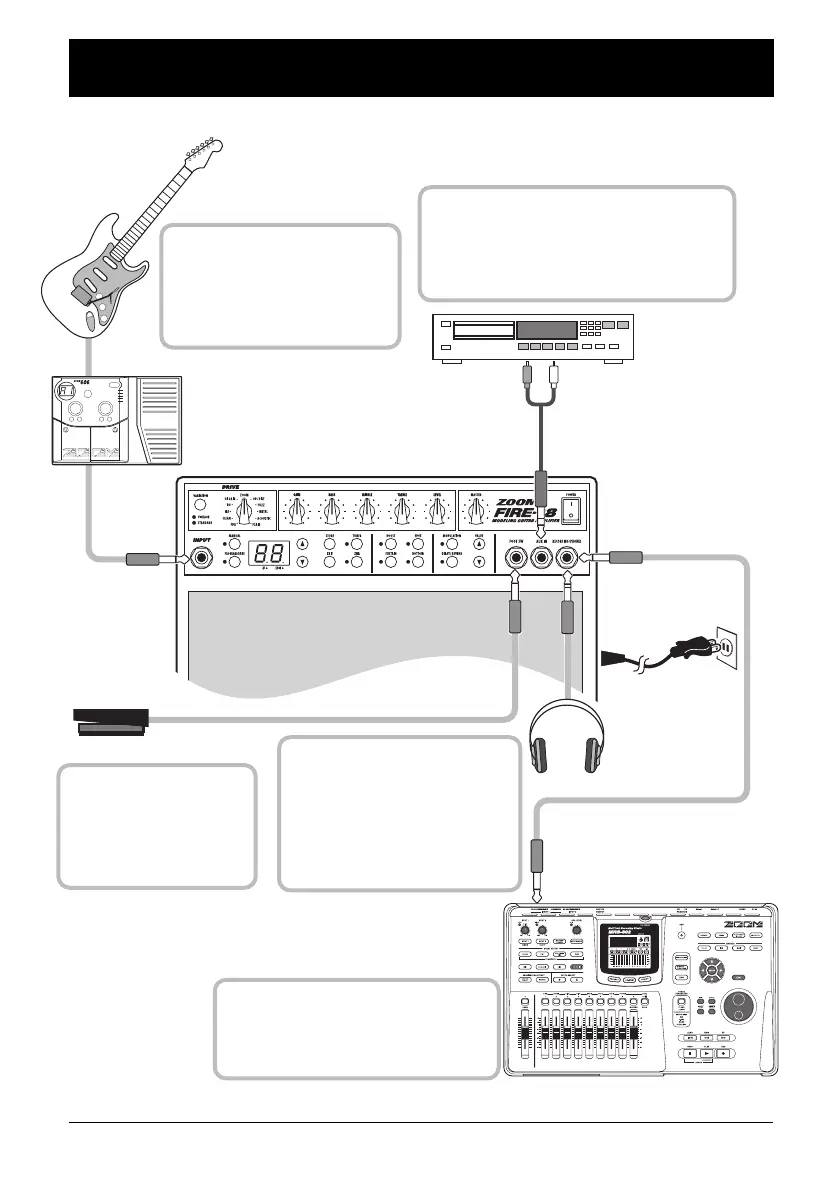
Connections
8
ZOOM FIRE-18
FS-01
Guitar
606 or similar effect pedal
CD player or similar
Power Cord
Headphones
MRS-802 or similar recording device
When connecting a multi-effect
device (such as the ZOOM 606
or 707II) between the guitar and
the FIRE-18, set the [DRIVE
TYPE] knob to "PLAIN".
To input the signal from a CD player or
other stereo playback device, use a stereo
cable and connect it to the [AUX IN] jack.
The signal input here is mixed internally
with the guitar signal.
To monitor the output of the
FIRE-18 with headphones,
connect the headphone plug to
the [RECORDING/PHONES]
jack. (When a plug is inserted in
this jack, the speaker output is
automatically turned off.)
To record the output of the FIRE-18,
connect the recording device such as
the ZOOM MRS-1266 to the
[RECORDING/PHONES] jack.
To toggle between manual
mode and program mode
with your foot, connect the
separately available foot
switch ZOOM FS-01 here.
Connections
F18-E.fm 8 ページ 2004年2月27日 金曜日 午後2時25分



 To Next Page