14
Functions of parts
█
Input section
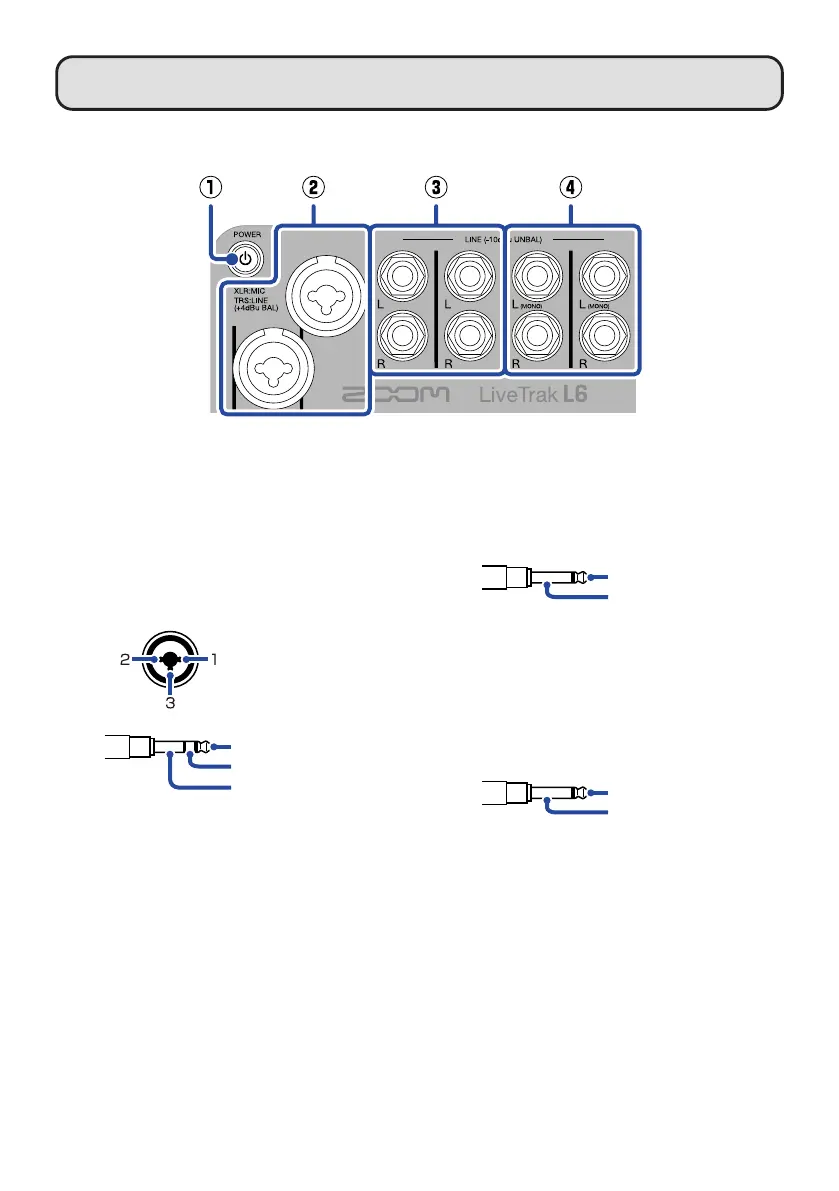
①
Power switch
This turns the power on/off.
②
INPUT 1 and 2 jacks
Connect mics and instruments to these.
These support XLR and 1/4-inch phone
(TRS) plugs.
TRS
TIP: HOT
RING: COLD
SLEEVE: GND
XLR
1: GND
2: HOT
3: COLD
③
INPUT 3 and 4 jacks
Connect synthesizers, samplers and
effects, for example, here. These support
1/4-inch phone (unbalanced TS) plugs.
TS
TIP: HOT
SLEEVE: GND/COLD
④
INPUT 5 and 6 jacks
Connect synthesizers, samplers and
effects, for example, here. These support
1/4-inch phone (unbalanced TS) plugs.
When connecting mono devices, con-
nect them to the L (MONO) jacks.
TS
TIP: HOT
SLEEVE: GND/COLD



 To Next Page