ZE205E/ZE230E OPERATION MANUAL
Basic operation technique of
the excavator
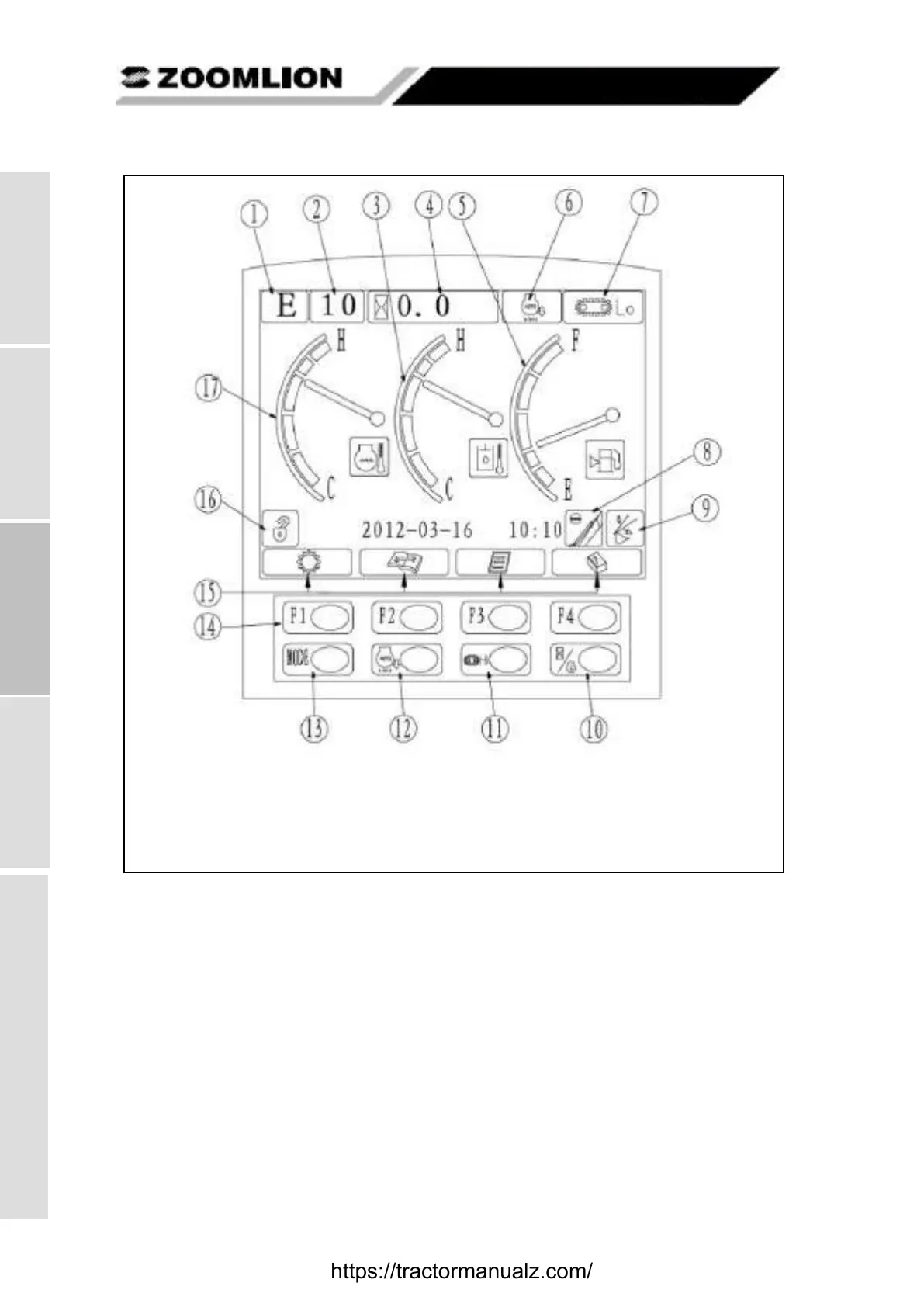
Figure 3-2 Standard working interface
3.2.1.2 Instrument operations and settings
3.2.1.2.1 Normal startup and shut-down of the instrument
a) Startup of the instrument: turn the key switch to the ON position and the display starts to initialize
into the standard interface, as shown in Figure 3-3.
1. Work mode 2. Gear position 3. Hydraulic oil temperature 4. Working hours 5. Fuel level 6.
Automatic idling 7. Travel speed 8. Arm semi-flow 9. Boom priority 10. Working hours / engine speed
11. Traveling high / low speed selection 12. Automatic idling selection 13. Work mode selection 14. Function
keys (F1-F4) 15. Key prompt area (from left to right: the operating parameters, maintenance, video menu, help)
16. Safety pilot 17.Coolant temperature
https://tractormanualz.com/


 To Next Page