G. ADJUSTABLE STEM
Your Zoomo Zero may be tted with an
adjustable stem. If this is the case the
stem can be adjusted for height and
reach. The stem can be adjusted between
the angles of 0 to 60 degrees. In order to
adjust the angle of the stem you will need
a 5mm allen key. It is recommended that
the stem is adjusted close to 60 if you are
shorter and prefer a higher bar. It should
be closer to 0 if you want to extend the
reach and prefer a sportier riding
position.
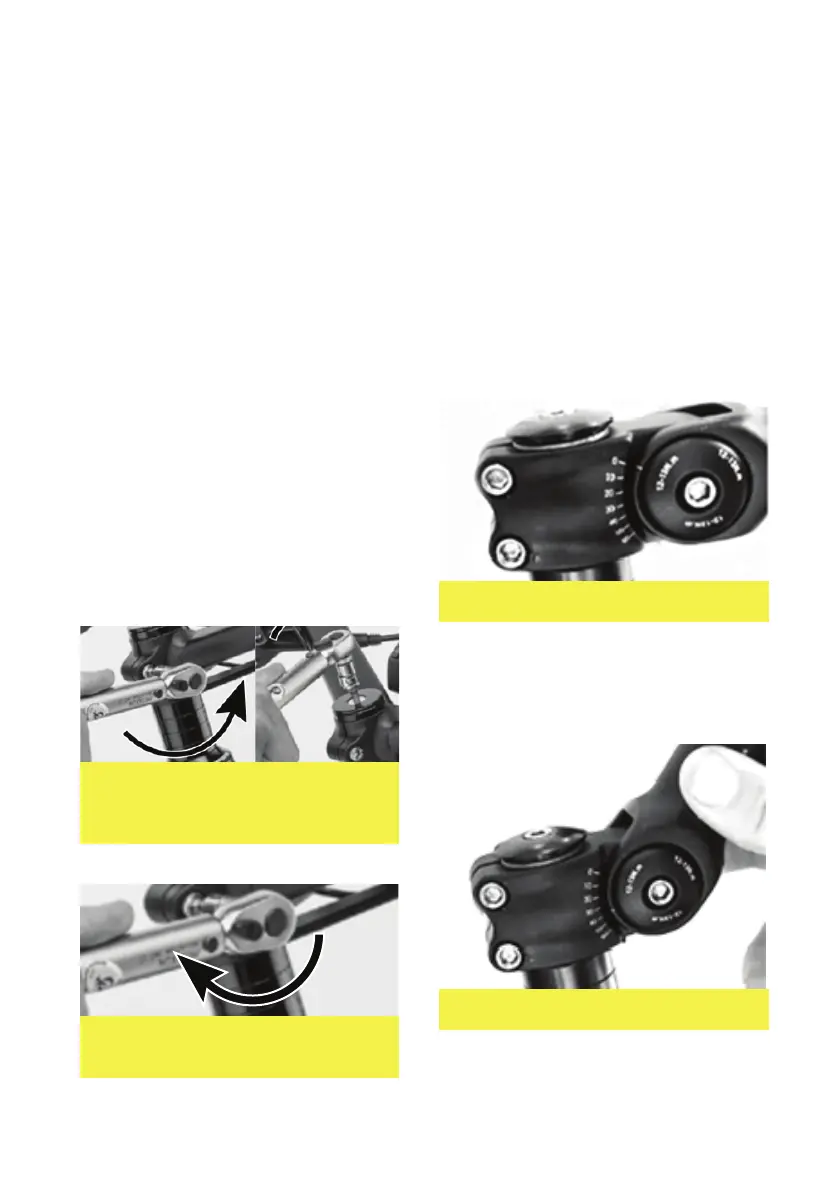
When the bolt is loosened you can adjust
the handlebar stem to the desired
position / angle. Once this is set
re-tighten the bolt to 12-13nm
TEST 2 - Make the front wheel of your bike
bounce. You will hear a sharp loud noise only
if there is signicant play in the head set.
Pay attention to other noises, such as those of
the cables hitting against the frame, or even
the spokes. Do not take these into account.
If you have found play in the head set,
follow these steps:
1. Loosen the screw(s) on the stem.
(see Figure 9)
2. Then progressively tighten,
without forcing, the screw in the
hood until play disappears as in
stage 2. (see Figure 12)
3. Check that play in the fork is no
longer present. The fork should turn
easily and you should not feel any
friction or resistance when it turns.
4. Retighten the screw(s) on the stem
following the recommended torque
setting of 5 Nm. (see Figure 10)
Figure 9. Headset tightening step
one loosen stem screws then
tighten the top cap.
Figure 10. Retighten the stem bolts
to 5 Nm.
08
Figure 11. Loosen the M5 Bolt (center)
Figure 12. Adjusting the stem to position


 To Next Page