Authorization. To access 4G/Wi-Fi hotspot settings you need to enter a password on the login page.
Default password - admin. Enter your password and click "Login”.
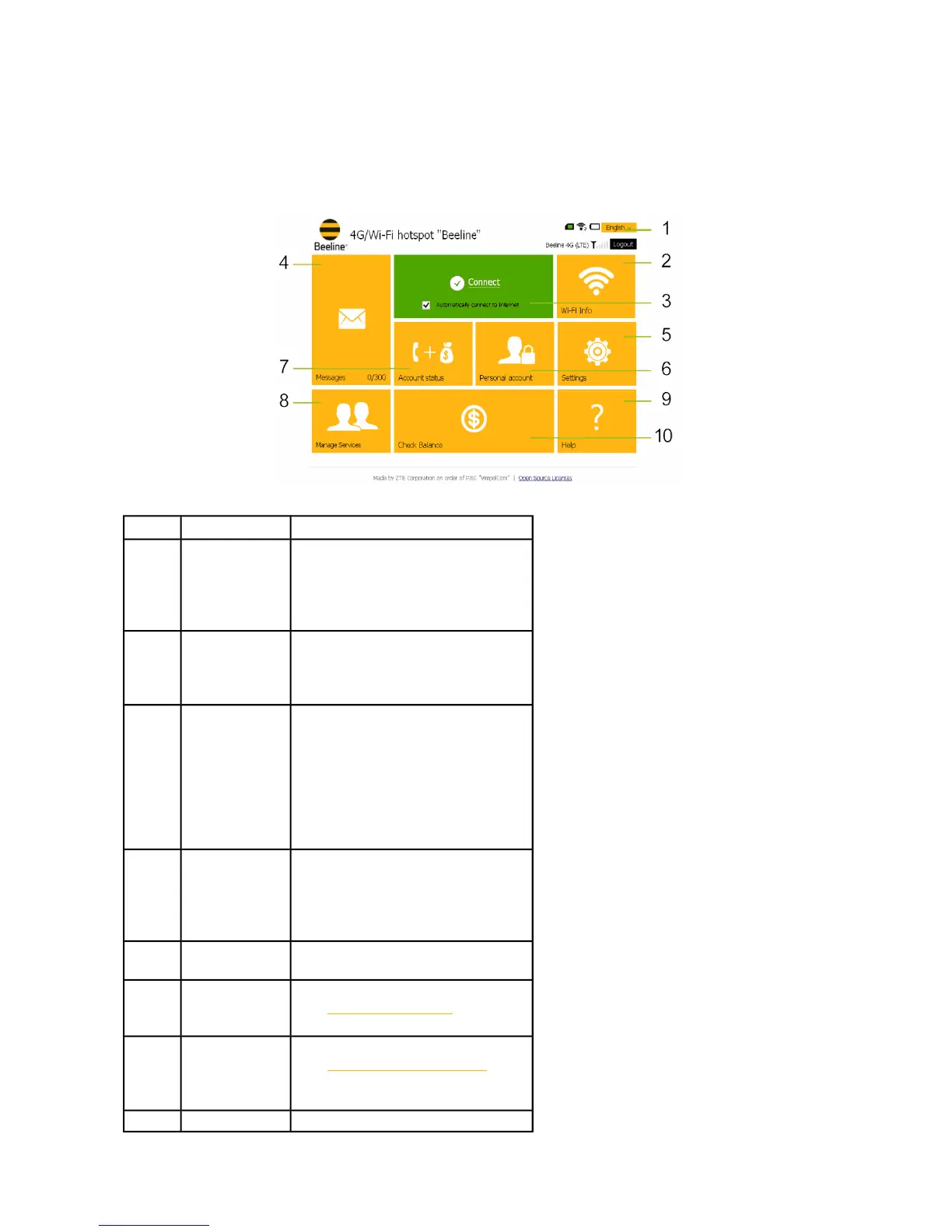
Main page. Contain links to all sections, and also information about current router status, network
information etc. Using main page functions, you can establish Internet connection, check your current
balance and move to any section of WEB UI for 4G/Wi-Fi hotspot “Beeline”.
# Name Description
1
Status bar,
language bar
Status bar displays current USIM
card status, current network type
and signal strength.
Language bar allows you to quickly
switch WEB UI language.
2 Wi-Fi Info
On click will open Wi-Fi settings
section, which allows you configure
Wi-Fi, check current list of
connected devices via Wi-Fi.
3 Connect tile
Allows you to establish connection
with Internet, also will display
current connections status and data
transfer rate. If connection to
Internet is not established, click on
this tile to establish connection. If
connection already established, on
click this connection will be closed.
4 Messages tile
On click will open Messages section,
for reading, sending and deleting
SMS. Also tile displays the last
incoming message, on click will
open directly this message text.
5 Settings tile
On click will open Settings section
for modify current device settings.
6
Personal
account
On click will open the
portalhttp://my.beeline.ru/ ,allows
you to manage services online.
7 Account status
On click will open the
portalhttps://balance.beeline.ru/ ,allow
ing to display the online account
balance.
8 Manage On click will open Manage Services


 To Next Page