EasyManua.ls Logo

Zte Sonata 4G - User Manual

Zte Sonata 4G
56 pages
Print Icon
To Next Page IconTo Next Page
Loading...
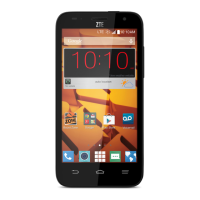
ZTE Sonata 4G
User Guide
Device color may vary.

Table of Contents

Other manuals for Zte Sonata 4G

Questions and Answers

  • D
    David HawkinsJul 26, 2025
    How to fix a SIM card error on Zte Cell Phone?
    • T
      Tyler Campbell MDJul 26, 2025
      If your Zte Cell Phone displays a SIM card error, the SIM card may have malfunctioned or is damaged, so take it to your service provider for testing. Ensure the SIM card is inserted properly. Also, check for debris on the SIM card contacts and clean them with a soft, dry cloth.
  • J
    jamessimmonsJul 30, 2025
    Why does my Zte Sonata 4G Cell Phone have poor reception?
    • A
      alewisJul 30, 2025
      If your Zte Cell Phone shows poor reception, it might be due to a weak network signal in your current location. This can happen in basements or near tall buildings because wireless transmissions may not reach effectively. Moving to a location where the network signal can be properly received may help. Also, the network might be busy during peak times. Avoiding phone use during these times or trying again after a short wait could resolve the issue. If you are too far from your service provider's base station, request a service area map from them.
  • J
    Justin GlassAug 3, 2025
    What to do if my Zte Sonata 4G battery is not charging?
    • T
      Tracy HahnAug 3, 2025
      If your Zte Cell Phone battery isn't charging, the battery or charger might be damaged, so contact the dealer. Also, if the phone's temperature is below 0°C or above 45°C, adjust the environment to avoid temperature extremes. Check all connectors to ensure proper connections, as poor contact between the battery and charger can also prevent charging.
  • S
    singhandrewAug 7, 2025
    Why is the standby time on my Zte Cell Phone shortened?
    • M
      Mary HernandezAug 7, 2025
      If your Zte Cell Phone's standby time is shortened, it could be related to your service provider's system configuration. If you're in an area with a weak signal, temporarily power off the phone. A depleted battery or high temperatures can also shorten battery life, so try using a new battery. Battery power is also consumed when the phone sends signals to find a base station or when Wi-Fi, GPS, and Bluetooth are on but not in use. Turn off these features when not needed, and adjust screen brightness and timeout in Settings > Display.
  • P
    Paul CooperAug 12, 2025
    What to do if Zte Sonata 4G is unable to connect to the network?
    • A
      Adrienne BrownAug 12, 2025
      If you are unable to connect your Zte Cell Phone to the network, the SIM card may be invalid, so you should contact your service provider. You might also be outside of the network's service area; check with your provider. Poor signal strength could also be the issue. Try moving to an open space or closer to a window if you're indoors.
  • A
    Alexander BentonAug 16, 2025
    What causes Zte Sonata 4G Cell Phone to crash or freeze?
    • W
      Wanda OwenAug 16, 2025
      If your Zte Cell Phone crashes, reboots, freezes, or cannot be powered on, it might be due to incompatible third-party software. Try uninstalling any software that may be causing the problem. Also, consider upgrading the phone software or resetting the phone to its factory settings.
  • K
    Kendra PowellAug 20, 2025
    What to do if PIN code is blocked on Zte Sonata 4G Cell Phone?
    • S
      Susan WareAug 20, 2025
      If your Zte Cell Phone's PIN code is blocked, it's because an incorrect PIN code was entered three consecutive times. Contact your service provider. If they provide the SIM card’s PUK code, use it to unlock the SIM card.

Summary

Getting started

Phone setup

Instructions for installing the SIM card and battery into the phone.

Switching phone on and off

Steps to power the phone on, off, and manage power options.

Initial phone setup

Guide to setting up your phone for the first time, including language and account configuration.

Sleep Mode

Information on how to use Sleep Mode to conserve battery power.

Get to know your phone

Phone hardware overview

Identifies and describes the main physical components and ports of the phone.

Key hardware functions

Explains the primary functions of the phone's hardware keys and buttons.

Home screen customization

Guide to managing home screens, adding items, widgets, folders, and wallpapers.

Understanding phone indicators and icons

Indicator light meanings

Details the different colors and patterns of the indicator light and their meanings.

Status and notification icons

Explains the various icons displayed in the status and notification bar.

Using the Notifications panel

Accessing and managing notifications

How to open, respond to, remove, and manage notifications from the panel.

Phone calls

Making calls

Instructions for making calls using the dialer, contacts, and call history.

Call management

Details on answering, rejecting, muting, holding, speakerphone, swapping, merging, and ending calls.

Speed dial setup

How to assign and use speed dial numbers for quick calling.

Customizing call settings

Guide to adjusting call settings like voicemail, TTY mode, and hearing aid compatibility.

Managing contacts

Importing and exporting contacts

Steps to import or export contacts from/to SIM card, phone storage, or microSDHC card.

Creating and editing contacts

How to create new contacts, add them to favorites, and search for existing ones.

Contact groups

Instructions for creating and managing contact groups for easier communication.

Entering text

Android keyboard usage

Guide to using the default Android keyboard for text input, including special characters.

TouchPal keyboard options

Instructions for using the TouchPal keyboard, its layouts, and features like Curve™.

Messaging

Sending and receiving messages

Instructions for composing, sending, and managing SMS and MMS messages.

Message settings management

Guide to configuring storage, text, MMS, display, and notification settings for messages.

Email

Email account setup

Steps to create and configure standard email and Exchange ActiveSync accounts.

Managing email

Instructions for receiving, composing, sending, replying, forwarding, and deleting emails.

Connecting to the Internet

Mobile data connection

Steps to add and manage mobile data connections for internet access.

Wi-Fi network management

Guide to connecting, adding, checking status, and using advanced Wi-Fi settings.

WPS network setup

Instructions for connecting to Wi-Fi networks using the WPS button or PIN method.

Browsing the Internet

Using Google Chrome

Guide to browsing the web with Google Chrome, including syncing and using URLs.

Web browsing features

Covers opening pages, tabs, bookmarks, incognito mode, and browsing options.

Wi-Fi Direct

Connecting and transferring data

Steps for connecting to other devices via Wi-Fi Direct and sending/receiving data.

Bluetooth

Using Bluetooth

Guide to pairing Bluetooth devices and exchanging information wirelessly.

Entertainment: Camera and Media

Camera and Video

Covers taking pictures, shooting videos, and adjusting related settings.

Viewing and sharing media

How to play videos, open the gallery, and share media files.

Entertainment: Music and Sound

Adding music to phone

Steps to transfer music files to the phone from a computer via USB.

Playing music

Guide to using the music player, managing playlists, and setting songs as ringtones.

Music management

How to create, manage, and add songs to playlists, and set ringtones.

Voice memos

Using the Sound Recorder to record, play, save, and manage voice memos.

Applications

Alarms and Clock

Setting new alarms, using the bed clock, and configuring alarm options.

Productivity Tools

Using Calculator, File Manager, Downloads, and Facebook app.

Office and Management Apps

Managing apps like Kingsoft Office, Mi-EasyAccess, My Cricket, NotePad, and Task Manager.

Communication and Utilities

Using Timer, Twitter, Voice Dialer, Voicemail, and Cricket Wi-Fi apps.

Google Applications

Google Search and Now

Using Google Search for information and Google Now for personalized updates.

Gmail and Calendar

Managing email with Gmail and scheduling events with Google Calendar.

Google Play and Google+

Accessing apps via Google Play and managing social connections on Google+.

Google Social and Location Services

Managing Google+ features, location services, and Google Maps for navigation.

Music and Media Playback

Using Play Music to stream, manage, and play audio files.

Music, News, and Books

Playing music, checking news, and accessing books and magazines via Google services.

Phone Settings

Date, Time, and Display

Configuring date, time, and display settings like brightness, wallpaper, and font size.

Sound and Notification Settings

Adjusting volume, ringtones, vibration, and silent mode settings.

Language and Network

Changing system language and managing mobile network services.

Screen lock security

Setting up and unlocking screen patterns, PINs, and passwords for phone security.

Advanced Security Features

Securing phone with encryption and protecting SIM card with PIN.

Device Management and Reset

Managing device memory, factory reset, and application management.

Other Settings and PC Connection

Configuring voice interaction, data usage, and connecting the phone to a PC.

Accessibility Features

Accessibility Options Overview

Configuration for TalkBack, power button calls, auto-rotate, and text-to-speech.

Developer and About Phone

Accessing developer options and checking phone information and updates.

Troubleshooting

Common Phone Problems and Solutions

Guidance for resolving issues like poor reception, echo, and feature selection problems.

Battery and Connectivity Issues

Resolving problems with charging, standby time, network connection, and SIM errors.

Performance and Software Issues

Troubleshooting crashes, slow performance, and call/PIN related problems.

Safety Information

General Safety Guidelines

Important safety precautions for using the phone, including driving and environmental considerations.

Regulatory Compliance

FCC, RF Exposure, and HAC

Covers FCC rules, SAR information, and hearing aid compatibility regulations.

CTIA Battery Safety Standards

Guidelines for safe battery handling, modification, and disposal according to CTIA standards.

Safety and Handling Precautions

Driving and Operating Machinery

Warnings against using the phone while driving or operating machinery.

General Product Handling

Advice on caring for the phone, avoiding liquids, extreme temperatures, and physical damage.

Child Safety and ESD

Precautions regarding small children, demagnetization, and electrostatic discharge.

Health and Usage Warnings

Covers RSI, emergency calls, loud noise, and phone heating.

Electrical Safety and Interference

Safe Accessory Use

Guidelines for using approved accessories and avoiding faulty products.

Medical Device Interference

Precautions regarding pacemakers, hearing aids, and other medical devices.

Environmental and Device Safety

Aircraft and Vehicle Safety

Instructions for using the phone in aircraft, cars, and areas with explosive atmospheres.

Specifications

Phone Hardware Specifications

Details on network standards, dimensions, weight, display, camera, and battery.

Warranty Information

Limited Warranty Terms

Details of the limited warranty, coverage, exclusions, and liability limitations.

Obtaining Warranty Service

Instructions for getting warranty service and required information for repairs.

Notes

General Notes

Placeholder for any additional notes or remarks regarding the product or manual.

Zte Sonata 4G Specifications

General IconGeneral
ProcessorQualcomm Snapdragon 400
RAM1 GB
Storage8 GB
Expandable StoragemicroSD, up to 32 GB
Rear Camera5 MP
Front CameraVGA
Network4G LTE
Operating SystemAndroid 4.4 KitKat
CoresQuad-core 1.2 GHz

Related product manuals