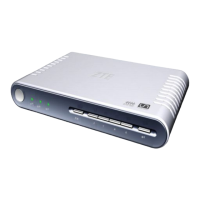
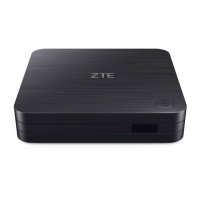
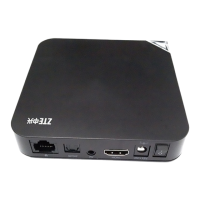
The ZTE ZXV10 B866V2K zBox 1 is a Set-Top Box (STB) designed for multimedia entertainment, offering a range of features for connectivity, audio/video output, and user interaction. This user guide provides comprehensive information on its safety, setup, operation, and troubleshooting.
Function Description:
The ZXV10 B866V2K zBox 1 serves as a central hub for accessing multimedia content, primarily designed for IPTV services. It supports both wired and wireless network connections, allowing flexible integration into home networks. The device outputs audio and video to various display types, including standard definition (SD) and high-definition (HD) televisions, and supports multiple audio formats. It comes with a remote control for easy navigation and interaction with the user interface, including dedicated buttons for popular streaming services like YouTube, Netflix, and Google Play.
Important Technical Specifications:
- Compliant Standard: GB4943.1-2011, GB9254-2008.
- Power Adapter:
- Input: 100 V ~ 240 V, 50 Hz ~ 60 Hz
- Output: +12.0 V DC
- Environmental Requirements:
- Working Environment Temperature: +32 °F (0 °C) ~ +104 °F (+40 °C)
- Working Environment Humidity: 5% ~ 95%
- Wi-Fi Radio Specifications:
- Wi-Fi 2.4 GHz band: 2412 ~ 2484 MHz / EIRP: 19 ± 1 dBm
- Wi-Fi 5 GHz band: 5180 ~ 5725 MHz / EIRP: 20 ± 1 dBm
- Note: WLAN function for this device is restricted to indoor use only when operating in the 5150 to 5350 MHz frequency range in certain regions (BE, BG, CZ, DK, DE, EE, IE, EL, ES, FR, HR, IT, CY, LV, LT, LU, HU, MT, NL, AT, PL, PT, RO, SI, SK, FI, SE, TR, NO, CH, IS, LI).
- BT Radio Specifications:
- BT band: 2402~2480 MHz / EIRP: 15 ± 1 dBm
- Video:
- Supports PAL, NTSC, 720p, 1080i, 1080p, and 4K.
- Format: 4:3/16:9.
- Receiving Bit Rate Range: 200 kbps ~ 40 Mbps.
- Resolution: 720 × 576/PAL, 720 × 480/NTSC, 1280 × 720/720p, 1920 × 1080 /1080i, 1920 × 1080 /1080p, and 3840×2160/4K.
- Audio:
- Supports MPEG-1 Layer 1/2, MPEG-1 Layer3(Optional), AAC, MPEG-2 AAC LC, MPEG-4 AAC LC, HE-AAC v1/v2, wav, wma, PCM, Dolby Digital, and Dolby Digital Plus.
- Audio Modes: Surround, Single/Dual/Multi Track, and Stereo.
- Dimensions: 108 mm × 108 mm × 25 mm (Length × Width × Height).
- Weight: 0.2 kg.
- Interfaces:
- Front Panel: Power indicator (Red for standby, Green for running, Not Lit for powered off).
- Rear Panel: WAN (10 M/100 M Base-T RJ45 Ethernet), HDMI output, AV (Audio and composite video output), DC +12 V power input.
- Side Panel: USB interface.
- Certification: CE.
- Trademarks: HDMI, the HDMI Logo, and High-Definition Multimedia Interface are trademarks or registered trademarks of HDMI Licensing LLC. Dolby, Dolby Audio, and the double-D symbol are trademarks of Dolby Laboratories Licensing Corporation.
Usage Features:
- Connectivity: The STB offers versatile network connectivity options. Users can choose between a wired connection via the WAN port to an ONT/Home Gateway or a wireless connection via Wi-Fi to an Access Point (AP).
- Audio/Video Output: The device supports two main audio/video output modes:
- Mode 1 (SD TV): Connects to a standard definition TV using an AV cable (Yellow, White, Red connectors for video and audio L/R).
- Mode 2 (HD TV): Connects to a high-definition TV using an HDMI cable, supporting resolutions up to 4K.
- Remote Control: The included remote control facilitates easy operation. Key functions include:
- Power Button: Switches between standby and working states.
- Indicator Light: Provides visual feedback.
- APPS Button: Accesses applications.
- Settings Button: Opens system settings.
- OK Button: Confirms inputs.
- Direction Buttons: Navigates menus.
- Return Button: Returns to the previous level or page.
- Home Button: Goes to the home screen.
- Live TV Button: Accesses live television.
- Volume Control: Adjusts the volume (up/down).
- Mute Button: Turns sound on/off.
- Channel Control: Changes channels (up/down).
- Watchlist Button: Adds entities to a watchlist.
- Dedicated Service Buttons: Quick access to YouTube, Netflix, Prime Video, and Google Play.
- Remote Control Operation: The remote control operates in infrared mode by default. Upon successful Bluetooth pairing, the infrared function is disabled. For infrared operation, the remote control must be pointed towards the infrared receiving area on the STB. The remote control is powered by two AAA batteries, which should be inserted according to polarity instructions.
- Power Adapter: It is crucial to use the provided +12V DC power adapter. Using other types of power adapters requires consultation with technical personnel.
- Cable Connections: All cables (network, HDMI, AV) must be correctly and fully inserted into their respective ports on the STB.
Maintenance Features:
- Safety Instructions:
- Remove plastic covering before use for proper ventilation.
- Use only the provided power adapter.
- Ensure electric voltage meets device requirements; replace damaged cables immediately.
- Do not remove the cover; refer servicing to qualified personnel.
- Avoid using near water; clean with a dry cloth.
- Place on a flat surface; do not place heavy objects on the device.
- Do not block ventilation openings; install according to manufacturer's instructions.
- Avoid installing near heat sources.
- Use only manufacturer-specified attachments/accessories.
- Power off and unplug during long periods of disuse or lightning storms.
- Wait at least 15 seconds between power off and next power-on.
- The socket-outlet for the adapter should be easily accessible.
- Keep the appliance and packaging out of reach of children to prevent suffocation.
- Troubleshooting: The manual provides solutions for common issues:
- No Power Indicator: Check power adapter connection and power outlet. If the adapter is damaged, contact service provider for replacement.
- No Image on TV:
- If the STB is in standby, press the power key on the remote control.
- Check video cable connection.
- Ensure the TV's video input source is set correctly.
- No Sound from Speaker:
- If the STB is in standby, press the power key on the remote control.
- Check audio cable connection.
- Check if STB or TV is muted, or if volume is turned down.
- Remote Control Failure:
- If physically damaged, replace with a new Bluetooth remote control.
- If Bluetooth pairing fails, press the "VOL -" and "VOL +" buttons simultaneously for 3 seconds to initiate pairing.
- Check battery installation and replace dead batteries.
- If TV cannot receive instructions, move the remote closer to the STB, remove obstacles, or recheck Bluetooth pairing.
- Service and Recycling:
- Do not disassemble the device. Contact the service provider if issues like damaged power cable/socket, liquid leakage, abnormal operation, or physical damage occur.
- Dispose of the product correctly to avoid environmental and health damage, and to facilitate recycling. Follow current regulations for disposal and recycling.
- FCC Compliance: The device complies with FCC rules, including radiation exposure limits for an uncontrolled environment. It must be installed and operated with a minimum separation distance of 20 cm between the device and the human body. Any unauthorized changes or modifications could void the user's authority to operate the equipment.



 To Next Page
 General