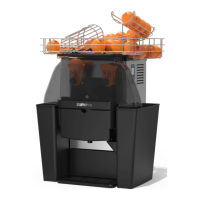
A - 11
F. At the inner top left of the machine is a Door Switch (Scheme 1, No. 10) with three
positions:
- “Sunken” with the door closed: There is communication between the control panel and
the coin box and if there are no oranges on the rollers these and the hopper loader will
begin to work automatically. (Scheme 1, No. 13 and 14)
- “Free” with the door open: Nothing working automatically and no communication
between the control plate and the coin box, although the control plate buttons are
working.
- “Stretched” with the door open: The same function as sunken with the door closed.
Useful during the loading operation, as the loader and rollers can be filled, using
machine capacity to a full.
1.4. PROGRAMMING
FUNCTION OF THE CONTROL SWITCHES
The control panel switches (Scheme 2) (that work with the door switch “free”) have the
following functions:
S1. Programming field selection.
S2. Modifying field selection.
S3. Water pump.
S4. Cup loader activator.
S5. Cup conveyor motor – backwards.
S6. Cup conveyor motor – forwards.
S7. Free sale (with door switch “stretched”)
S8. Squeezing machine.
S9. Orange conveyor rollers.
S10.Loader
S11.Compressor unit.
PROGRAM SETTING ACCESS LEVEL 1
To enter to program, you must have the door switch in “free” position (Scheme 1 No. 10) (Door
open, the display will show 4 dashes).
By S1 and S2 you will have access to: see the counter of cups sold, set the number of oranges
to squeeze per cup and the sale price per cup. The display (Fig. 30) will show the following
fields:
Fields 1 and 2: Meter.
Activate switch S1 to access the first field.
Field 1 displays sales from 1 to 9,999.
Field 2 displays the number of entire cycles of Field 1.
To pass from one field to the next, activate switch S1.
Field 3. Number of oranges per serving.
Press S1 again to access the third field, where the number of oranges to be squeezed per
serving can be selected. A message 3 4 will appear on the screen, which means that you
are in field 3 and 4 oranges per serving have been selected. If you want to modify the
number of oranges, press button S2 until the desired number is shown.
Field 5. Serving price.
Switch S1 leads to field 5 and a message 5020 appears on the screen. This means that the
price is “20 base coins” per serving (in Spain, the base coin normally programmed on coin
boxes is 5 cent.). By intermittently pressing button S2, the price increases and when held
down, the price decreases.


 To Next Page