15
MAIN UNIT INFORMATION
After customizing your OWL
TM
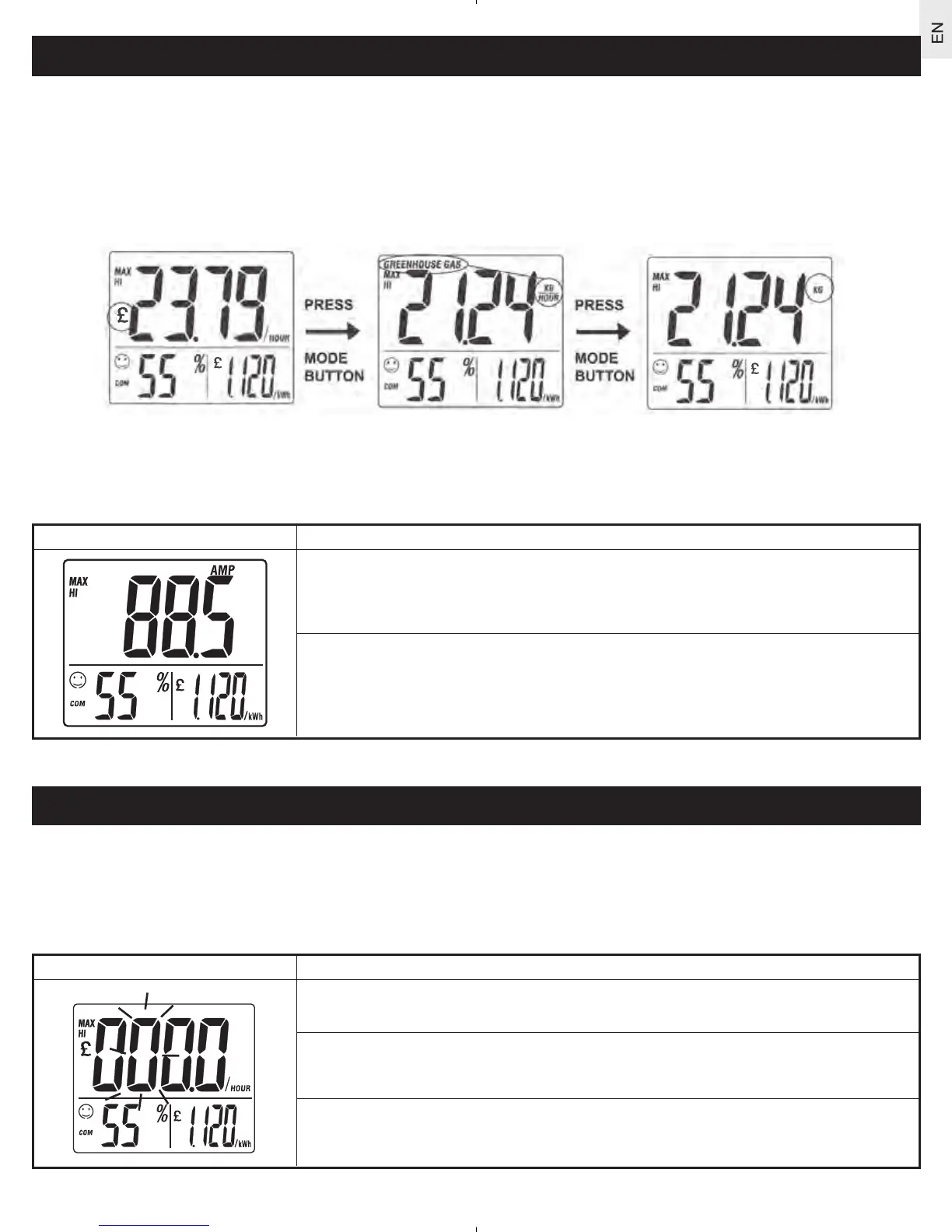
three information modes can be displayed on the Remote Monitor:
• cost of household power consumption in dollars/pounds/euros per hour
• amount of greenhouse gas emissions produced in kilograms per hour or tonnes per year
• household power consumption in kilowatts or amps (see To display power consumption in amps
)
To display the information, simply use the mode key to switch between screens.
T
o
display power consumption in amps
Household power consumption can be displayed in terms of amps instead of kilowatts (see HOW THE
PRODUCT WORKS). To display the amount of electrical current passing into your home (amps), instead of
the amount of energy consumed (kW) follow the instructions below:
Diagram Instructions
1. Press
mode to change to kW display.
2. Pr
ess and hold mode for 2 seconds. The AMP display is shown.
3. Press mode again to return to kW display.
SETTING THE ALARM
The OWL
TM
comes equipped with an alarm that alerts users when the electricity cost-per-hour exceeds a
pre-set limit. This helps control energy consumption and may reduce electricity bills and the possibility of
blackouts during peak load periods.
To set the alarm limit
To set the alarm limit follow the instructions below:
Diagram Instructions
1. Pr
ess and hold alarm key for 2 secs.
2. Use the arrow key to change a value.
3. Pr
ess alarm again and continue until all values are set.
Press mode
button
Press mode
button



 To Next Page