8
Section 2.
Installation of 3M
™
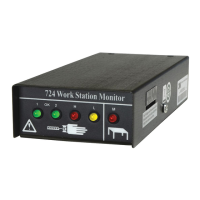
724
Monitor with Work Surface
Ground Monitoring
Wire Attachments and Grounding -
See Fig. 12 for complete drawing of
the Model 724 monitor wire
connections.
Tools required - Small blade,
screwdriver and wire cutter.
Note:
Two snap fasteners or appropriate
connectors must be installed at
opposite corners of the work surface to
use this feature. Recommended
surfaces are 3M
™
8200, 8300, and
8800. Use of a 3M
™
Female Snap
Fastener 3034 or 3050 (depending on
the type of surface) is recommended
for connection to the 3M
™
2380
Monitor/Table Mat Cord that is
supplied with the Model 724 monitor.
If you are using the 3M 8300
Dissipative Hard Laminate Material,
attach the 3M
™
2380 cord to suitable
hardware used to make an electrical
connection to the ground layer of the
work surface. This may require you to
cut off the plastic cap end of the
2380 cord.
a) Connect the work surface to
an electrical ground with the
appropriate one megohm ground
cord you received at time of
purchase.
b) Using a small screwdriver move the
DIP switch #2 on the Model 724
monitor to the ON position to
activate the work surface audible
alarm (Fig. 4).
c) Locate the accessory package that
contains a 3M
™
2380 Monitor/Table
Mat Cord, Model 724 ground wire
(with ring terminal), and the two-
wire connector plug.
d) Attach the 3M 2380 (tinned wire
end) to the work surface terminal of
the two-wire connector by inserting
it into opening and securing with the
screwdriver (Fig. 5A or 5B). Attach
the plastic cap end to the snap on
the work surface.
Note:
If for any reason a snap fastener
cannot be used on the work surface,
the plastic cap on the end of the 2380
cord can be cut off and replaced with a
ring terminal not supplied (Fig. 6).
e) Determine how you want to ground
the Model 724 monitor:
• If you are grounding through the AC
adapter perform step (2f).
• If you are grounding through the
724 ground wire perform step (2g).
f) Attach the tinned ground wire of the
AC adapter to the ground terminal
of the two-wire connector by
inserting it into opening and
securing with screwdriver (Fig. 5B).
Continue with step (2h).



 To Next Page