Product Handbook
Product HandbookProduct Handbook
Product Handbook
EAP760 Enterprise Access Point ENGLISH
Copyright © 4IPNET, INC. All rights reserved.
14
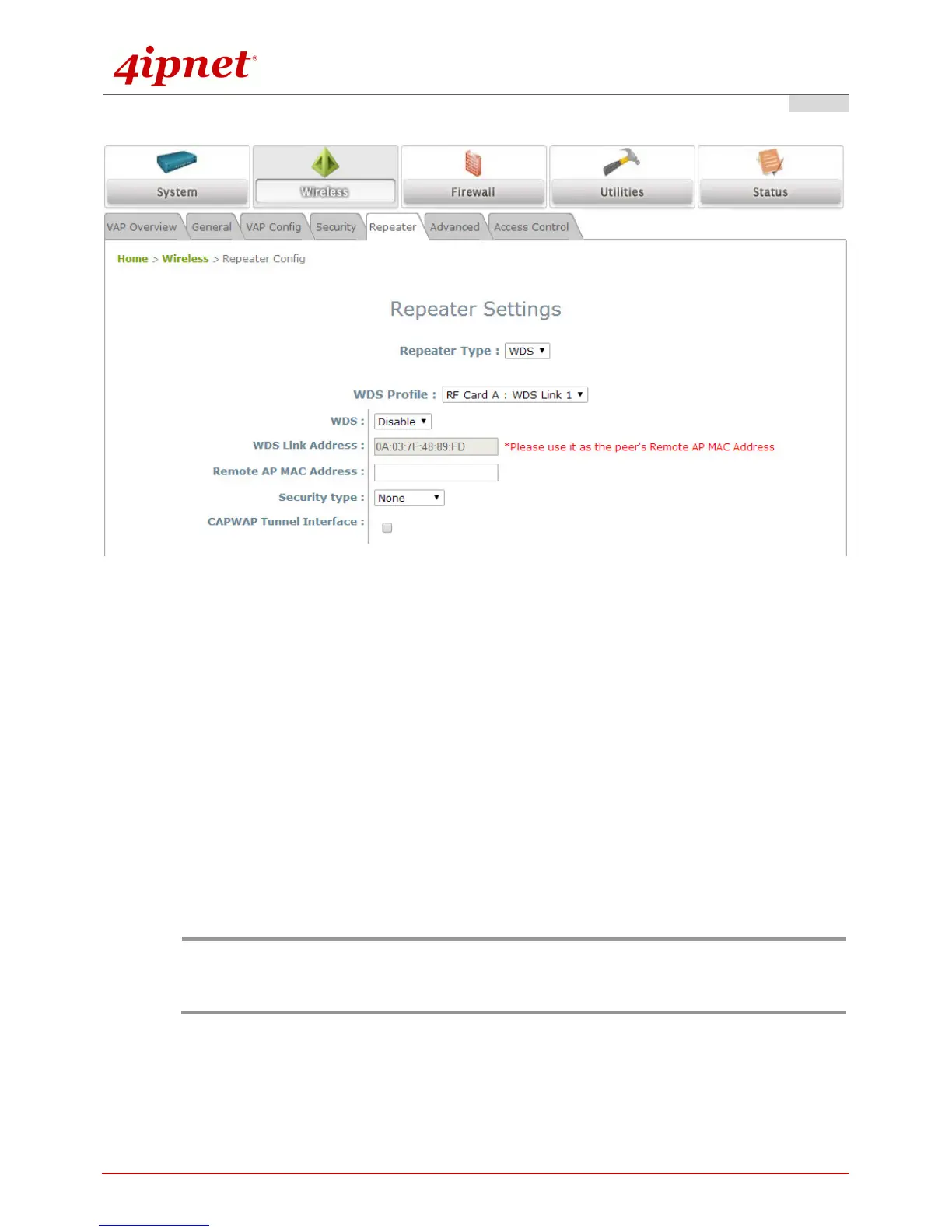
Step 4. Configure WDS (Wireless Distribution System) Settings (Optional)
To extend the wireless coverage, EAP760 supports up to 8 WDS links for connecting wirelessly to other
WDS-capable APs (peer APs). By default, all WDS profiles are disabled.
Click on the Wireless button on the main menu.
Select the Repeater Settings tab.
Choose WDS as the Repeater Type.
Choose the desired WDS profile:
(a) Enable WDS.
(b) Enter the MAC Address (peer AP) and then Click SAVE.
If you are using another EAP760 as the peer AP, simply repeat the above-mentioned steps to configure
another peer AP(s).
Note:
On each and every configuration page, you may click SAVE to save the changes of your configured
settings, but you must reboot the system for the changes to take effect. After clicking SAVE, the
following message will appear: “Some modifications have been saved and will take effect after
Reboot.”
Congratulations!
Now, 4ipnet EAP760 is installed and configured successfully.



 To Next Page