12
Owner`s manual
4.3 Operation and use of the display
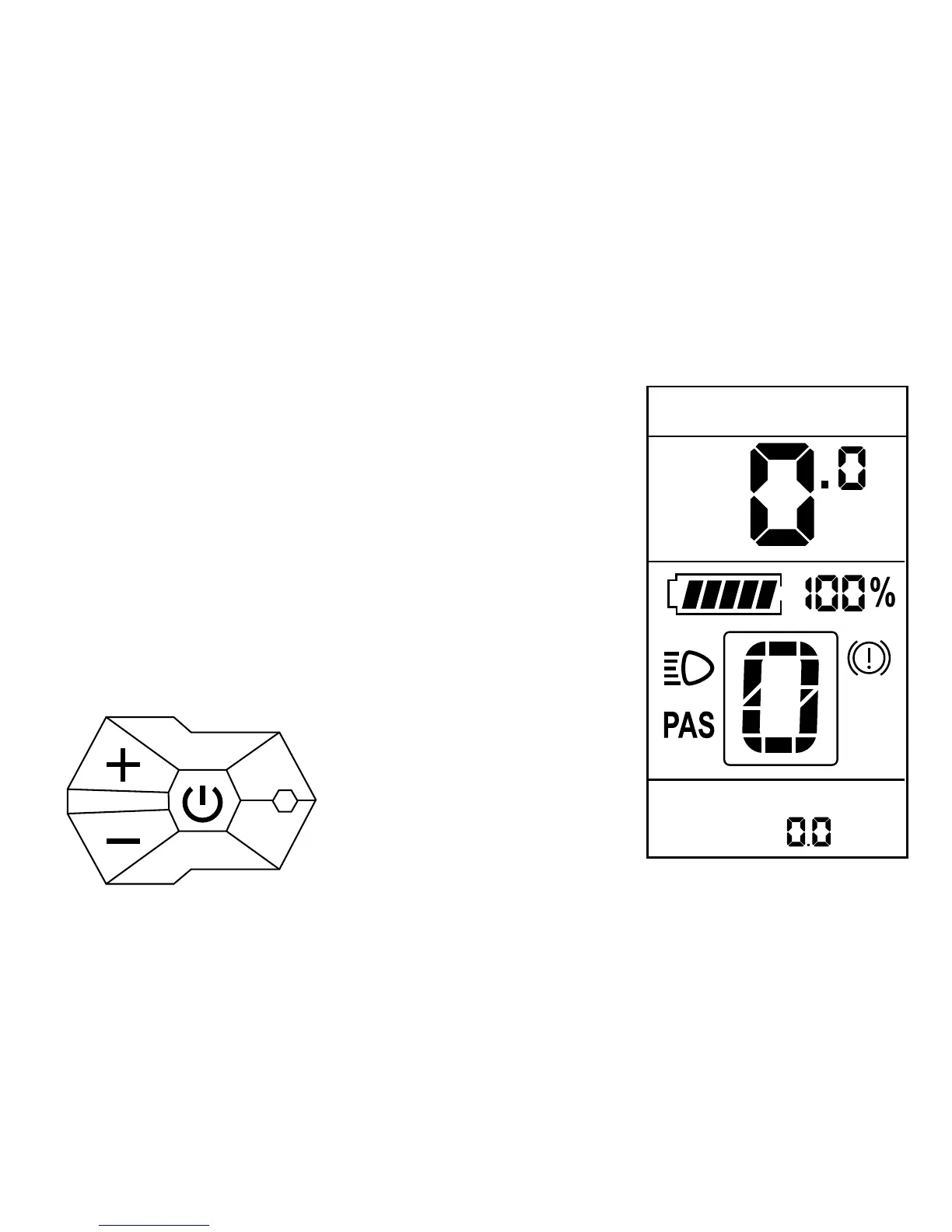
Your A2B has a modern LCD display attached
to the handlebar remote (Controller).
Controller
The handlebars on your A2B Controller
activate all functions, controlling your A2B
drive system.
The following functions are defi ned:
1. ON (+) (A step up)
2. Select button (on / off switch)
3. DOWN (-) (A step down)
The Display
The display is divided into three display areas:
1. Multi-function box for speed
a. Actual speed (SPEED)
b. Average speed (AVG SPEED)
c. Maximum Speed (MAX SPEED)
2. Battery charge status, display mode
support, backlight, brake symbol
3. Multi-function fi eld trip for optional
display of:
a. Trip (TRIP)
b. Odometer (ODO)
c. Residual range with current battery
charge with constant current drain (DIST)
d. Total time since last reset (TIME)


 To Next Page