11
3.5 Adjustment of the
handlebars
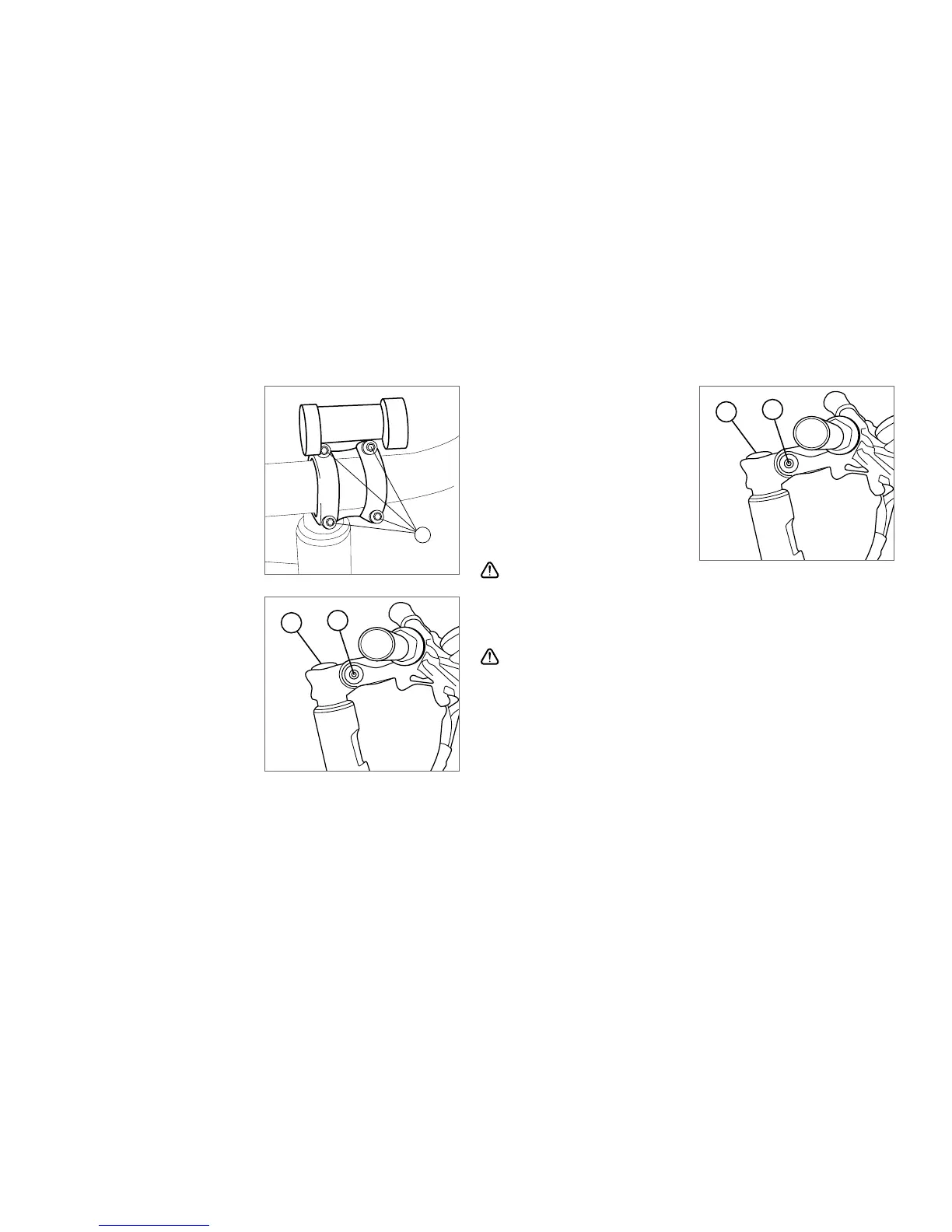
1. Loosen the screws A using an
appropriate Allen key.
2. Align the handlebars centrically
with respect to the stem.
3. Turn the handlebars to achieve
the desired angular position.
4. Tighten the screws A evenly
using 5 Nm.
3.6 Adjustment of the variable
stem
Alignment of the handlebars
stem
1. Loosen the screws B using an
appropriate Allen key.
2. Align the stem with respect to
the front wheel.
3. Tighten the screws evenly
using 15 Nm.
Angle adjustment of the stem
1. Loosen the screw C using an
appropriate Allen key.
2. Position the stem in the
desired angle.
3. Tighten the screw C to 17-
18.5 Nm und ensure the stem
is aligned with respect to the
front wheel.
Caution: This is an A-headset
stem, the upper screw D is a pretensioning screw and not intended
for adjusting the stem! Trying to tighten screw D may result in
damage of the headset.
An improperly attached handlebar and stem may lead to severe
or even fatal injuries.
Make sure the steering is free of play and can be operated easily.
Please contact your A2B specialist dealer if you need more help in
adjusting the handlebars, headset and stem.
A
C
B
C
B



 To Next Page