24
Owner’s manual
5.3.2.2 Start menu
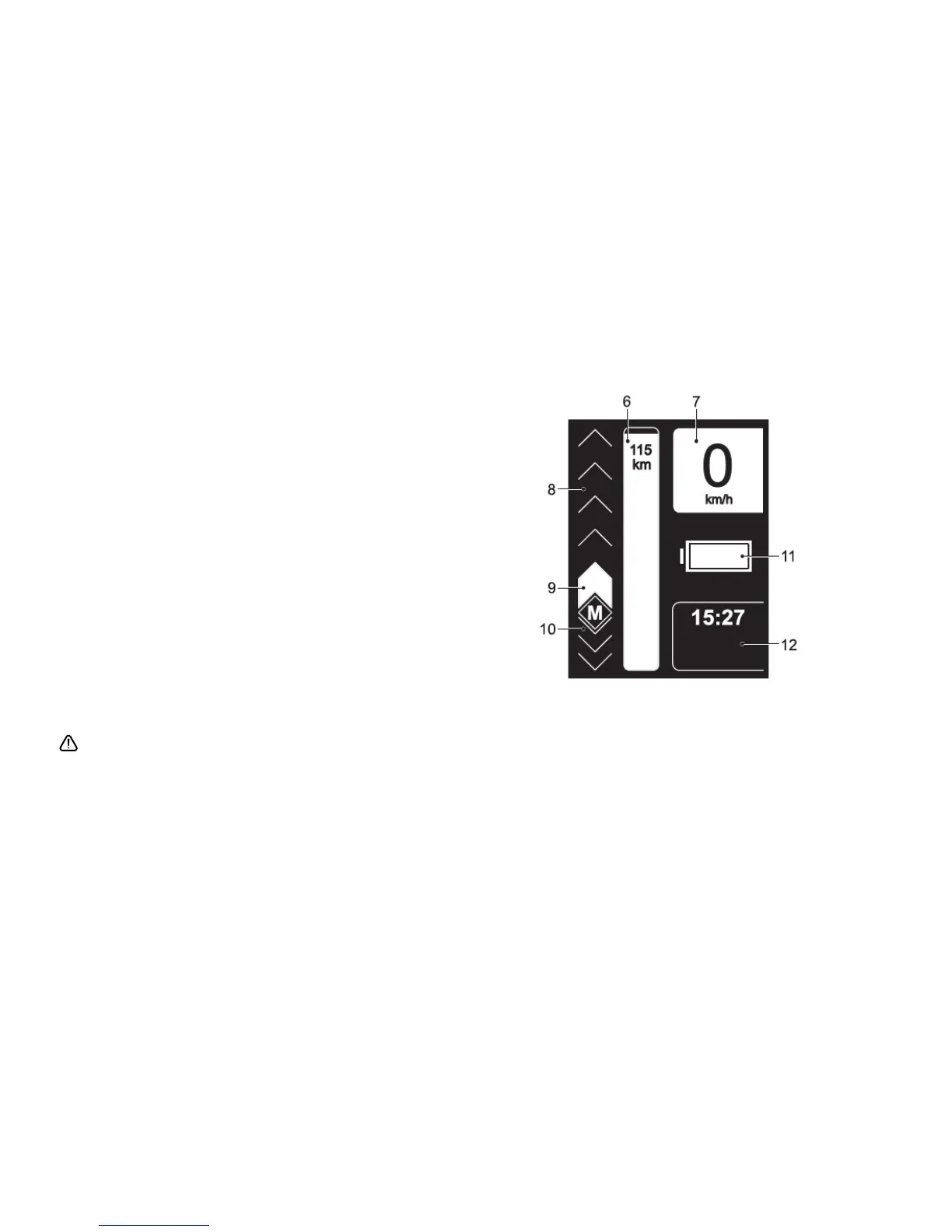
As described in section 3.2.1, the start menu shown in the opposite
chart will appear upon startup.
Explanation:
6. Approximate value of the distance in km which can be travelled
at the preselected level of assistance (remaining range)
7. Display of the current speed
8. Selection of the assistance level (see section 3.2.4)
9. Set assistance level (see section 3.2.4)
10. Selection of recuperation (see section 3.2.5)
11. Various alternating information and warning indications, see
section 3.2.11 (shown here: remaining battery capacity)
12. Display of various travelling information (see section 3.2.10)
The letter "M" to set the menu functions in the left lower third of
the display is only visible at standstill. For reasons of safety, various
functions cannot be selected during the ride.
All parameters changed by you will be saved permanently and
be available each time the sMMI is switched on. In this respect, the
display of your Pedelec may differ from the chart.



 To Next Page