W
d
(kg) = 0.005 x 2/5 = 0.002 (kg)
Ws (kg) = 0.002 (kg) x 6,000 = 12 (kg)
Calibrating the Remote Scale
When a remote scale is newly connected, set the capacity and calibrate the scale
using a weight.
The scale must be warmed up (plugged in) for at least 30 minutes before starting
calibration.
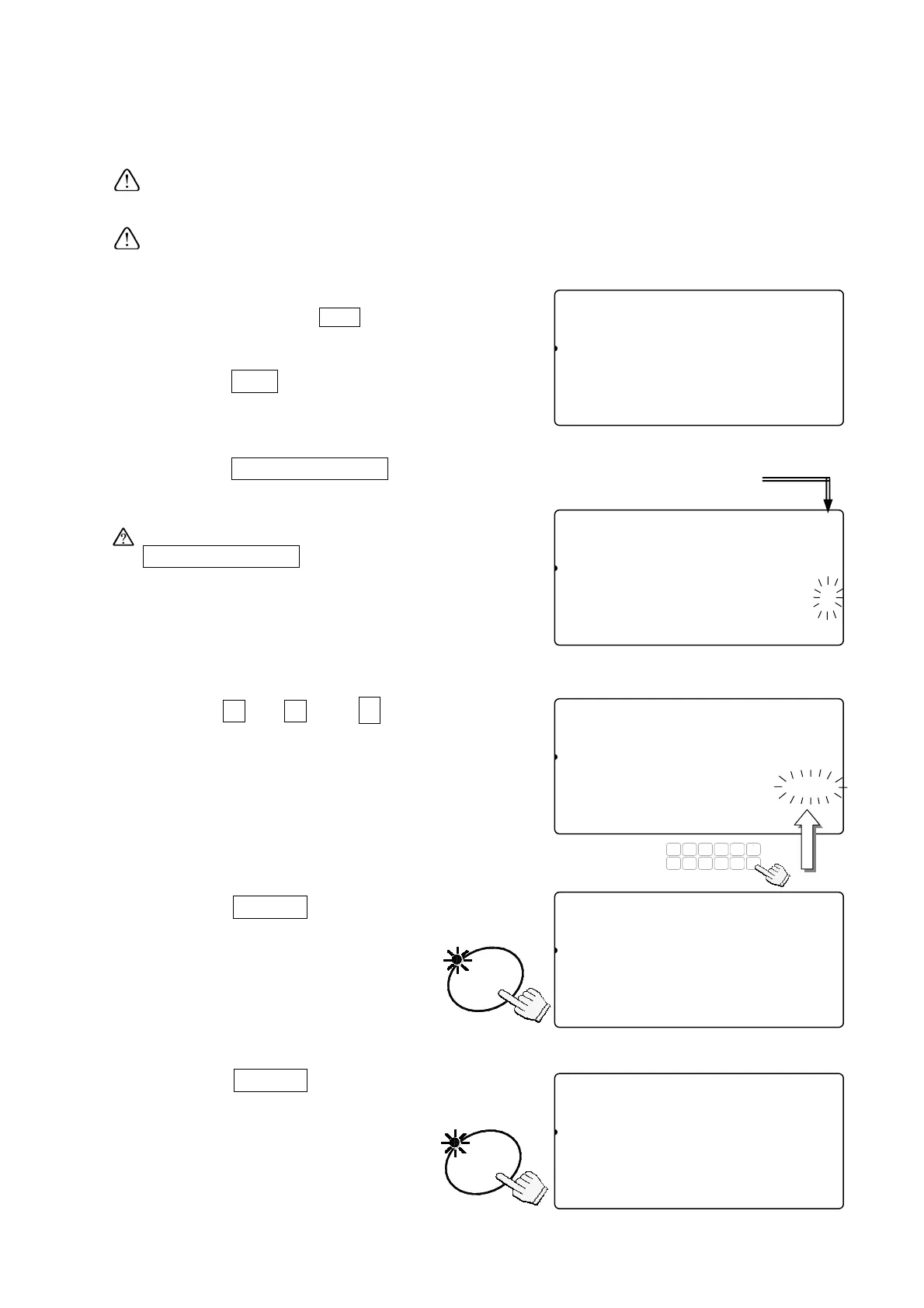
1. Remove the calibration switch cover, and
press the calibration
CAL
switch.
The scale shows “CAL” in the count display.
Press the
CAL
switch to exit without
calibrating the scale.
2. Press the
REMOTE SCALE
key to
display SCALE “
2
”.
When SCALE “1” is displayed, press the
REMOTE SCALE
key again.
Once the remote scale has been
calibrated, the display will go to step 4.
3. Use the
0
Æ
9
and
.
10-key pad
to display the desired capacity.
(Example of capacity 2000kg)
4. Press the
ENTER
key.
The capacity value stops blinking.
When the remote scale has been
changed or to change capacity,
go back to step 3.
5. Press the
ENTER
key again to
store the capacity entered and
the remote scale is ready to be
calibrated.
88Cal10
81
pcs
[ZERO] Calibration
1234567890123
[TARE] Gravity Acceleration
1234567890123
88Cal10
8
pcs
Maximum Capacity (kg)
Cal4567890123aaaaaaaaa10.000
[TARE] Gravity Acceleration
1234567890123
SCALE “1”: Main Scale
SCALE “
”: Remote Scale
ENTER
88Cal10
8
pcs
Maximum Capacity (kg)
Cal4567890123aaaaaaaaa12000
[TARE] Gravity Acceleration
1234567890123
TUV
DEFABC
MNO
6
1
78
PQRS
23
JKLGHI
09
WXYZ
4
#
5
C
.
88Cal10
8
pcs
Maximum Capacity (kg)
Cal4567890123aaaaaaaaa2000.0
[TARE] Gravity Acceleration
1234567890123
ENTER
88Cal10
8
pcs
[ZERO] Calibration
1234567890123
[TARE] Gravity Acceleration
1234567890123
72



 To Next Page