6
4. SETTING UP
4-1. Attaching a display pod to the base (FG-KAL and FG-KAM)
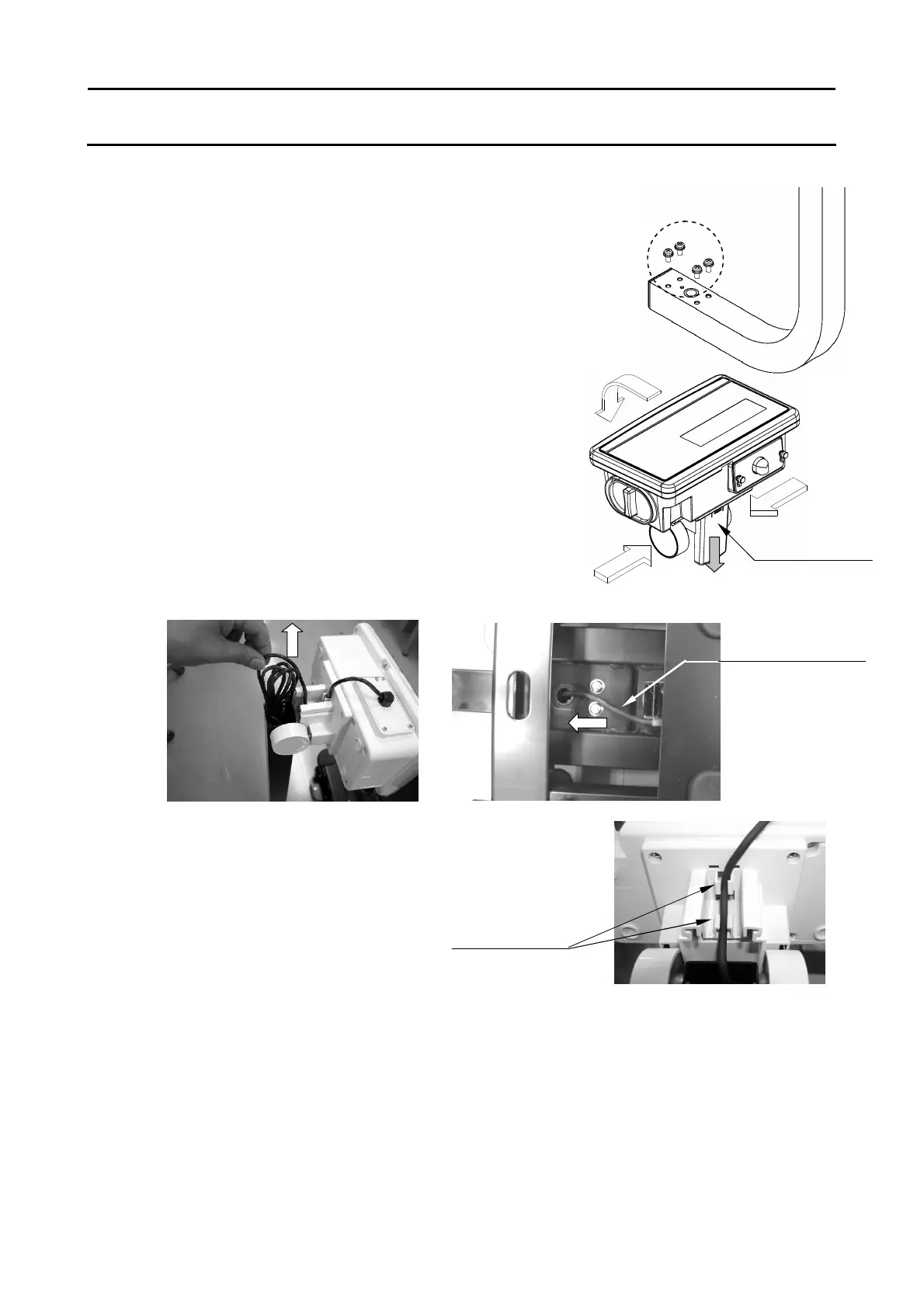
1. First, remove the 4 screws from the bottom of the display column.
2. Set the display column to the base by pulling the cable
into the base.
? Take care not pinch the cable between the
column and the base.
3. Tighten the 4 screws removed at step 1 to fix
the display column firmly.
4. Tilt the display pod forward by pressing in on
the two round side clamps, and slide off the
cable cover.
5. Pull the bundle of cable out from the top end of
display column, feeding all of slack of the
cable on the base into the display column.
? Take care not scratch the cable.
6. Put the bundle of cable back into the display column.
7. Make sure the cable is fitted to the 2 cable
guides and attach the cable cover.
8. Place the weighing pan on the base.
4-2. Installing the scale
1. Select the place for installing the scale. Refer to “Cautions for installing the scale”
below.
2. Adjust the level of the base, using the spirit level and leveling feet. The FG-KAM has
an extra foot under the display column. Adjust this foot to reach floor after adjusting
the level of the base.
3. Tilt the display pod by pressing in on the two round side clamps.
Cable
Nor tension



 To Next Page