English 6
Operation Mode
1. Normal Measurement
Press the START button. Blood pressure is measured and the data is stored
in memory. This device can store the last 90 measurements in memory.
2. Recalling the Data
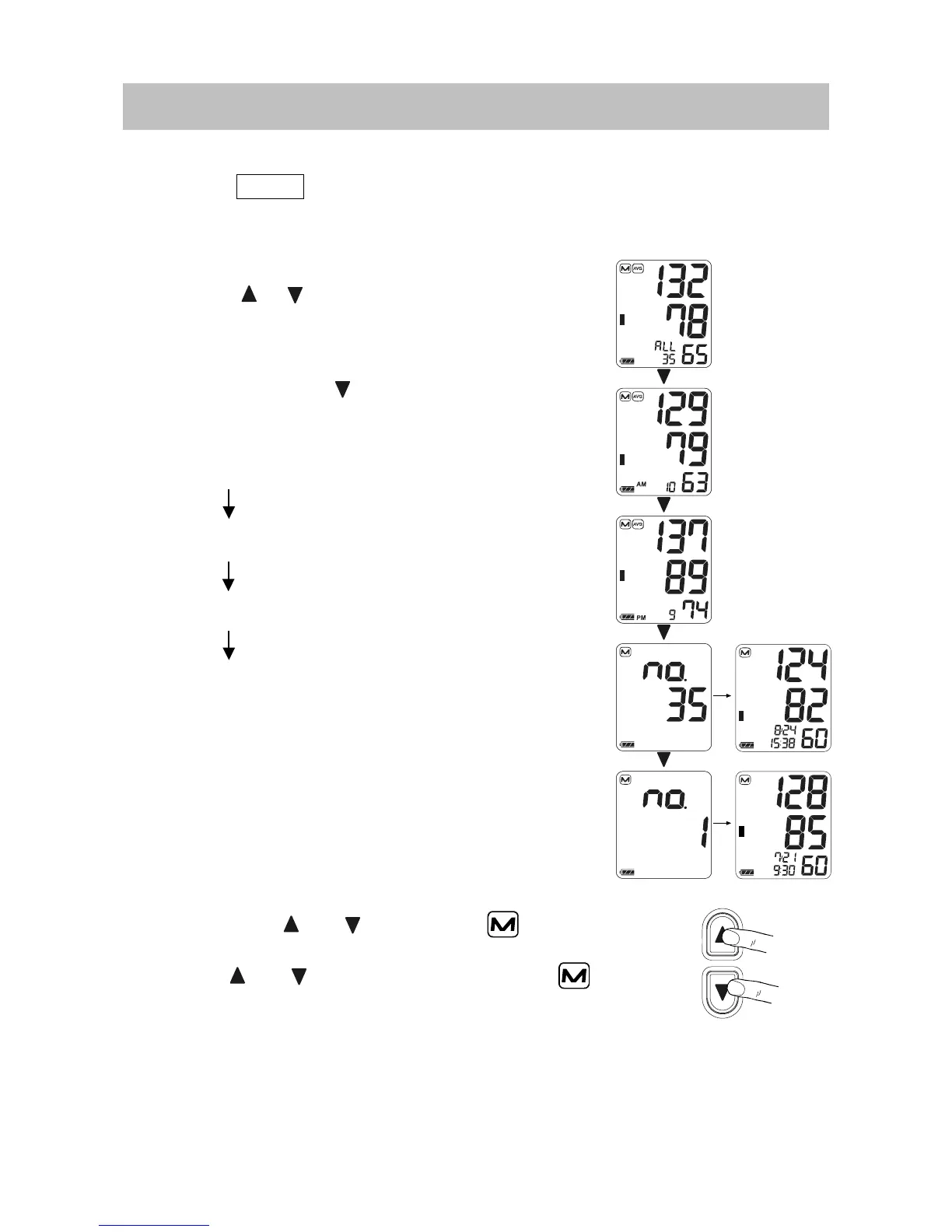
Press the or button to recall the data in
memory. The average of all measurements is
displayed, as indicated in the figure at the right.
Then, each time the
button is pressed, the
memory data is displayed as follows.
Average of all AM (morning) measurements
taken between 4:00 and 9:59.
Average of all PM (evening) measurements
taken between 18:00 and 1:59.
Most recent data (No.n, in the example,
No.35)
Last data (No.1)
For details on recalling the data, refer to
“Recalling the Memory Data”.
3. Deleting all Data Stored in Memory
Press both the and buttons. The mark
and the battery indicator appear. Press and hold
both the
and buttons until the illuminated
mark starts blinking to delete all data stored in
memory.
4. Measurement with the Desired Systolic Pressure
Refer to page 12 for measurement with the desired systolic pressure.


 To Next Page