E-15
Normal Measurement
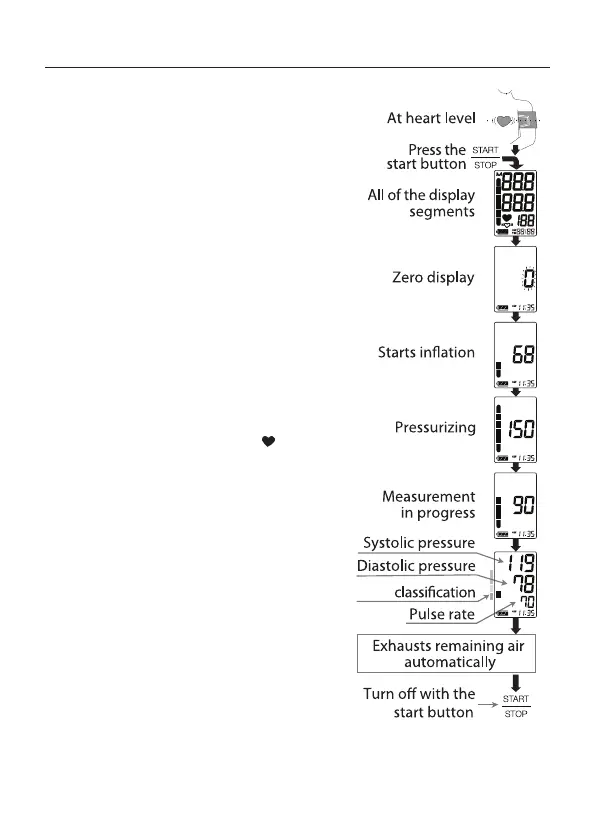
1. Place the cu on the arm
(preferably the left arm).
Sit quietly during measurement.
2. Press the START/STOP button.
All of the display segments are
displayed. Zero is displayed blinking
briey. Then the display changes,
as indicated in the gure at the right,
as the measurement begins. The
cu starts to inate. It is normal for
the cu to feel very tight. A pressure
bar indicator is displayed, as in the
gure at the right, during ination.
Note: If you wish to stop ination at any time, press
the START/STOP button again.
3. When ination is complete, deation
starts automatically and the
(heart mark) blinks, indicating that
the measurement is in progress.
Once the pulse is detected, the
mark blinks with each pulse beat.
Note: If an appropriate pressure is not obtained, the
monitor starts to inate again automatically.
4. When the measurement is
complete, the systolic and diastolic
pressure readings and pulse rate
are displayed. The cu exhausts
the remaining air and deates
completely.
5. Press the START/STOP button
again to turn o the power.
Note: This product is provided with an automatic power shut-o function, which turns the power
o approximately one minute after measurement.
AHA
Taking your Blood Pressure


 To Next Page