E-8
Using the Monitor
Installing/Changing the batteries
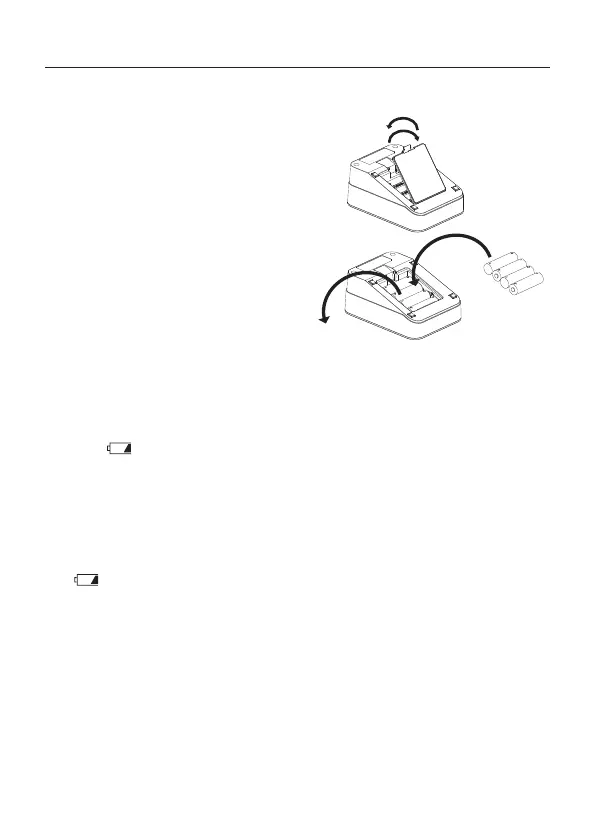
1. Remove the battery cover.
2. Remove the used batteries
from the battery compartment
when changing them.
3. Insert new batteries or replace
used batteries as shown,
taking care that the polarities
(+) and (-) are correct.
4. Replace the battery cover. Use
only R6P, LR6 or AA batteries.
CAUTION
• Insert the batteries as shown in the battery compartment. If installed
incorrectly, the monitor will not work.
• When (LOW BATTERY mark) blinks on the display and the
monitor announces that the battery needs to be replaced, replace
all batteries with new ones. Do not mix old and new batteries. It may
shorten the battery life, or cause the monitor to malfunction.
• Replace the batteries two seconds or more after the monitor turns
o.
• If (LOW BATTERY mark) does not appear then the batteries are
drained.
• The battery life varies with the ambient temperature and may be
shorter at low temperatures.
• Remove the batteries if the monitor is not to be used for a long time.
The batteries may leak and cause a malfunction.
• Use the specied batteries only. The batteries provided with the
monitor are for testing the monitor performance and may have
limited life.
Step 1
Step 2
Step 3



 To Next Page