E-17
Recalling the Memory Data
Note: This monitor stores the last 60 measurements in memory.
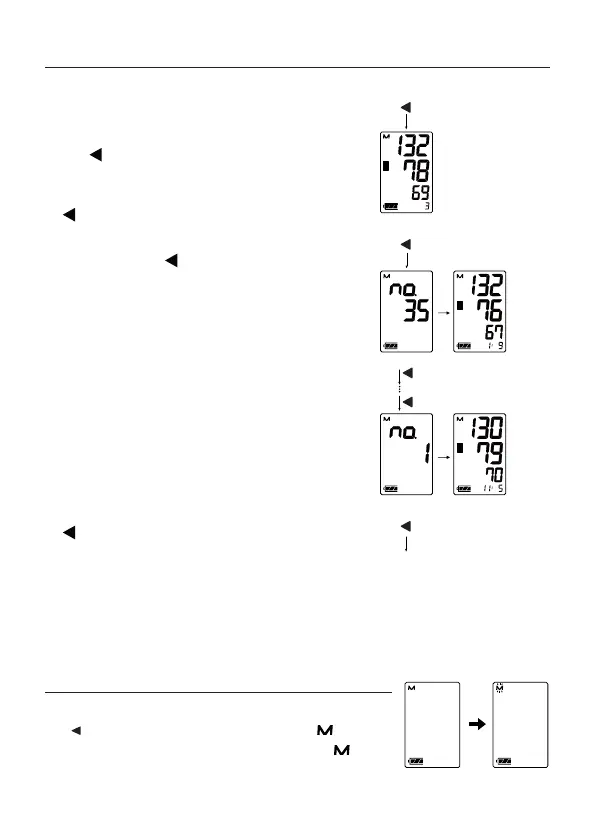
Recalling the memory
1. When the monitor is turned o, press.
the button. The average of the last
three measurements is displayed.
(If no data, “0” is displayed. Press the
or START/STOP button to turn the
device o.)
2. Each time the button is pressed, the
memory data is displayed as follows.
Most recent data (No.n, in the example,
No.35)
Three seconds after the data number
display, the measurement data is
displayed.
←
Last data (No.1). Three seconds
after the data number display, the
measurement data is displayed.
3. After the last data is displayed, press the
button to return to the average of the
last 3 measurements.
4. Press the START/STOP button to turn
the device o. After one minute of non-
operation, the device will turn
o automatically.
Deleting Data Stored in Memory
When the monitor is turned o, press and hold
the button. The monitor displays the mark,
deletes data stored in memory when the mark
is blinking and turns o automatically.
Systolic
Diastolic
Pulse
Systolic
Diastolic
Pulse
Last data
(oldest)
Press
Average systolic
Average diastolic
Average pulse
Average of the
last 3 data
Most recent data
Return to the
average of the last
3 measurements


 To Next Page