E-7
Connecting to a mobile device (Pairing)
This scale needs to be registered with a receiver in order to use Bluetooth
®
communication with the receiver. The process of registering this scale with a
receiver is known as pairing. When pairing is completed, measurement data from
this scale is automatically sent to the paired device each time a measurement is
made when the receiver is in the state in which it can receive transmissions.
Consult the receiver instruction manual and set it to enable pairing. If the receiver
has a “pairing wizard”, use the wizard to complete pairing. Place the receiver and
this scale as close as possible to carry out pairing.
1. Install four AAA size alkaline batteries into this
scale.
• For details, see “Installing (or Replacing) the
Batteries”.
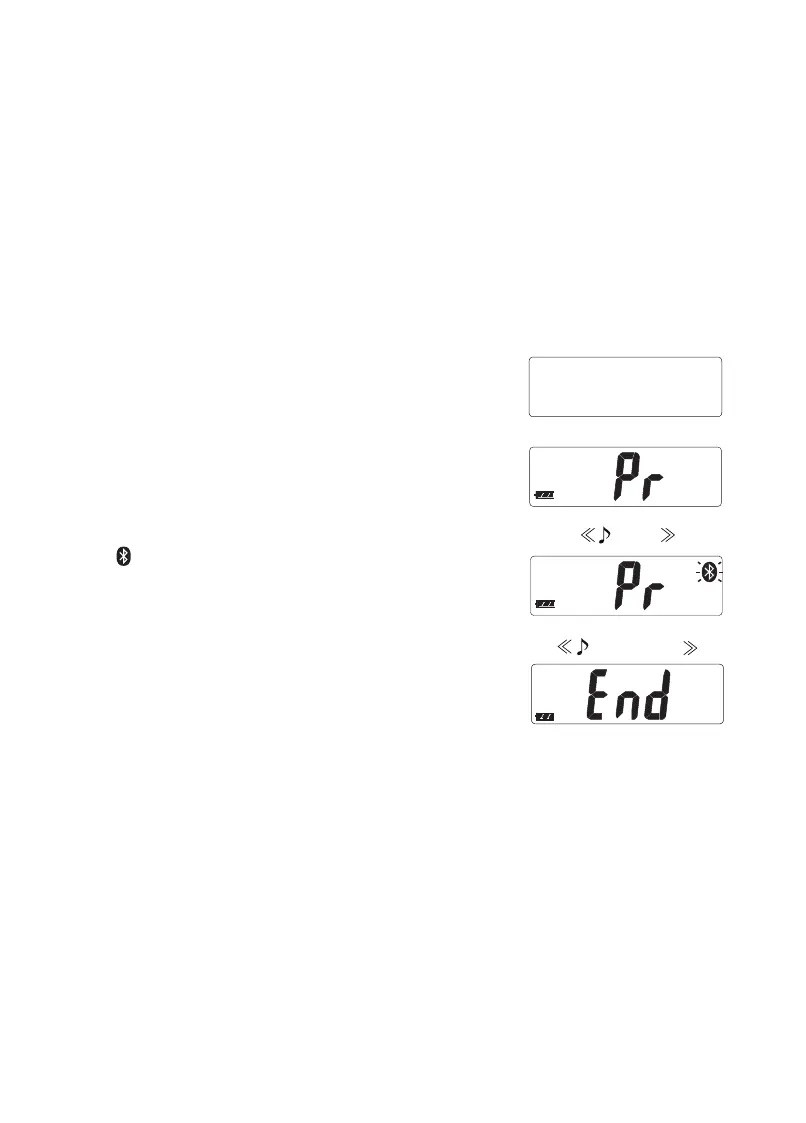
2. Conrm that the scale is turned off, and press
and hold the set switch..
• When the set switch is continuously pressed,
“Pr” is displayed.
3. Release the set switch when “Pr” is displayed.
• “ ” ashes.
• This scale is discoverable by the receiver.
• Pairing can be skipped press the set switch
when “Pr” is displayed.
4. Start pairing on the receiver.
• Follow the pairing instructions for the receiver
to search for, select and pair with this scale.
5. Conrm that “End” is displayed.
Once paired, changing batteries should not require re-pairing.
Beep
Beep beep


 To Next Page