Home
AAXA Technologies
Projector
M7
Page 39 (Powerbank Mode Operation)
AAXA Technologies M7 - Powerbank Mode Operation
48 pages
Manual
Save Page as PDF
To Next Page
To Next Page
To Previous Page
To Previous Page
Loading...
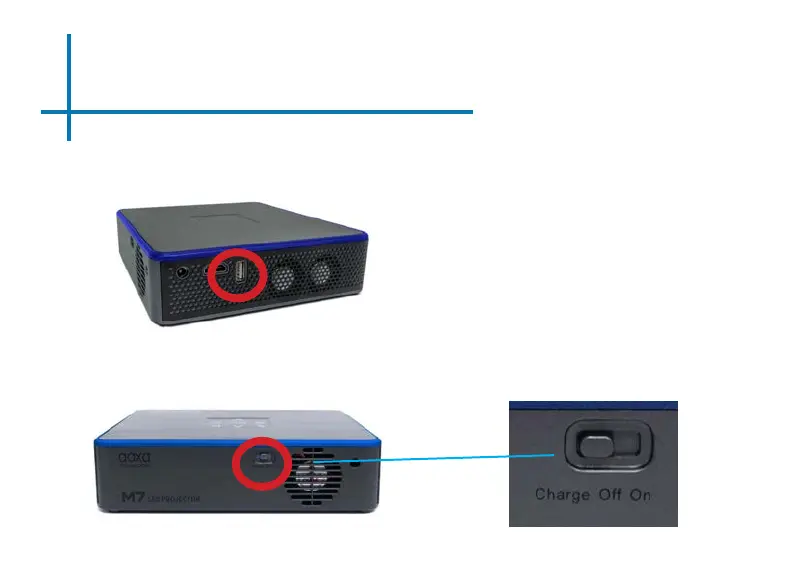
Powerbank Mode
36
How to use the Powerbank Mode:
•
Connect your device to the M7
projector through the USB port
•
Find the Charge/O/On switch at
the back of the M7 projector and
toggle the switch to the “Charge”
position
38
40
Table of Contents
Main Page
Default Chapter
3
Table of Contents
3
Chapter 1: M7 at a Glance
4
Remote & Keypad
5
Accessories
6
Chapter 2: Getting Started
7
Focus Adjustment / Throw Distance
8
Headphones
9
Loading External Content
10
Chapter 3: Menu Screens
13
Main Menu
13
Brightness Menu
14
Video Player Menu
15
Photo Menu
19
Connecting to Device Via Digital AV
23
Connecting to Device Via USBC
26
Connecting to Composite Video
28
Music Player Menu
30
Ebook Viewer
33
Chapter 4: Settings Menu
34
Picture Settings
35
Sound Settings
36
Option Settings
37
Chapter 5: Technical Details
38
Powerbank Mode
38
Keystone Adjustment
40
Troubleshooting
42
Specifications
46
Notes
47
Related product manuals
AAXA Technologies M6
45 pages
AAXA Technologies M5
48 pages
AAXA Technologies M4
46 pages
AAXA Technologies M1 Ultimate X
2 pages
AAXA Technologies P7
44 pages
AAXA Technologies P8
48 pages
AAXA Technologies P300
44 pages
AAXA Technologies P2-B
45 pages
AAXA Technologies P700
45 pages
AAXA Technologies LED PICO
39 pages
AAXA Technologies P300 Neo
57 pages
AAXA Technologies LED PICO +
46 pages















 To Next Page