9
2.3 Remote Control Unit (RCU)
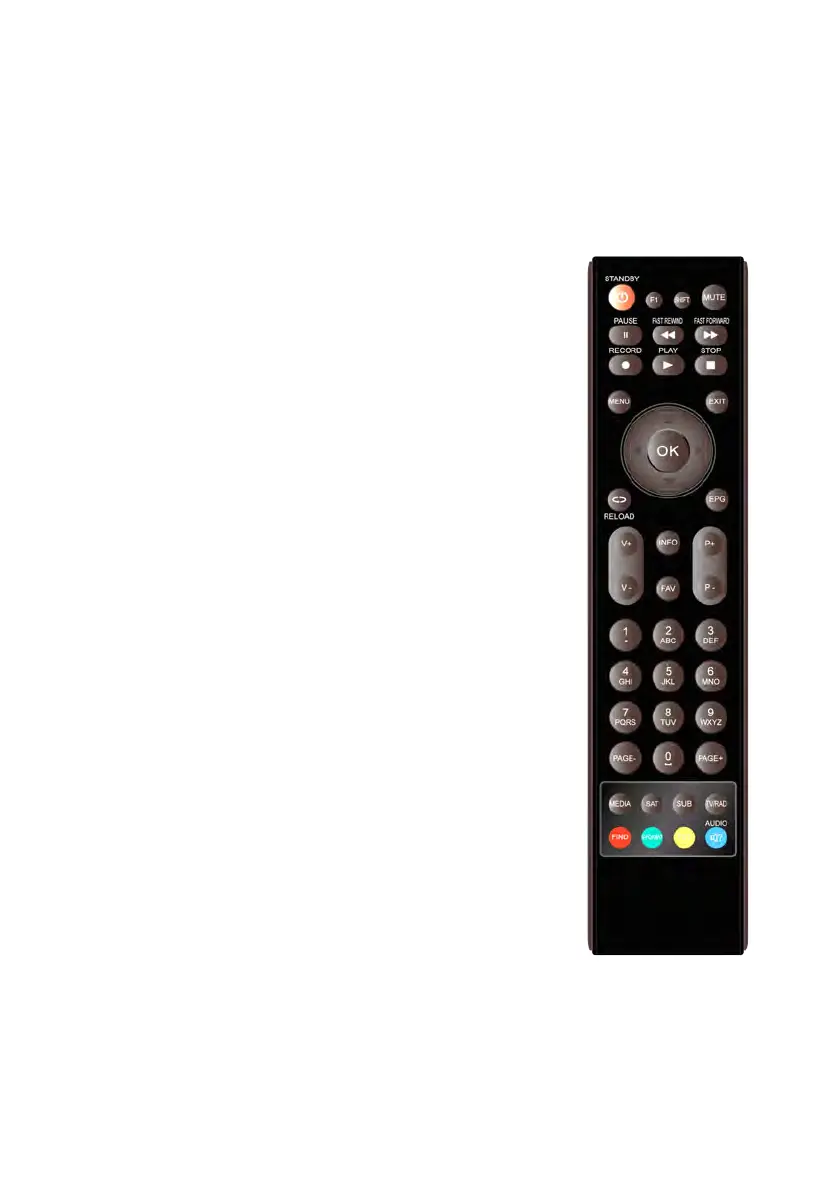
You can control this receiver by this remote controller with full function.
1. STANDBY: Switch between operation and standby modes.
2. F1: Accessorial function.
3. SHIFT
: Enable/Disable timeshift.
4. MUTE: Mute audio.
5. I I : Pause/Time shift.
6.
◄◄: Fast rewind.
7. ►►:Fast forward.
8. ● : Record.SLEEP: Set sleep time.
9. ►: Play.
10. ■:stop recording and playing.
11. MENU: Activate main menu.
12. EXIT: Exit current menu step by step..
13. ▲ /▼/◄/► :Navigates through the Menus
14. OK: Confirm
15. RELOAD: Move to the previous viewed channel.
16.
EPG (Electronic Program Guide): Display the program
guide.
17. V+/V- : Change volume in viewing mode.
18. P+/P-: Change program.
19. INFO: Display the program information.
20. FAV: Display favorite channel list you set before.
21. NUMERIC KEY (0~9): Enter a TV/radio channel number
or menu option number
22. PAGE-/PAGE+: Page up/down on menu or channel list.
23. MEDIA : Access to the USB menu.
24. SAT: Show the scanned satellite list.
25. SUB: Display the subtitle language list.
26. TV/RAD: Switch between TV and RADIO.
Figure 4. Remote
Control
Unit



 To Next Page