Installation and operating instructions, ATS022
1SDH000760R0002, L4106
36
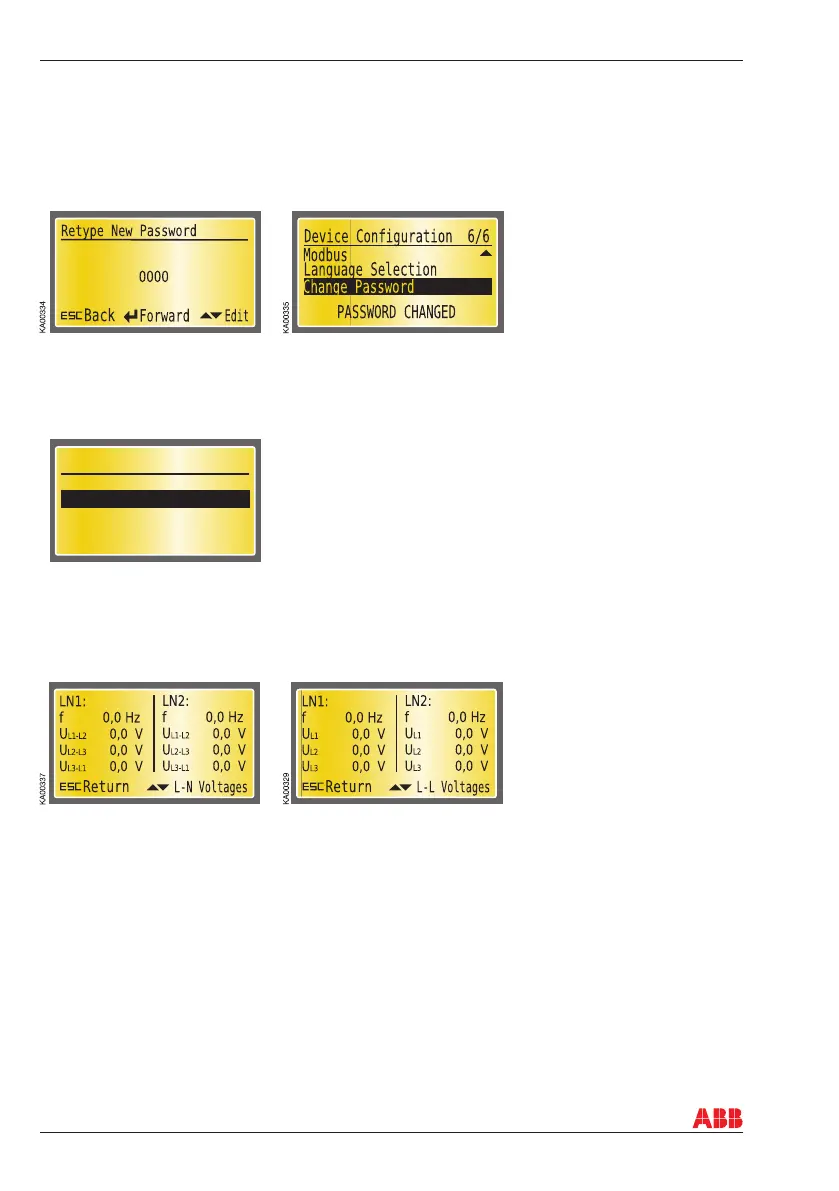
Retype New Password
The new password has to be confi rmed by retyping it. After confi rmation, the user is returned to the
Device Confi guration menu and on the bottom of the display the message PASSWORD CHANGED is
shown. If password confi rmation does not succeed, on the bottom of the display is shown the message
INVALID PASSWORD and the old password is still valid.
8. Using automatic transfer switch ATS022
Figure 8.22 Confi rmation of the new password
10.2.3.5 Diagnostics
Under Diagnostics are submenus: Measured Values, Alarm Log and Counters.
Diagnostics
Measured Values
Alarm Log
2/2
KA00477
SW: 1A
SN: 12345678
Figure 8.24 Measured Values: Main Voltages with frequency and Phase Voltages with frequency
Alarm log
Under Alarm Log are submenus: View Log and Clear Log.
View Log
On this page the latest alarms are shown. The number of alarms is shown at the top of the page. The log
can contain a maximum of the 20 latest alarms. The latest alarm is always at the top of the list.
Clear Log does not have its own page. The log is cleared when Clear Log is chosen and the Enter key is
pressed.
Figure 8.23 Diagnostics
Measured Values
On the display the measurements of Main Voltages and Phase Voltages are shown. The frequency is also
shown on both pages.



 To Next Page