C1900 | CIRCULAR CHART RECORDER | CI/C1900/REC-EN REV. B 13
7 Operator level menus
Al
A2
A3
A4
100.3
200.5
––––
––––
––––
––––
––––
––––
––––
––––
––––
––––
––––––
155 _
t1___
t2___
____
____
––––
––––
––––
––––
____
CH1
CH2
CH3
CH4
OPrtOr
LEVEL
A CK N LG
ALArMS
tO tA LS
PAGE
rESEt
rESEt
dAtE
tI M E
COUNt
COUNt
SECOdE
Operator level Acknowledge alarm Security code
Total 1 EPROM identity
Total 1Date
Reset total
Reset total
Stop/GoTime
Stop/Go
PV1 & PV2
PV1 & units
Totalized value
Alarm identity/type
Operating
page
Totals
page
Alarm
acknowledge
page
Security code
page
Applicable only
with Timer option
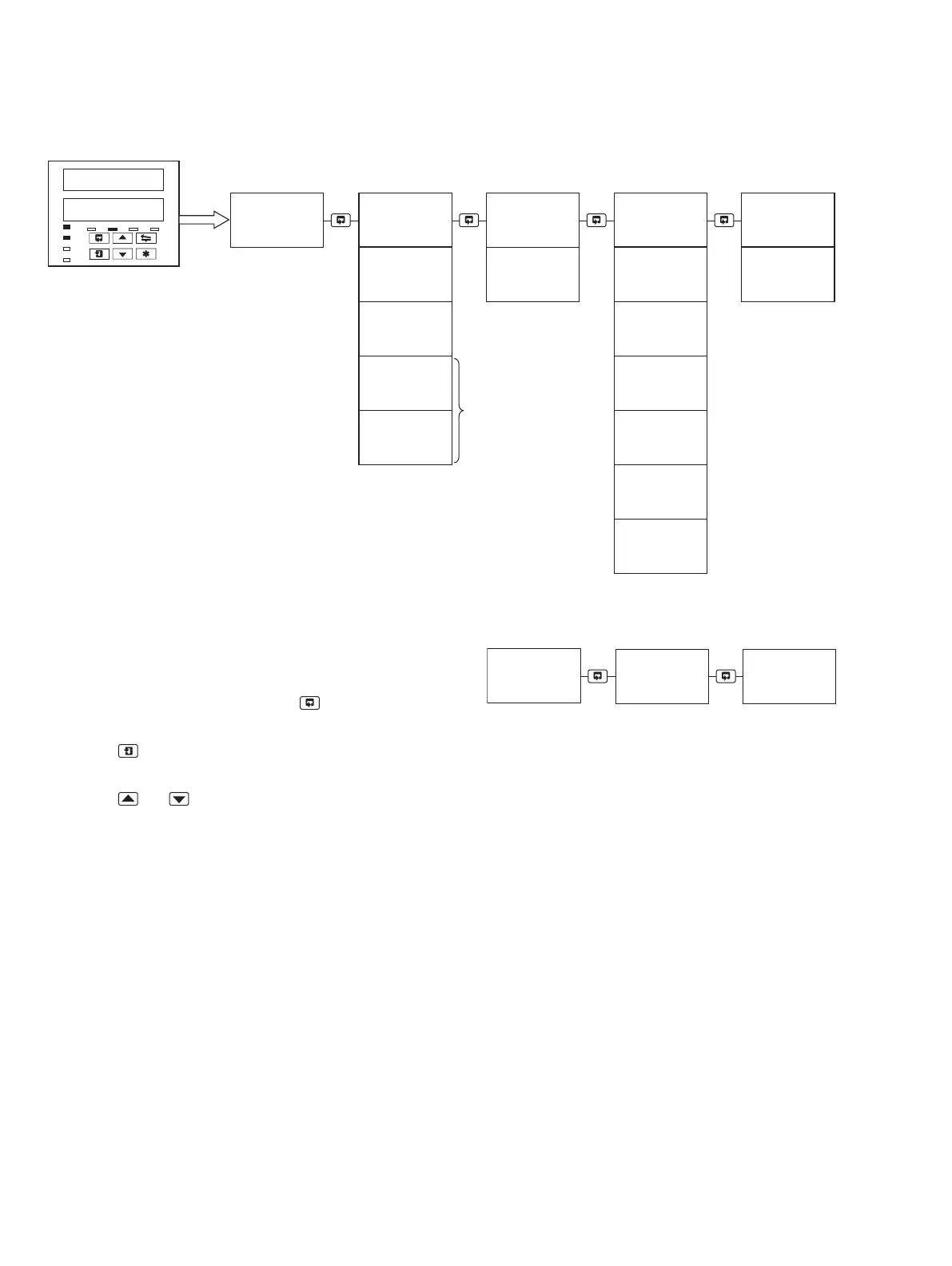
The operator level menus are used to acknowledge alarms and
start, stop and reset totalizers (If enabled). The operator level
also provides access to the configuration level.
To access the operator menus:
1 From the operating page, press the key to scroll through
the available menu pages.
2 Use the key to scroll through each page and its available
parameters.
3 Use the and keys to select the required parameters.
ACKNLG ALArMS Enables the operator to acknowledge any
currently active alarms
tOtALS PAGE Enables the operator to display totalizer
values, their current state and manually
reset any totalizers
SECOd E Enables the operator to enter the
configuration level security password
The following menus are available only on the C1950
pasteurizer variant:
8888
8888
OPrtOr
LEVEL
Operator level PV & SPT Divert parameters
Operating
page
View divert
parameters
dI V E r t
PAGE
dIVErt PAGE Enables the operator to view all the divert
parameters without entering the
configuration menu


 To Next Page