5
For the best results, it’s important to select suitable contact points based
on the thickness of your dog’s coat.
You can use the contact points separately or together with the spring sheet.
How to Select Contact Points and Contact Spring Sheet?
HOW DO I USE MY E-COLLAR?
STEP 1. CHARGE THE REMOTE AND COLLAR
STEP 2. SET UP THE COLLAR
Test all buon funcons before placing the collar on your dog.
1. Check E-collar sengs to ensure they are appropriate for your dog.
2. Ensure your E-Collar is fied correctly.
3. Begin with Tone or Vibraon, then a very low Smulaon seng,
gradually increasing unl you find a level that works for you.
1. Please use the supplied charging cable to charge.
2. Once the collar is fully charged, its red LED Light will turn green.
3. In order to avoid leakage, squeeze the Rubber Cap of charging port.
Use the following output: DC 5V 0.5-2A, Don’t use chargers that
don’t meet necessary specificaons to charge.
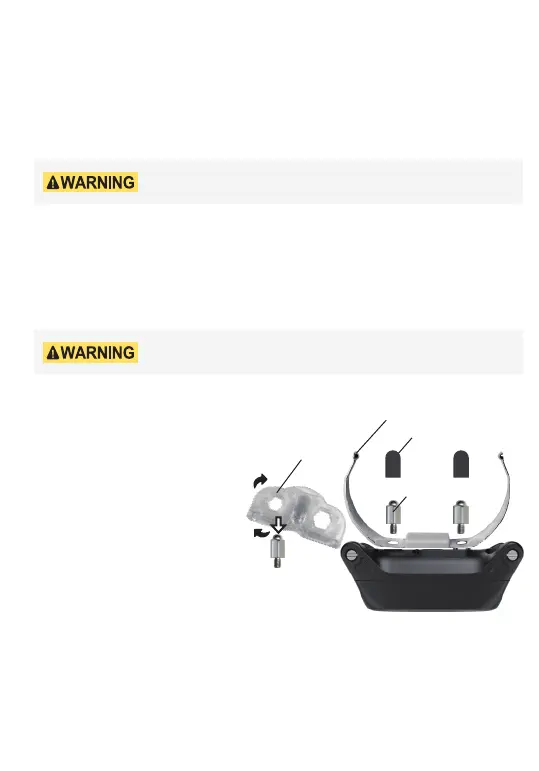
1. Please choose the right Contact
Points that fits your dog.
2. Please remove the Metal
Extension Contact if your dog's
hair is very short.
3. Please use the Test Light to
ghten the contact points, then
put on the Silicone Caps to protect
your dog effecvely.
Contact Points
Silicone Caps
Metal Extension Contact
Test light



 To Next Page