8
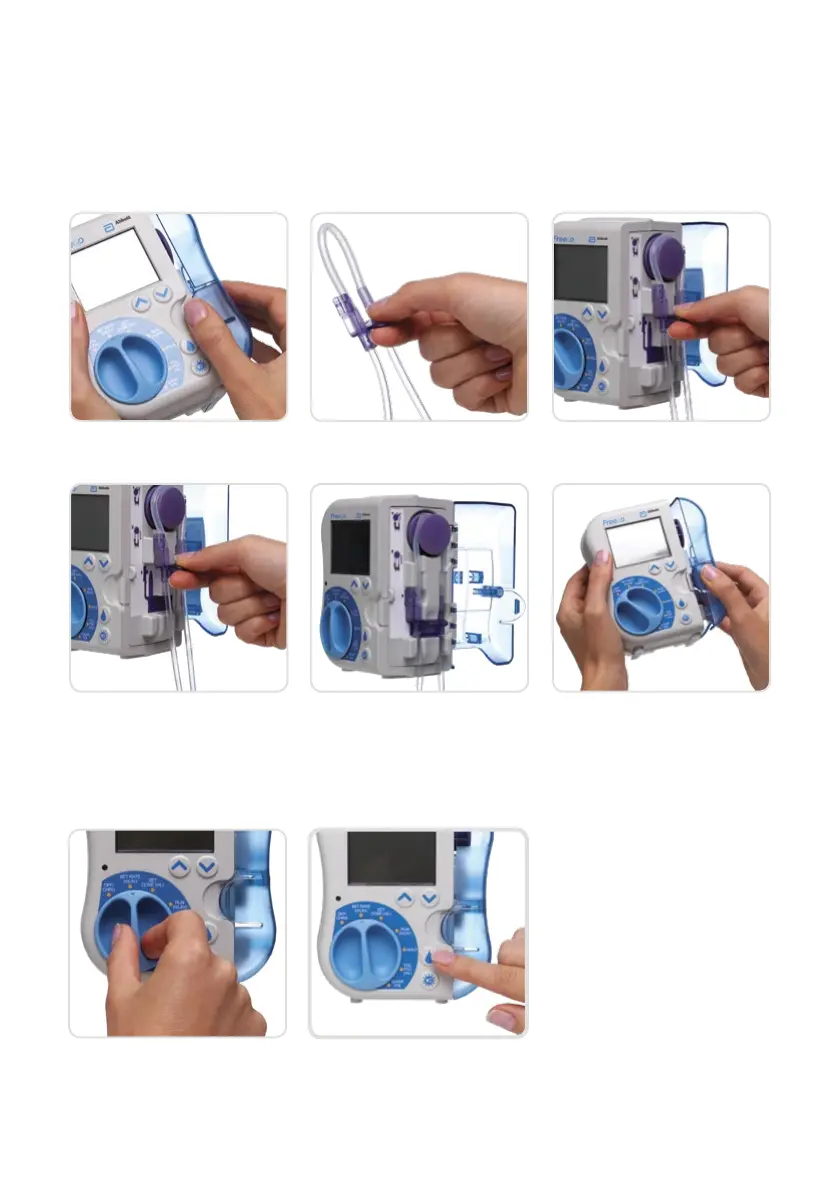
INSERT GIVING SET CASSETTE INTO
PUMP AND PRIME THE GIVING SET:
AUTO PRIMING
1. Open the pump door 2. Grasp the purple cassette
body
3. Loop pump insert around
wheel, stretching lightly
4. Gently pull down on
the loop
5. Seat purple cassette into
pump. Gently press the
tubing to ensure it is fully
seated in slots below
the cassette
6. Close pump door. You will
hear a click when the door
has been closed properly
7. Turn pump dial to
SET RATE or SET DOSE
8. Press and hold the Prime
button for 2 seconds, then
release
‘PRIMING’ will be
displayed. Autopriming
will stop when the priming
volume has been reached.
To stop the process,
press and release the
PRIME button
Note: In order to prime the giving set, ensure that the end of the giving set is free from any attachment/cap










 To Next Page