You Decide Whether and How You Want to Use the
Alarms
12
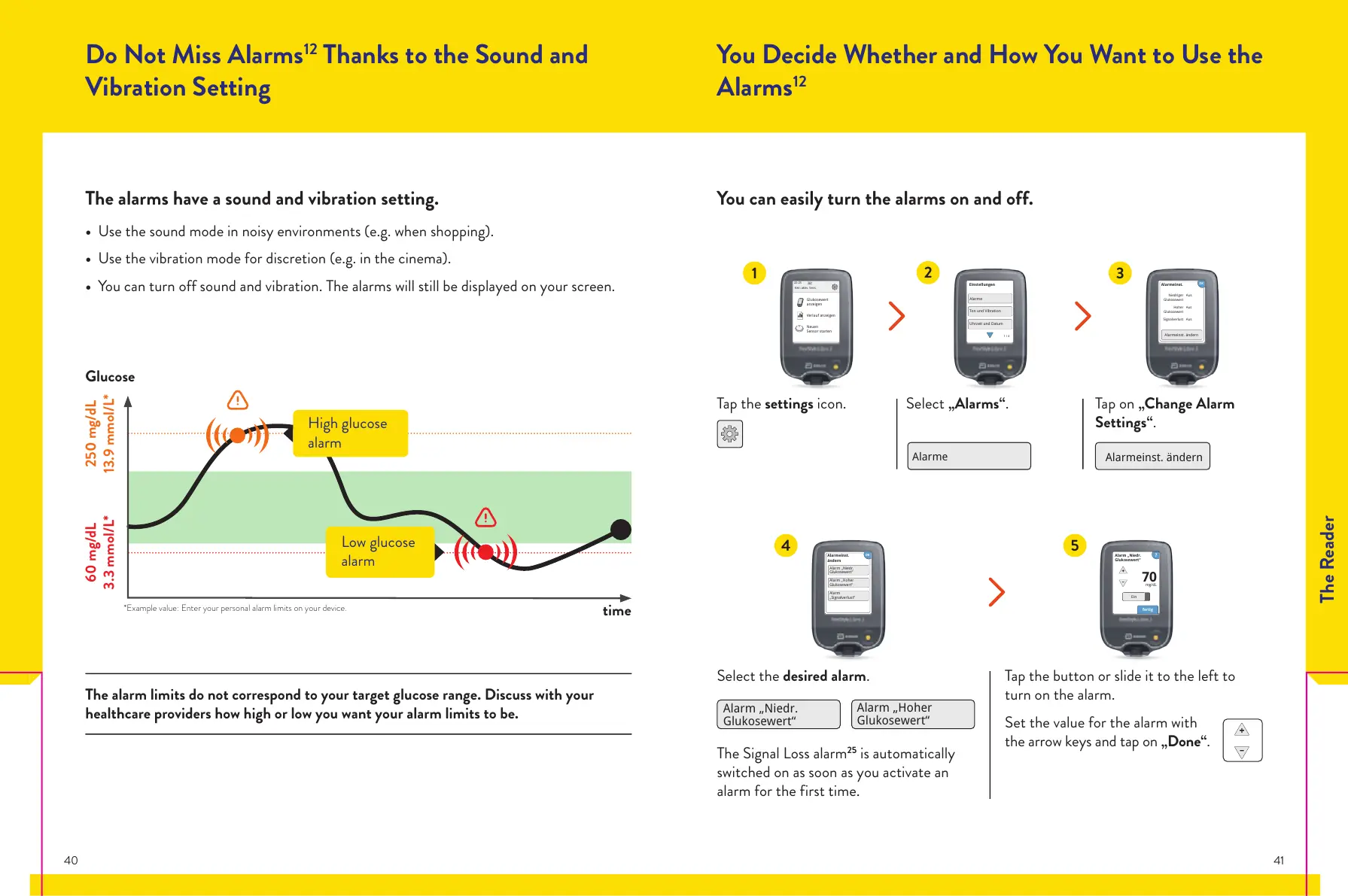
You can easily turn the alarms on and off.
Tap the settings icon. Select „Alarms“. Tap on „Change Alarm
Settings“.
Glukosewert
anzeigen
Verlauf anzeigen
Neuen
Sensor starten
Kein aktiv. Sens.
Alarme
Ton und Vibration
Uhrzeit und Datum
Einstellungen
1 / 4
Alarmeinst. ändern
Alarmeinst.
Niedriger
Glukosewert
Aus
Hoher
Glukosewert
Aus
Signalverlust Aus
Alarm „Niedr.
Glukosewert“
Alarm „Hoher
Glukosewert“
Select the desired alarm.
The Signal Loss alarm
25
is automatically
switched on as soon as you activate an
alarm for the first time.
Tap the button or slide it to the left to
turn on the alarm.
Set the value for the alarm with
the arrow keys and tap on „Done“.
OK
Alarm „Niedr.
Glukosewert“
Alarm „Hoher
Glukosewert“
Alarm
„Signalverlust“
Alarmeinst.
ändern
Ein
mg/dL
70
fertig
Alarm „Niedr.
Glukosewert“
Do Not Miss Alarms
12
Thanks to the Sound and
Vibration Setting
The alarms have a sound and vibration setting.
• Use the sound mode in noisy environments (e.g. when shopping).
• Use the vibration mode for discretion (e.g. in the cinema).
• You can turn off sound and vibration. The alarms will still be displayed on your screen.
1
2
3
4
5
The alarm limits do not correspond to your target glucose range. Discuss with your
healthcare providers how high or low you want your alarm limits to be.
250 mg/dL
13.9 mmol/L*
60 mg/dL
3.3 mmol/L*
time
Glucose
*Example value: Enter your personal alarm limits on your device.
Low glucose
alarm
High glucose
alarm
The Reader
40 41














 To Next Page