How to Easily Connect Your FreeStyle Libre 3 App
5
to Your Medical Practice
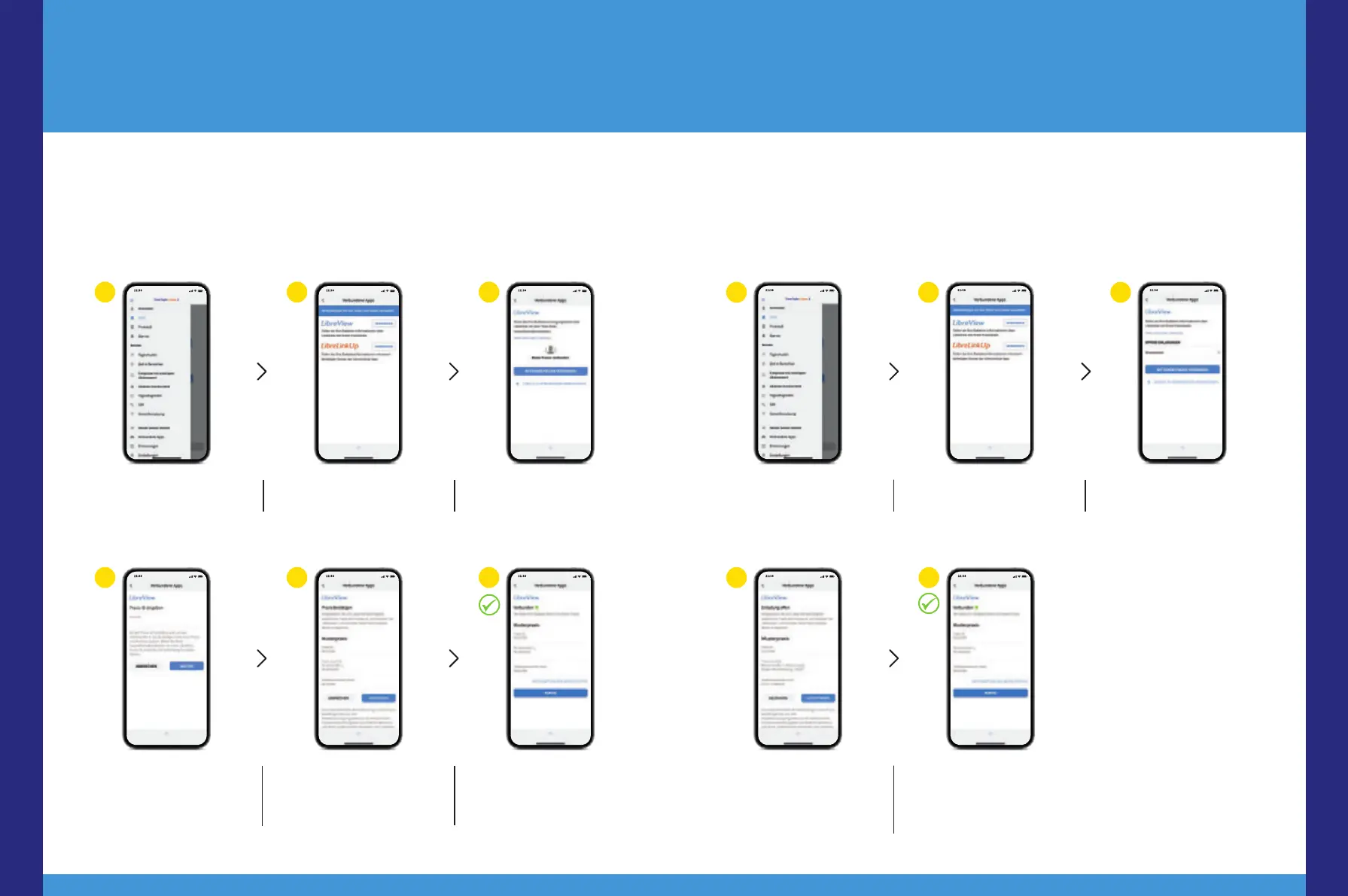
Tap on „Menu“ and go to
„Connected Apps“.
Select „LibreView“. Tap on „Connect to a
practice“.
1 2 3
Enter the practice ID and
tap „Next“.
Check the contact infor-
mation of your practice
and select „Connect“.
Done! You are now con-
nected to your practice.
4 5 6
Option 1:
Start sharing
15,17
your glucose data with the FreeStyle Libre 3 app. Ask your medical
practice for the LibreView
13
practice ID
32
and write it down on the last page. Enter the
practice ID in the FreeStyle Libre 3 app.
Tap on „Menu“ and go to
„Connected Apps“.
Select „LibreView“
13
. Tap on the practice under
„Open invitations“.
Review your practice‘s
contact information and
tap „Accept“ to accept
the invitation.
Done! You are now
connected to your
practice.
3
Option 2:
Your practice sends you an invitation to share
15,17
your glucose data. Your medical
practice can send you an invitation to share your glucose data. Accept the practice
invitation directly in the app
5
or in the invitation email.
1 2
4 5
Digital Tools
48 49














 To Next Page