PROSHIP
®
5
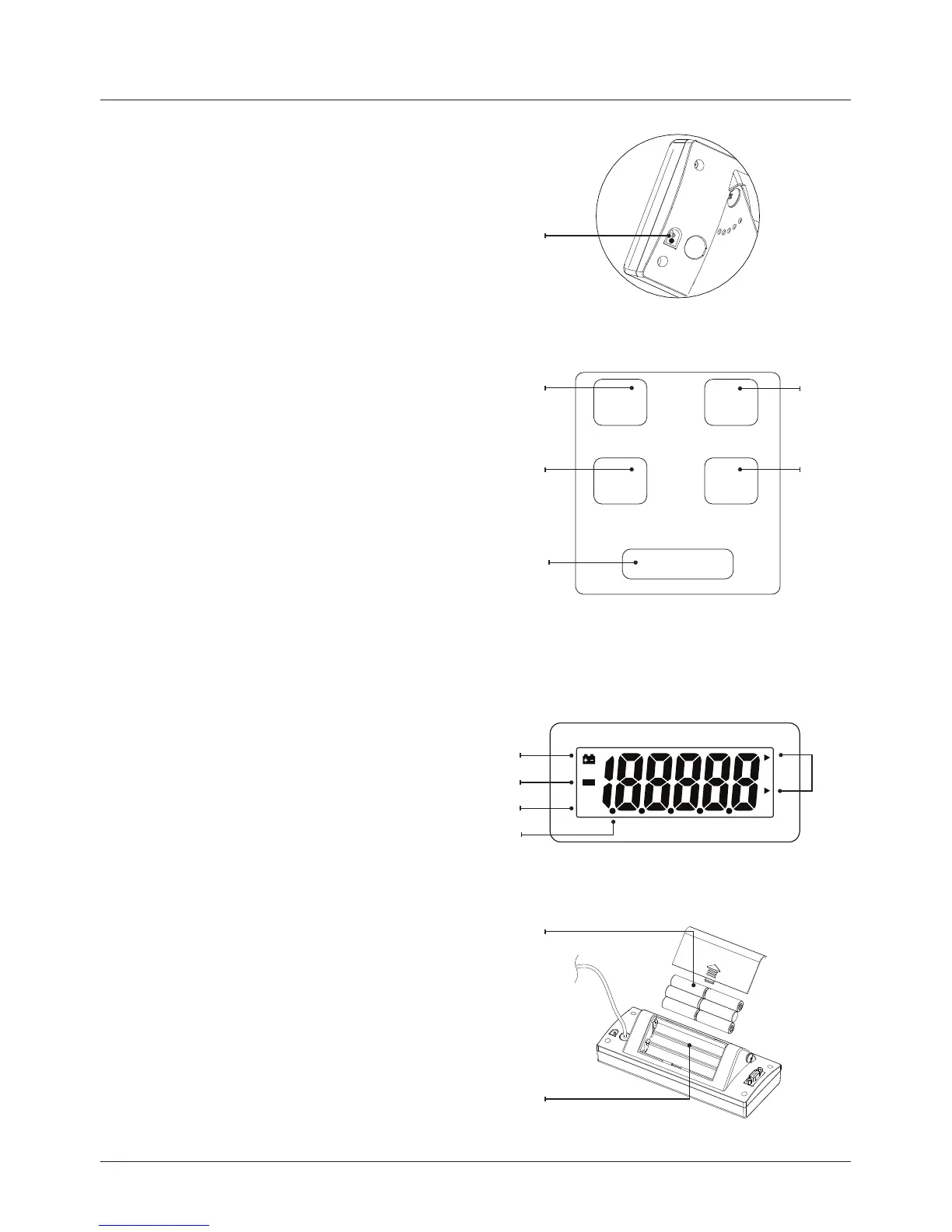
PARTS DESCRIPTION
ON/OFF
UNIT
TARE
ZERO
HOLD
ZERO
B
A
D
F
E
C
G
I
J
K
L
M
H
RIGHT SIDE REAR OF DISPLAY
A ACadaptorSocket
FRONT CONTROLS
B ON/OFFBUTTON
Turnsthescalepoweron/off
C HOLDBUTTON
The item’s weight reading will
remain on the display
D UNITBUTTON
Changesweighingunits,e.g.kgorlb
E ZEROBUTTON
Sets display to zero or
Zero Range (4% to full capacity)
F TAREBUTTON
Tare Range (100% to full capacity)
LCD DISPLAY
G Lowbatteryindicator
H Weighing unit
I Negativevalueindicator
J ZEROindicator
K Hold indicator
REAR OF DISPLAY
L Use6xAA1.5Vbatteries
MBatterycompartmentcover
For wall mounting see Pg.14


 To Next Page