14 PROSHIP
®
CLEANING
STAINLESSSTEELPLATFORM
For best results use a stainless steel cleaning spray and clean cloth.
SCALE BODY
Spray a general purpose cleaner onto a dry clean cloth and wipe scale body with cloth.
Clothmustnotbedrippingwet.
WALL MOUNTING
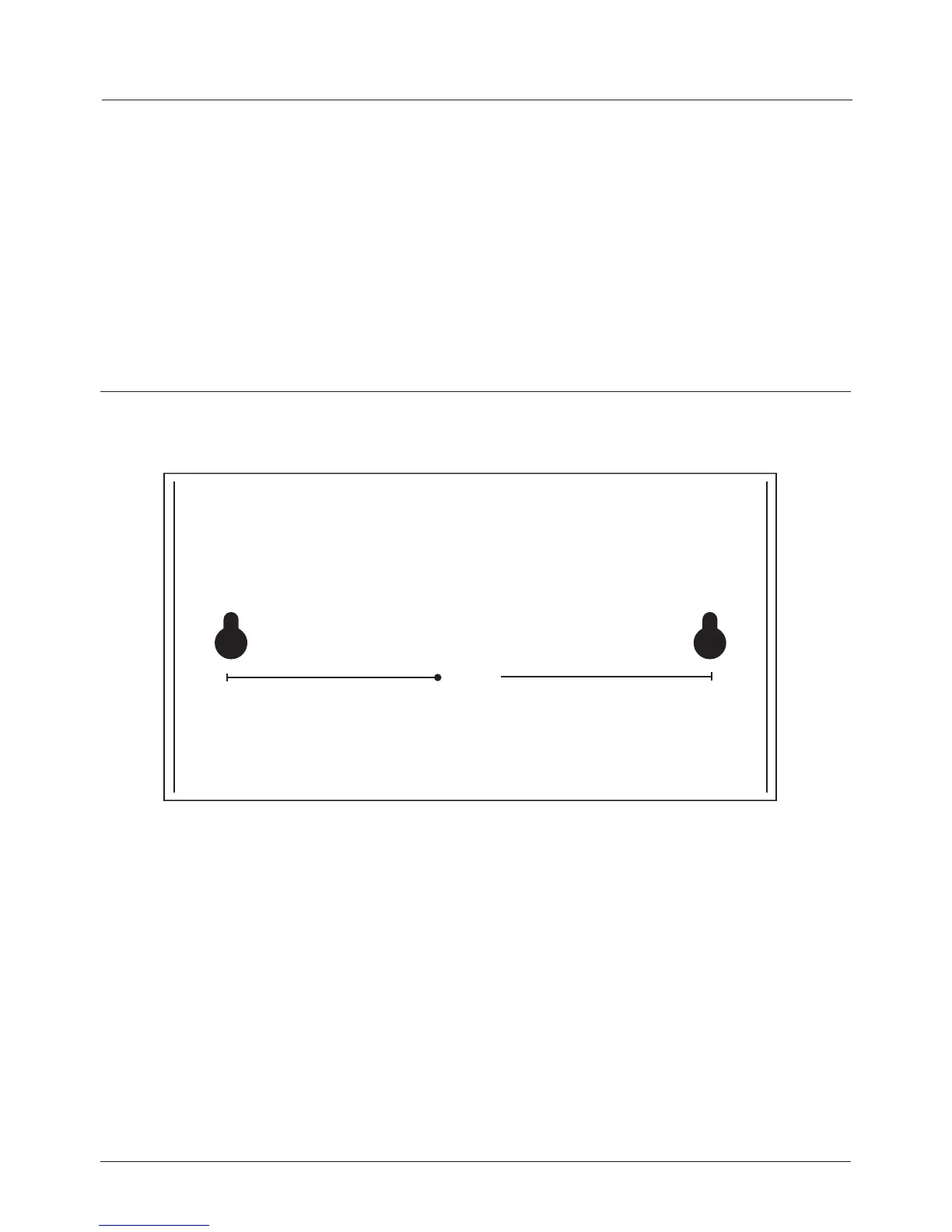
Thedisplayhasabracketttedwhichcanbeusedtowallmountthedisplay.
1. Markonthewallthepositionofwheretheholesneedtobedrilled(12.0cmapart).Itis
recommendedtouseaspiritlevel/bubbleleveltomakesuredisplaywillbelevel.
2. Usinganappropriatedrilltwoholesinthemarkedpositionsapproximately40mm
deepusinga6mmdrillbit.
3. Insert6mmwallplugsintotheholessothattheyareushwiththewallsurfaceand
thenusingascrewdrivertighten4mmdiameterx35mmlongscrewsintothewallplug
leavingonly@3-4mmofthescrewprotrudingoutofthewall.
4. Aligntheholesonthedisplaybracketoverscrewsandpushbrackettowardsthewall
sothatthescrewsgothroughtheholes.Thenreleasethebracketsothatthedisplay
isnowsittingonscrewsandtightenthescrewssothatthebracketwillnotmovefrom
this position.
12.0cm


 To Next Page