Hardware Setup 2-5
2-4. Connectors, Headers and Switches
Here we will show you all of the connectors, headers and switches, and how to connect them. Please read
the entire section for necessary information before attempting to finish all the hardware installation inside
the computer chassis. A complete enlarged layout diagram is shown in Chapter 1 for all the position of
connectors and headers on the board that you may refer to.
WARNING: Always power off the computer and unplug the AC power cord before adding or removing
any peripheral or component. Failing to so may cause severe damage to your motherboard and/or
peripherals. Plug in the AC power cord only after you have carefully checked everything.
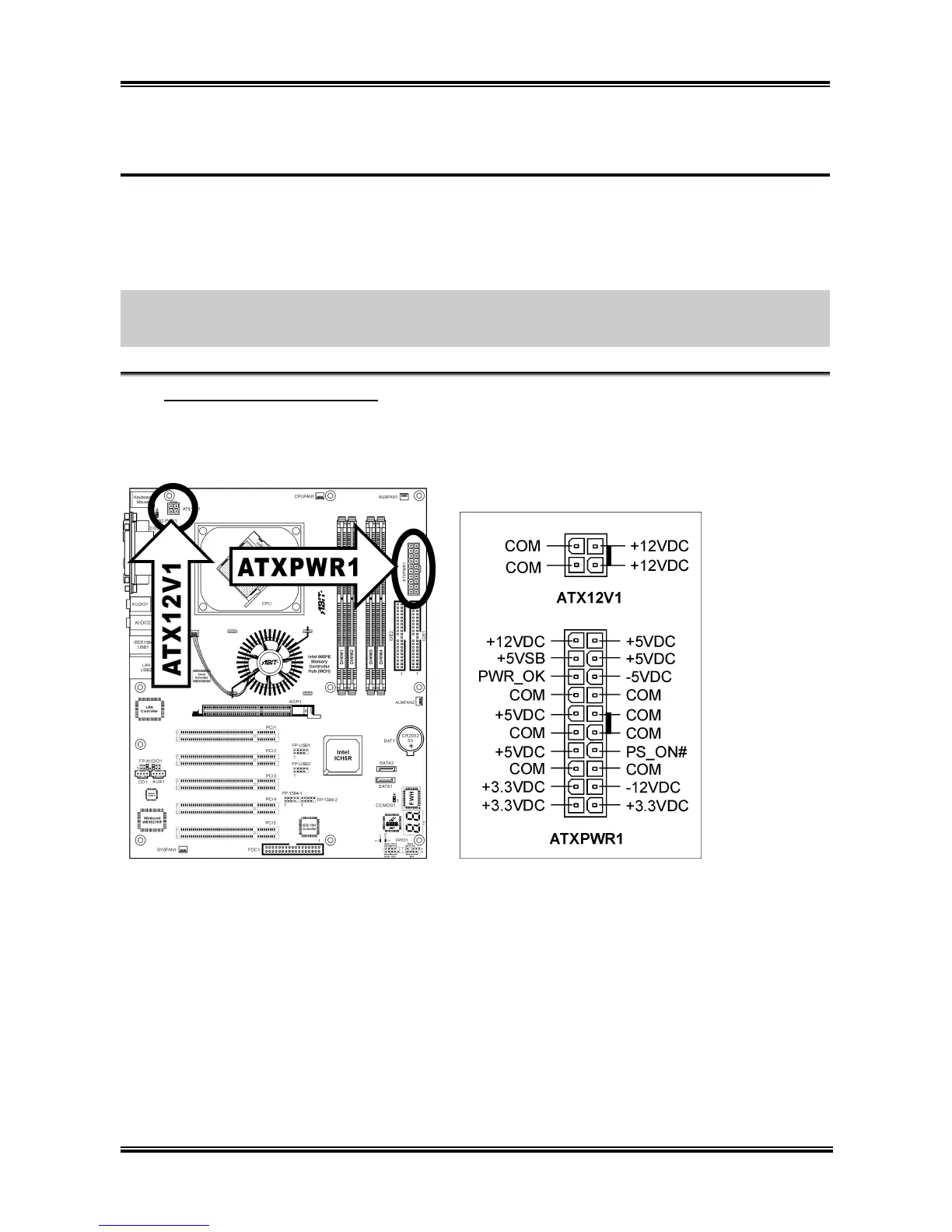
ATX Power Input Connectors
(1).
The Pentium 4 requires a power supplier different from the regular one. It’s a newly designed ATX12V
power with 300W, 20A +5VDC capacity at least for heavily loaded system, and 720mA +5VSB at least
for supporting Wake-On-LAN feature.
User’s Manual



 To Next Page